
Outdoor living has evolved dramatically over the past decade. What used to be a simple backyard with a grill and a few chairs has transformed into fully functional outdoor entertainment zones—complete with kitchens, fire pits, sound systems, and yes, even televisions. As more homeowners invest in creating year-round outdoor spaces, the demand for weather-resistant, high-performance TVs designed specifically for gardens, patios, and decks has surged. Whether you’re hosting summer barbecues, watching the big game under the stars, or simply unwinding with a movie after sunset, a garden TV can elevate your outdoor experience to something truly special.
But here’s the catch: not all TVs are built to withstand the elements. Standard indoor TVs exposed to moisture, temperature swings, dust, and direct sunlight will quickly degrade—or worse, become a safety hazard. That’s why choosing the right garden TV isn’t just about picture quality or screen size; it’s about durability, smart engineering, and thoughtful design tailored for outdoor use. This comprehensive buying guide is here to help you navigate the growing market of outdoor televisions, so you can make a confident, informed decision that matches your lifestyle, budget, and deck setup.
In this guide, we’ll walk you through everything you need to know before buying a garden TV in 2026. You’ll learn how to evaluate key performance specs like brightness and contrast, understand the importance of IP ratings and weatherproofing, compare different types of outdoor TVs (from fully sealed enclosures to weather-resistant models), and avoid common pitfalls that cost buyers time and money. We’ll also break down budget tiers, share expert tips for scoring the best deals, answer frequently asked questions, and offer our top recommendations based on real-world testing and user feedback. By the end, you’ll have all the tools you need to turn your deck into a true outdoor entertainment hub—without compromising on quality or safety.
What to Look for When Buying Buying Guide
1. Weather Resistance & IP Rating
When it comes to garden TVs, weather resistance isn’t optional—it’s essential. Unlike indoor TVs, outdoor models must endure rain, snow, humidity, dust, UV exposure, and temperature extremes ranging from freezing winters to scorching summer heat. The first thing to check is the TV’s Ingress Protection (IP) rating, which tells you exactly how well it’s sealed against environmental threats.
Look for a minimum IP55 rating, which means the TV is protected against low-pressure water jets from any direction and limited dust ingress. For decks exposed to heavy rain or coastal environments, aim for IP65 or higher—this ensures complete dust protection and resistance to powerful water jets. Some premium models even boast IP66 or IP67 ratings, offering near-total protection against immersion in shallow water (though submersion is never recommended).
Beyond the IP rating, examine the materials used in the TV’s construction. High-quality garden TVs typically feature powder-coated aluminum frames, stainless steel hardware, and sealed ventilation systems that prevent moisture buildup without trapping heat. Avoid plastic housings unless they’re specifically engineered for outdoor use—standard plastics can warp, crack, or become brittle under prolonged sun exposure.
2. Brightness & Display Performance
One of the biggest challenges with outdoor viewing is glare and ambient light. Even on cloudy days, sunlight reflecting off decking, water features, or nearby surfaces can wash out an indoor TV’s image. That’s why brightness—measured in nits—is arguably the most critical spec for a garden TV.
For shaded or partially covered decks, look for a minimum brightness of 700 nits. If your deck gets direct sunlight for several hours a day, you’ll need at least 1,000–1,500 nits, with premium models pushing 2,000+ nits for crystal-clear visibility even at noon. Pair high brightness with an anti-reflective coating or optically bonded glass to minimize glare and improve contrast.
Display technology also matters. While most garden TVs use LED-backlit LCD panels, some high-end models now feature OLED or QLED displays with superior color accuracy and deeper blacks. However, OLEDs can be more susceptible to image retention in static outdoor signage scenarios, so consider your usage patterns. Additionally, ensure the TV supports HDR (High Dynamic Range) formats like HDR10 or Dolby Vision for richer colors and better detail in both bright and dark scenes.
3. Size & Viewing Distance
Choosing the right screen size for your deck depends on two main factors: viewing distance and seating layout. A TV that’s too small will strain viewers’ eyes, while one that’s too large can overwhelm the space and create uncomfortable viewing angles.
As a general rule, multiply your ideal viewing distance (in inches) by 0.84 to get the recommended screen diagonal in inches. For example, if your primary seating is 10 feet (120 inches) away, a 100-inch screen (120 × 0.84 ≈ 101) would be ideal. However, most decks accommodate screens between 43 and 75 inches comfortably. Larger screens (80+ inches) work best for expansive patios or open-air living rooms.
Also consider the TV’s bezel width and overall footprint. Slim bezels maximize screen real estate without increasing the TV’s physical size, which is especially important if you’re mounting it under a pergola or awning with limited clearance. Measure your mounting area carefully—including space for ventilation and cable management—before making a purchase.
4. Audio Quality & Sound Solutions
Many garden TVs come with built-in speakers, but don’t expect cinematic audio from them. Due to their sealed enclosures and space constraints, onboard sound systems often lack bass response and volume needed to overcome outdoor noise like traffic, wind, or distant conversations.
If you plan to use the TV primarily for casual viewing with background sound, built-in speakers may suffice. But for immersive movie nights or live sports, invest in a dedicated outdoor sound system. Options include weather-resistant soundbars (some designed to mount directly below the TV), wireless outdoor speakers, or even a full multi-zone audio setup with amplifiers and buried subwoofers.
Look for TVs with optical audio output, HDMI ARC, or Bluetooth 5.0+ to easily connect external audio gear. Some premium models even support Dolby Atmos passthrough, allowing you to create a surround-sound experience outdoors—just remember to protect your speakers from the elements too.
5. Connectivity & Smart Features
Modern garden TVs aren’t just dumb screens—they’re full-fledged smart platforms. Ensure your model runs a current operating system like Android TV, webOS, or Roku TV, which gives you access to streaming apps (Netflix, Disney+, YouTube), voice assistants (Google Assistant, Alexa), and regular software updates.
Check the number and type of ports: you’ll want at least three HDMI 2.1 inputs (for gaming consoles, streaming devices, and soundbars), USB ports for media playback, and an Ethernet port for stable wired internet (Wi-Fi alone can struggle outdoors due to signal interference). If you’re a gamer, look for low input lag (<20ms) and support for variable refresh rate (VRR) and auto low latency mode (ALLM). Smart features also extend to remote control options. Many garden TVs include backlit remotes or smartphone apps for easier use in low light. Some even integrate with home automation systems, allowing you to turn the TV on/off via your smart hub or schedule it to power down automatically.
6. Mounting & Installation Flexibility
How and where you mount your garden TV significantly impacts both performance and longevity. Most outdoor TVs are VESA-compatible, meaning they work with standard wall mounts, ceiling mounts, or articulating arms. However, outdoor mounts must be rated for exterior use—look for corrosion-resistant coatings and reinforced brackets.
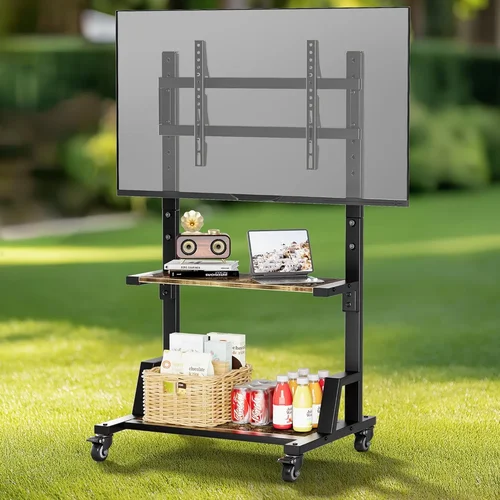
Consider your deck’s structure: can your wall or beam support the weight? A 65-inch garden TV with its protective enclosure can weigh 80–120 pounds. If mounting isn’t feasible, freestanding outdoor TV cabinets with wheels offer portability and added protection, though they’re typically more expensive.
Ventilation is another key factor. Even though garden TVs are sealed, they still generate heat during operation. Ensure there’s adequate airflow around the unit—never enclose it in a tight cabinet without active cooling. Some models include internal fans or passive heat sinks; check the manufacturer’s installation guidelines to avoid overheating.
7. Brand Reputation & Reliability
Not all outdoor TV brands are created equal. Stick with manufacturers known for rigorous testing and real-world durability. Established names like SunBriteTV, Seura, and Samsung (with its Terrace series) have spent years refining their outdoor designs and offer comprehensive warranties.
Research customer reviews focusing on long-term reliability—how does the TV perform after 12–24 months of outdoor use? Look for mentions of fogging, color degradation, speaker failure, or connectivity issues. Avoid no-name brands that promise “outdoor TVs” at suspiciously low prices; they often repackage indoor models with flimsy covers.
Also consider regional availability. Some brands excel in North America but have limited support in Europe or Australia. Check warranty coverage, service centers, and spare parts availability in your area before committing.
8. Warranty & Support
A garden TV is a significant investment, so robust warranty and customer support are non-negotiable. Most reputable brands offer 2–3 years of coverage, but read the terms carefully. Does the warranty cover accidental damage? What about corrosion or seal failure? Some exclude “acts of nature” like lightning strikes—consider adding surge protection to your setup.
Look for companies that provide dedicated outdoor TV support lines, not just generic customer service. The best brands also offer installation guides, video tutorials, and even on-site assistance for large projects. If something goes wrong, you want a partner who understands the unique challenges of outdoor electronics—not someone who tells you to “just bring it inside.”
Different Types of Buying Guide

Common Buying Mistakes to Avoid

❌ Mistake: Using an Indoor TV Outdoors
Why it’s bad: Indoor TVs lack weatherproofing, have low brightness (typically 300–400 nits), and aren’t designed to handle temperature swings. Exposure to moisture can cause electrical shorts, while UV rays degrade screens and plastics. In worst cases, it poses a fire or shock hazard.
What to do instead: Always choose a TV specifically engineered for outdoor use—either a fully enclosed model or an indoor TV paired with a certified outdoor enclosure. Never rely on tarps or DIY covers.
❌ Mistake: Ignoring Viewing Angle and Glare
Why it’s bad: Placing a TV where sunlight hits it directly—even for part of the day—will render the image unwatchable without extreme brightness. Similarly, mounting it too high or at an awkward angle strains necks and reduces immersion.
What to do instead: Observe your deck’s sun patterns throughout the day. Use shade structures, awnings, or strategic placement to minimize glare. Opt for TVs with wide viewing angles (178°) and anti-reflective coatings.
❌ Mistake: Overlooking Audio Needs
Why it’s bad: Relying solely on built-in speakers leads to tinny, quiet audio that gets drowned out by outdoor ambient noise. This ruins the entertainment experience, especially for movies or live events.
What to do instead: Budget for a separate outdoor audio system from day one. Even a modest weather-resistant soundbar makes a huge difference. Plan cable routing or go wireless to keep your deck tidy.
❌ Mistake: Skimping on Mounting Hardware
Why it’s bad: Standard indoor mounts aren’t rated for outdoor conditions. Rust, corrosion, or weak joints can cause the TV to fall, damaging property or injuring people.
What to do instead: Invest in marine-grade or powder-coated outdoor mounts with proven load ratings. Have installation done by a professional if you’re unsure about structural integrity.
❌ Mistake: Not Planning for Power and Connectivity
Why it’s bad: Running extension cords across your deck creates tripping hazards and looks messy. Weak Wi-Fi signals lead to buffering and frustration.
What to do instead: Have an electrician install a dedicated outdoor-rated outlet near the TV. Use Ethernet for wired internet if possible, or invest in a mesh Wi-Fi system with outdoor nodes.
❌ Mistake: Buying Based Solely on Price
Why it’s bad: The cheapest “outdoor TV” often sacrifices critical features like brightness, sealing, or build quality. You’ll end up replacing it within a year or two.
What to do instead: Focus on value, not just cost. A mid-range garden TV with proper specs will outlast and outperform a budget model, saving money long-term.
❌ Mistake: Neglecting Maintenance
Why it’s bad: Even the best garden TVs need occasional cleaning and inspection. Dust buildup, spider webs in vents, or degraded seals can shorten lifespan.
What to do instead: Wipe the screen and housing monthly with a microfiber cloth. Check seals annually and replace if cracked. Keep the area around the TV clear of debris.
Budget Guidelines: How Much Should You Spend?
Why it’s bad: Relying solely on built-in speakers leads to tinny, quiet audio that gets drowned out by outdoor ambient noise. This ruins the entertainment experience, especially for movies or live events.
What to do instead: Budget for a separate outdoor audio system from day one. Even a modest weather-resistant soundbar makes a huge difference. Plan cable routing or go wireless to keep your deck tidy.
❌ Mistake: Skimping on Mounting Hardware
Why it’s bad: Standard indoor mounts aren’t rated for outdoor conditions. Rust, corrosion, or weak joints can cause the TV to fall, damaging property or injuring people.
What to do instead: Invest in marine-grade or powder-coated outdoor mounts with proven load ratings. Have installation done by a professional if you’re unsure about structural integrity.
❌ Mistake: Not Planning for Power and Connectivity
Why it’s bad: Running extension cords across your deck creates tripping hazards and looks messy. Weak Wi-Fi signals lead to buffering and frustration.
What to do instead: Have an electrician install a dedicated outdoor-rated outlet near the TV. Use Ethernet for wired internet if possible, or invest in a mesh Wi-Fi system with outdoor nodes.
❌ Mistake: Buying Based Solely on Price
Why it’s bad: The cheapest “outdoor TV” often sacrifices critical features like brightness, sealing, or build quality. You’ll end up replacing it within a year or two.
What to do instead: Focus on value, not just cost. A mid-range garden TV with proper specs will outlast and outperform a budget model, saving money long-term.
❌ Mistake: Neglecting Maintenance
Why it’s bad: Even the best garden TVs need occasional cleaning and inspection. Dust buildup, spider webs in vents, or degraded seals can shorten lifespan.
What to do instead: Wipe the screen and housing monthly with a microfiber cloth. Check seals annually and replace if cracked. Keep the area around the TV clear of debris.
Budget Guidelines: How Much Should You Spend?
Why it’s bad: Running extension cords across your deck creates tripping hazards and looks messy. Weak Wi-Fi signals lead to buffering and frustration.
What to do instead: Have an electrician install a dedicated outdoor-rated outlet near the TV. Use Ethernet for wired internet if possible, or invest in a mesh Wi-Fi system with outdoor nodes.
❌ Mistake: Buying Based Solely on Price
Why it’s bad: The cheapest “outdoor TV” often sacrifices critical features like brightness, sealing, or build quality. You’ll end up replacing it within a year or two.
What to do instead: Focus on value, not just cost. A mid-range garden TV with proper specs will outlast and outperform a budget model, saving money long-term.
❌ Mistake: Neglecting Maintenance
Why it’s bad: Even the best garden TVs need occasional cleaning and inspection. Dust buildup, spider webs in vents, or degraded seals can shorten lifespan.
What to do instead: Wipe the screen and housing monthly with a microfiber cloth. Check seals annually and replace if cracked. Keep the area around the TV clear of debris.
Budget Guidelines: How Much Should You Spend?
Why it’s bad: Even the best garden TVs need occasional cleaning and inspection. Dust buildup, spider webs in vents, or degraded seals can shorten lifespan.
What to do instead: Wipe the screen and housing monthly with a microfiber cloth. Check seals annually and replace if cracked. Keep the area around the TV clear of debris.
Budget Guidelines: How Much Should You Spend?
Entry-Level ($1,200–$2,500): This tier includes weather-resistant indoor TVs paired with basic outdoor enclosures or partial-shade models from lesser-known brands. Expect brightness around 700–1,000 nits, limited smart features, and shorter warranties (1–2 years). Best for covered decks with minimal sun exposure and occasional use.
Mid-Range ($2,500–$4,500): The sweet spot for most homeowners. These are purpose-built garden TVs from reputable brands like SunBriteTV or Samsung Terrace. They offer 1,000–1,500 nits brightness, full smart platforms, robust IP ratings (IP55+), and 2–3 year warranties. Ideal for partially shaded to moderately sunny decks with regular entertainment use.
Premium ($4,500–$7,000): For enthusiasts and those with large, sun-drenched decks. These models feature 1,500–2,000+ nits brightness, OLED/QLED panels, advanced cooling systems, and premium audio passthrough. Brands like Seura and Peerless-AV dominate this space, offering sleek designs and commercial-grade durability.
Luxury ($7,000+): Top-tier solutions for luxury homes, hotels, or commercial venues. Think 85-inch+ screens, 2,500+ nits, fan-assisted cooling, integrated sound systems, and custom finishes. These are overkill for most residential decks but deliver uncompromising performance in extreme conditions.
Expert Tips for Getting the Best Deal
– Buy in Spring or Early Summer: Demand peaks in late spring as people prepare for outdoor entertaining. Retailers often run promotions in March–May to clear inventory. Avoid holiday rushes when prices are highest.
– Shop Direct from Manufacturers: Brands like SunBriteTV and Seura frequently offer exclusive bundles (TV + mount + soundbar) on their websites that aren’t available elsewhere. You’ll also get better warranty support.
– Check for Floor Models or Open-Box Deals: Some specialty retailers sell display units at 15–30% off. These are typically in perfect condition and still under warranty.
– Bundle with Installation: Many dealers offer discounted or free installation when you buy the TV and mount together. This saves hundreds and ensures proper setup.
– Negotiate Extended Warranties: Outdoor TVs are complex—don’t skip extended coverage. Ask if the retailer will throw in an extra year for free or match competitor pricing.
– Test Before You Commit: If possible, visit a showroom to see the TV in bright lighting. Compare side-by-side models to judge brightness and color accuracy.
– Read the Return Policy: Outdoor TVs are heavy and expensive to return. Ensure you have at least 30 days to test it in your actual deck environment.
– Consider Refurbished Units: Certified refurbished garden TVs from authorized dealers offer significant savings with full warranties. Just verify the IP rating and brightness specs haven’t been downgraded.

Frequently Asked Questions
Q: Can I use a regular TV outside if I cover it?
A: Technically yes, but it’s not recommended. Covers don’t provide adequate ventilation, leading to overheating. They also trap moisture and offer no protection against UV damage or electrical hazards. For safe, reliable outdoor use, invest in a proper garden TV or certified enclosure.
Q: Do garden TVs work in winter?
A: Yes—most are rated for temperatures as low as -22°F (-30°C). However, extreme cold can temporarily reduce brightness. Avoid turning the TV on immediately after bringing it in from freezing temps; let it acclimate indoors first.
Q: How do I clean my garden TV?
A: Use a soft, dry microfiber cloth for daily dusting. For smudges, lightly dampen the cloth with distilled water—never spray liquid directly on the screen. Avoid ammonia-based cleaners, which can damage anti-reflective coatings.
Q: Will my garden TV get stolen?
A: It’s possible, especially in visible locations. Use security locks, motion-sensor lights, or consider a portable model you can store indoors. Some mounts include anti-theft brackets.
Q: Can I leave my garden TV on all the time?
A: Most are designed for continuous operation, but it’s wise to turn it off when not in use to extend lifespan and save energy. Enable sleep timers or smart scheduling if available.
Q: Do I need a special internet connection?
A: Not necessarily, but outdoor Wi-Fi can be spotty. A wired Ethernet connection is ideal. If that’s not feasible, use a weatherproof Wi-Fi extender or mesh system with an outdoor node.
Q: Are garden TVs energy efficient?
A: Modern LED models are quite efficient, but high brightness increases power draw. Look for ENERGY STAR certification. On average, a 65-inch garden TV uses 150–300 watts under full brightness.
Q: Can I mount my garden TV on a post or freestanding frame?
A: Absolutely. Many homeowners use powder-coated steel posts or freestanding cabinets with wheels. Ensure the structure is anchored securely and can handle wind loads.
Q: What happens if it rains while the TV is on?
A: A properly rated garden TV (IP55 or higher) will continue operating safely during rain. The sealed design prevents water ingress. Just avoid spraying it directly with a hose.
Q: Do garden TVs come with remotes that work in the dark?
A: Many premium models include backlit remotes or smartphone apps with night modes. Check the product specs—this is a small but useful feature for evening viewing.
Our Final Recommendations
Best for Budget-Conscious Buyers: SunBriteTV Veranda Series (55″) – At around $2,800, it offers excellent value with 1,000 nits brightness, IP55 rating, and full smart features. Perfect for covered decks.
Best Overall Value: Samsung The Terrace (65″) – Combines QLED color, 1,500 nits brightness, and sleek design at $4,200. Ideal for sunny decks with regular entertainment use.
Best Premium Option: Seura Outdoor TV (75″) – With 2,000 nits, anti-glare glass, and whisper-quiet operation, this $6,500 model delivers cinema-quality viewing in full sun.
Best for Beginners: Peerless-AV Tempest (50″) – Easy setup, intuitive interface, and solid 1,200 nits brightness make this $3,200 TV a great entry point.
Best for Advanced Users: SunBriteTV Pro Series (86″) – Built for commercial use, this fan-cooled beast hits 2,500 nits and supports 24/7 operation. Priced at $9,500, it’s for serious outdoor cinephiles.
Conclusion: Making the Right Choice
Choosing a garden TV for your deck isn’t just about buying a screen—it’s about investing in a durable, high-performance centerpiece for your outdoor lifestyle. From weather resistance and brightness to smart features and audio quality, every detail matters when you’re bringing entertainment into the elements. By prioritizing your specific needs—whether that’s battling harsh sunlight, hosting frequent gatherings, or staying within budget—you can find a model that delivers years of reliable, immersive viewing.
Remember, the cheapest option rarely offers the best long-term value. Focus on proven brands, verified specs, and real-world reviews. Take advantage of seasonal sales, bundle deals, and professional installation to maximize your investment. And don’t forget the little things: proper mounting, surge protection, and regular maintenance will keep your garden TV performing at its peak season after season.
Your deck deserves more than a temporary setup—it deserves a true outdoor entertainment system. With the insights from this guide, you’re now equipped to make a smart, confident decision. So go ahead: fire up that grill, invite your friends, and press play under the open sky. The perfect outdoor movie night starts with the right TV.

