
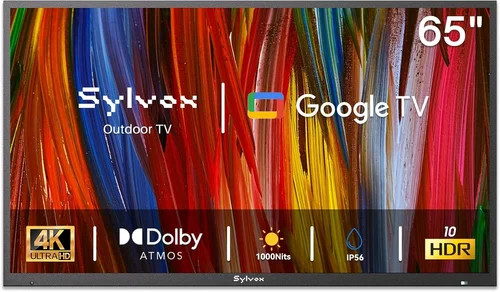
Outdoor living spaces have become extensions of our homes—especially for renters who want to maximize comfort without making permanent changes. A patio TV can transform a simple backyard or balcony into a cozy entertainment zone, perfect for movie nights, sports viewing, or casual relaxation under the open sky. However, choosing the right TV for outdoor use—particularly on a budget and in a rental setting—requires careful thought. Unlike indoor TVs, patio models must withstand fluctuating temperatures, humidity, direct sunlight, and potential exposure to rain or dust. At the same time, renters need solutions that are affordable, non-invasive, and easy to remove when moving out.
This comprehensive guide is designed specifically for renters and budget-conscious buyers looking to upgrade their outdoor spaces with a functional, durable, and cost-effective patio TV. Whether you’re setting up a small balcony in a city apartment or a spacious backyard in a suburban rental, we’ll walk you through every critical decision point—from understanding weather resistance and brightness requirements to evaluating portability, installation options, and smart features. You’ll learn how to balance performance with price, avoid common pitfalls, and find a model that delivers excellent value without breaking the bank or violating lease agreements.
The market for outdoor TVs has evolved significantly in recent years. While fully weatherproof, permanently mounted outdoor displays still command premium prices, there’s now a growing segment of “semi-outdoor” or “patio-friendly” TVs that offer a smart compromise: they’re not built for full exposure like commercial-grade outdoor models, but they’re engineered to handle covered patios, screened-in porches, and shaded decks with minimal risk. These budget-friendly options often leverage advancements in display technology—like high-brightness panels and anti-glare coatings—to deliver usable picture quality even in daylight. Combined with portable stands, removable mounts, and plug-and-play setups, they’re ideal for renters who need flexibility, affordability, and ease of use.

What to Look for When Buying Buying Guide
1. Budget & Price Range
For renters, budget isn’t just about upfront cost—it’s also about long-term value and flexibility. A patio TV should be affordable enough to replace if damaged or lost, yet capable enough to justify the investment. Most renters should aim for a sweet spot between $300 and $800. This range typically includes 40- to 55-inch models with decent brightness, basic smart functionality, and sufficient durability for covered outdoor use.
Avoid the temptation to go ultra-cheap (under $250). These models often use lower-grade panels, lack essential features like HDR or proper brightness, and may fail quickly in outdoor conditions. Conversely, spending over $1,000 on a semi-outdoor setup is usually unnecessary unless you’re installing in a fully exposed area—which most renters aren’t. Instead, focus on getting the best performance within your price bracket by prioritizing key specs like nits (brightness), IP rating (if applicable), and build quality.
2. Performance Specifications
Outdoor viewing demands different performance metrics than indoor use. The most critical spec is brightness, measured in nits. For a covered patio with partial sun exposure, aim for at least 400 nits; for brighter areas or partial shade, 500–700 nits is ideal. Anything below 300 nits will struggle in daylight, even under an awning.
Resolution matters too. While 4K is standard even in budget TVs today, ensure the model supports HDR10 or Dolby Vision for better contrast and color in variable lighting. Refresh rate (60Hz vs. 120Hz) is less critical for casual viewing but worth considering if you plan to stream sports or play games outdoors.
Audio is another often-overlooked factor. Most budget TVs have weak built-in speakers. If you’re placing the TV away from walls or using it in a breezy area, consider pairing it with a compact Bluetooth soundbar or weather-resistant outdoor speakers. Also, check input options: HDMI 2.0 or higher ensures compatibility with modern streaming devices, game consoles, and cable boxes.
3. Build Quality & Durability
Even on a covered patio, your TV will face more environmental stress than an indoor unit. Humidity, temperature swings, dust, and occasional splashes can degrade electronics over time. Look for models with robust chassis materials—metal frames are preferable to all-plastic builds—and sealed components where possible.
While true outdoor TVs carry IP55 or IP65 ratings (indicating dust and water resistance), most budget patio-friendly models won’t have official IP ratings. That’s okay—just ensure the TV is used under cover and never directly exposed to rain or sprinklers. Some manufacturers offer “outdoor-ready” variants of standard models with enhanced cooling, UV-resistant coatings, or improved ventilation. These are worth seeking out.
Also consider the power supply. Outdoor outlets may be less stable or farther away. A TV with efficient power consumption (look for ENERGY STAR certification) reduces strain on extension cords and minimizes fire risk. Avoid daisy-chaining multiple high-draw devices through a single outdoor outlet.
4. Features & Functionality
Smart TV platforms are essential for renters who want plug-and-play convenience. Roku TV, Android TV, and webOS dominate the budget segment and offer seamless access to Netflix, YouTube, Hulu, and more. Avoid proprietary or outdated systems that limit app availability or receive infrequent updates.
Voice control via Alexa or Google Assistant is a nice bonus, especially if you’re controlling the TV from a distance (e.g., while grilling). Built-in Wi-Fi (dual-band 2.4GHz/5GHz) ensures stable streaming, even if your outdoor signal is weaker than indoors.
Portability features matter too. Look for lightweight designs (under 25 lbs for 50-inch models), VESA mount compatibility (for easy attachment to stands or arms), and front-facing or easily accessible ports. Some models include carrying handles or optional rolling stands—ideal for moving the TV between patio, garage, or indoor storage.
Lastly, consider connectivity beyond HDMI. USB ports allow for media playback or firmware updates, while optical audio outs enable connection to external sound systems. Bluetooth support lets you stream audio directly to headphones or speakers without wires cluttering your space.
5. Brand Reputation
Not all budget TV brands are created equal. Stick with established names like TCL, Hisense, Vizio, Samsung, and LG—even their entry-level lines undergo rigorous testing and offer reliable customer service. These brands also dominate the refurbished market, giving you more options for savings.
Avoid obscure or no-name brands sold exclusively through third-party Amazon sellers or discount warehouses. While they may seem tempting due to low prices, they often lack warranty support, use inferior components, and disappear from the market quickly, leaving you stranded if something goes wrong.
Check brand-specific outdoor performance reviews. For example, TCL’s 4-Series and 5-Series have proven track records in semi-outdoor setups, while Hisense’s U6 and U7 series offer strong brightness at competitive prices. Samsung and LG tend to be pricier but deliver better color accuracy and motion handling—worth considering if you can stretch your budget slightly.
6. Warranty & Support
Warranty terms are crucial for renters. Most budget TVs come with a standard 1-year limited warranty, but some brands offer extended coverage or accidental damage protection for a small fee. Always register your purchase online to activate warranty benefits.
Pay attention to what the warranty covers. Does it include screen burn-in? Power supply failure? Damage from environmental factors? Most standard warranties exclude “acts of nature” or improper use—so using a non-outdoor TV in direct rain could void coverage. However, using it under a covered patio is generally acceptable.
Customer support quality varies widely. Brands like Samsung and LG offer robust phone and chat support, while others rely on email-only systems with slow response times. Read recent user reviews about post-purchase service before buying. A TV is only as good as the support behind it—especially if you’re troubleshooting setup issues remotely.
7. Size & Portability
Patio spaces vary dramatically—from tiny urban balconies to sprawling backyard decks. Measure your available wall or stand space carefully, including clearance for ventilation (most TVs need 2–4 inches around the sides and top). A 43-inch TV is often the maximum for small patios, while 50–55 inches works well for medium to large areas.
Weight and thickness affect portability. Thinner, lighter models are easier to move indoors during storms or winter months—a must for renters who don’t want to leave electronics outside year-round. Consider whether you’ll need to store the TV in a closet, basement, or garage when not in use.
Mounting options also influence size choice. Fixed wall mounts save space but require drilling (check your lease!). Full-motion arms offer flexibility but add bulk. Rolling stands are renter-friendly—no permanent installation needed—and many include cable management and storage shelves. Choose a TV compatible with VESA patterns (e.g., 200×200 or 400×400) to ensure broad mount compatibility.
8. User Reviews & Ratings
Never rely solely on manufacturer specs. Real-world user feedback reveals how a TV performs in actual outdoor conditions. Search for phrases like “used on patio,” “outdoor viewing,” or “brightness in sun” in customer reviews on Amazon, Best Buy, or Reddit.
Look for patterns: if multiple users report overheating after 2 hours in direct sun, that’s a red flag—even if the TV is technically “covered.” Conversely, consistent praise for visibility on cloudy days or under pergolas is a good sign.
Be wary of fake reviews. Focus on verified purchases with detailed descriptions and photos. Sites like RTINGs and Wirecutter provide professional outdoor brightness tests, which can supplement user experiences. Cross-referencing at least two sources gives you a more accurate picture.
Different Types of Buying Guide
Common Buying Mistakes to Avoid
❌ Mistake: Buying a Standard Indoor TV for Full Sun Exposure
Why it’s bad: Most indoor TVs max out at 300–350 nits and lack anti-reflective coatings. In direct sunlight, the image becomes washed out, colors fade, and you’ll be squinting even at full brightness. Over time, UV exposure can damage the screen and internal components.
What to do instead: Only use indoor TVs under solid cover—like a roofed patio or enclosed sunroom. If your space gets morning or afternoon sun, invest in a model with 500+ nits brightness or add a retractable shade.
❌ Mistake: Ignoring Ventilation Requirements
Why it’s bad: TVs generate heat, and outdoor enclosures or tight wall mounts can trap it. Overheating causes throttling (reduced brightness), color shifts, and premature failure. Many renters seal TVs in plastic bins for “protection,” which is a fire hazard.
What to do instead: Ensure at least 3–4 inches of clearance around all sides. Use breathable covers or purpose-built outdoor enclosures with fans. Never block ventilation grills.
❌ Mistake: Overlooking Power Safety
Why it’s bad: Using indoor extension cords outdoors or plugging into ungrounded outlets risks electrical shock, short circuits, or fire—especially in damp conditions.
What to do instead: Use only UL-listed outdoor extension cords with GFCI protection. Plug into a weatherproof outlet cover. Consider a smart plug with surge protection to remotely cut power during storms.
❌ Mistake: Choosing the Wrong Mounting Solution
Why it’s bad: Drilling into stucco, brick, or rental walls may violate your lease and cost hundreds in repair fees. Fixed mounts also limit flexibility.
What to do instead: Opt for freestanding rolling stands or tension-mounted arms that don’t require permanent fixtures. Many include leveling feet for uneven surfaces and cable management.
❌ Mistake: Skipping the Sound System
Why it’s bad: Wind, traffic, and distance mute built-in TV speakers. You’ll end up turning the volume to max, which distorts audio and annoys neighbors.
What to do instead: Pair your TV with a compact, weather-resistant Bluetooth speaker or a soundbar mounted below the screen. Look for models with IPX4 rating or higher.
❌ Mistake: Not Planning for Seasonal Storage
Why it’s bad: Leaving electronics outside in winter exposes them to freezing temps, condensation, and pests. Moisture buildup can corrode circuits.
What to do instead: Choose a lightweight, easy-to-disassemble setup. Store the TV indoors during off-seasons in its original box or a padded case.
❌ Mistake: Falling for “Outdoor TV” Marketing Without Verification
Why it’s bad: Some brands label regular TVs as “outdoor-ready” but provide no real weatherproofing or brightness upgrades. You pay a premium for minimal benefit.
What to do instead: Demand specs: ask for nits rating, IP certification (if any), and warranty terms covering outdoor use. If they can’t provide details, walk away.
Budget Guidelines: How Much Should You Spend?
- Entry-Level ($250–$400): Ideal for fully covered, shaded patios with minimal sun exposure. Expect 40–43 inch screens, 350–450 nits brightness, basic Roku or Fire TV OS, and plastic builds. Great for casual viewing but may struggle on bright days. Best for short-term rentals or seasonal use.
- Mid-Range ($400–$650): The sweet spot for most renters. Look for 50-inch models with 500+ nits, HDR10, metal frames, and reliable smart platforms. These handle partial sun well and offer better longevity. Often include VESA mounts and dual-band Wi-Fi.
- Premium ($650–$900): For those wanting near-outdoor performance without commercial pricing. Features may include 600+ nits, local dimming, Dolby Vision, and enhanced cooling. Some models come with optional outdoor stands or certified enclosures. Perfect for year-round use under pergolas.
- Luxury ($900+): Reserved for fully exposed installations or high-end rentals. Includes true IP-rated outdoor TVs, heated/cooled enclosures, and professional mounting. Overkill for most renters but justified if you host frequently or live in extreme climates.
Expert Tips for Getting the Best Deal
- Shop During Off-Seasons: TV prices drop significantly in January (post-holiday sales) and July/August (pre-fall launches). Avoid Black Friday—outdoor-specific deals are rare, and stock is limited.
- Use Price Tracking Tools: Set alerts on CamelCamelCamel (for Amazon) or Honey for your desired model. Prices fluctuate weekly, and you can save $50–$100 by waiting for a dip.
- Check Warehouse Clubs: Costco and Sam’s Club often carry exclusive bundles with stands or soundbars at lower effective prices. Their return policies are also renter-friendly (90+ days).
- Negotiate with Landlords: Some landlords allow minor modifications if you offer to restore the wall later. Propose using adhesive mounts or tension rods to avoid drilling.
- Test Before Committing: If buying in-store, ask to see the TV powered on in a bright showroom. Check for backlight bleed, color accuracy, and remote responsiveness.
- Read the Fine Print on Returns: Ensure the retailer accepts returns for “change of mind” (not just defects). Outdoor use may void some policies, so confirm before unboxing.
- Bundle with Streaming Devices: Some retailers offer discounts when you buy a TV with a Roku Stick, Fire Stick, or Apple TV. This saves money and ensures compatibility.
- Consider Energy Efficiency: Look for ENERGY STAR ratings. Efficient TVs cost less to run and generate less heat—important for outdoor enclosures.
Frequently Asked Questions
Q: Can I use a regular indoor TV on my covered patio?
A: Yes—if it’s truly covered (roof overhead, no direct rain or sun). Ensure it has at least 400 nits brightness and use a breathable cover when not in use. Avoid leaving it outside in winter or during storms.
Q: Do I need a special outdoor TV mount?
A: Not necessarily. Standard VESA-compatible mounts work fine for covered areas. For freestanding setups, rolling TV stands with locking wheels are renter-safe and require no drilling.
Q: How do I protect my TV from humidity?
A: Use silica gel packs in storage, avoid placing the TV directly on concrete (which wicks moisture), and ensure good airflow. Never cover with plastic—use fabric or mesh covers instead.
Q: Will my landlord allow a patio TV?
A: Most leases permit non-permanent installations like stands or adhesive mounts. Avoid drilling, painting, or modifying structures. Get written permission if unsure.
Q: What’s the minimum brightness for daytime viewing?
A: At least 400 nits for shaded areas; 500–700 nits for partial sun. Below 350 nits, the image will be too dim even on cloudy days.
Q: Can I leave my patio TV outside year-round?
A: Only if it’s in a fully enclosed, climate-controlled space. Most budget TVs aren’t designed for freezing temperatures or summer heatwaves. Store indoors during extreme weather.
Q: Are refurbished TVs safe for outdoor use?
A: Yes, if they’re certified refurbished by the manufacturer or a trusted retailer (like Amazon Renewed). They undergo testing and come with warranties—just verify the model is suitable for semi-outdoor conditions.
Q: Do I need an outdoor antenna for local channels?
A: Not if you use streaming services. But if you rely on over-the-air broadcasts, a compact indoor antenna (placed near a window) usually suffices for patio use.
Q: How far should the TV be from seating?
A: A good rule: viewing distance (in inches) = screen size (in inches) × 1.5. So a 50-inch TV should be 6–8 feet away for comfortable viewing.
Q: What if my patio has no power outlet?
A: Use a heavy-duty outdoor extension cord from a nearby indoor outlet. Never run cords under doors or through windows—this creates tripping hazards and moisture gaps. Consider a portable power station for truly off-grid setups.
Our Final Recommendations
- Best for Budget-Conscious Buyers: TCL 43S450G (43″ 4K Roku TV) – Priced under $300, this model delivers 420 nits brightness, solid color accuracy, and reliable Roku OS. Perfect for shaded patios and small spaces.
- Best Overall Value: Hisense 50U6HF (50″ ULED Mini-LED) – At around $550, it offers 600+ nits, Dolby Vision, and excellent contrast. Handles partial sun beautifully and includes a metal frame for durability.
- Best Premium Option: Samsung QN50Q60CA (50″ QLED) – With 700 nits, anti-reflective coating, and Tizen OS, this TV rivals true outdoor models at half the price. Ideal for pergolas and east-facing decks.
- Best for Beginners: Vizio V-Series 43″ V435-H11 – Simple setup, intuitive interface, and 450 nits brightness. Great first outdoor TV with minimal learning curve.
- Best for Advanced Users: LG 55UR7300PUA (55″ NanoCell) + Peerless-AV Outdoor Enclosure – Combine LG’s accurate colors and 500 nits with a DIY weatherproof box for a custom, high-performance solution.
Conclusion: Making the Right Choice
Choosing a patio TV as a renter doesn’t have to be overwhelming or expensive. By focusing on key factors like brightness, portability, smart features, and non-permanent installation, you can create an inviting outdoor entertainment space that fits your budget and lifestyle. Remember: the goal isn’t to replicate a living room setup—it’s to enhance your outdoor experience with reliable, enjoyable viewing that respects your rental agreement and environmental conditions.
Prioritize your needs: if you watch mostly at night, a lower-brightness model suffices. If you host weekend barbecues with daytime sports, invest in higher nits and better sound. Always read reviews, test setups when possible, and plan for seasonal storage. And most importantly, don’t let perfection stop you from starting—even a modest 40-inch TV under a covered patio can elevate your downtime significantly.
With the insights from this guide, you’re equipped to make a confident, informed decision. Whether you’re streaming a movie under string lights or catching the big game with friends, your patio deserves a TV that performs as beautifully outdoors as it does indoors—without costing a fortune or complicating your lease. Now go enjoy that fresh air with your favorite show!

