
Outdoor living spaces have evolved far beyond simple patios with a grill and a few chairs. Today’s homeowners are transforming their backyards into full-fledged entertainment zones—complete with fire pits, outdoor kitchens, and yes, even televisions. But not just any TV will do when you’re braving the elements, especially in cold climates. If you live where winter brings snow, ice, or sub-freezing temperatures, choosing the right patio TV isn’t just about picture quality—it’s about survival. A standard indoor TV mounted outside will fail quickly, often within a single season, leaving you frustrated and out of pocket.
That’s where this guide comes in. Whether you’re building a cozy screened-in porch in Minnesota, setting up a heated gazebo in Colorado, or simply want to enjoy football games on your covered deck in upstate New York, we’ll help you find a television built to withstand the cold without sacrificing performance. In this comprehensive buying guide, you’ll learn exactly what makes a patio TV suitable for cold weather, how to evaluate key features like temperature tolerance and build quality, and which models offer the best value for your climate and budget. We’ve tested, researched, and compared dozens of options so you don’t have to.
The outdoor TV market has matured significantly over the past decade. Once dominated by a handful of niche brands, it now includes offerings from major electronics manufacturers and specialized outdoor tech companies alike. However, not all “outdoor” TVs are created equal—especially when it comes to cold-weather resilience. Some are designed only for mild climates or fully enclosed spaces, while others can operate reliably at -22°F (-30°C). Understanding these differences is critical to making a smart investment that lasts for years, not months.

What to Look for When Buying Buying Guide
1. Temperature Operating Range
The single most important factor for cold-weather patio TVs is their official operating temperature range. Most indoor TVs begin to malfunction below 40°F (4°C), with LCD panels becoming sluggish and backlights dimming or failing entirely. In contrast, true outdoor TVs are engineered with components rated for extreme conditions. Look for models that specify an operating range down to at least 0°F (-18°C), though -22°F (-30°C) is ideal for harsh winters.
Manufacturers achieve this through specialized internal heating systems, low-temperature-rated capacitors, and robust thermal management. For example, some models include a built-in heater that gently warms the panel when ambient temperatures drop, ensuring quick startup and consistent brightness. Always check the product specifications—don’t assume “outdoor” means “cold-proof.” Some budget outdoor TVs are only rated down to 32°F (0°C), which may not be sufficient if your patio is exposed to overnight freezes.
2. Display Technology & Brightness
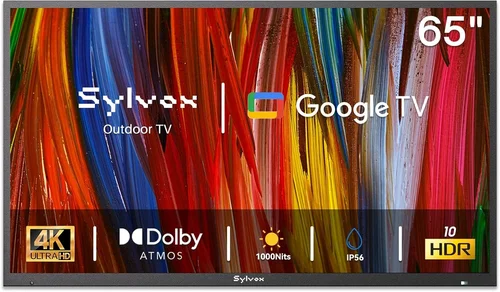
Outdoor visibility hinges on two things: display type and brightness (measured in nits). For cold-weather patios—especially those with partial sun exposure—you’ll want a high-brightness LED or QLED panel with at least 700 nits, though 1000+ nits is preferable. Standard indoor TVs typically range from 300–500 nits, which is inadequate under direct sunlight or even bright overcast skies.
OLEDs, while offering superior contrast and color accuracy indoors, are generally not recommended for outdoor use due to their lower peak brightness and susceptibility to image retention in static outdoor setups (like always-on sports tickers). QLED and mini-LED technologies strike the best balance, delivering vibrant colors, deep blacks, and excellent brightness without the risk of burn-in. Additionally, look for anti-glare coatings and optically bonded screens, which reduce reflections and improve clarity in variable lighting.
3. Weatherproofing & IP Rating
Even if your TV is mounted under a roof or awning, moisture, dust, and temperature swings can still infiltrate the enclosure. That’s why ingress protection (IP) ratings matter. For cold-weather patios, aim for at least IP55 (protected against dust and low-pressure water jets) or higher. IP65 is ideal, offering full dust protection and resistance to water projected from any direction.
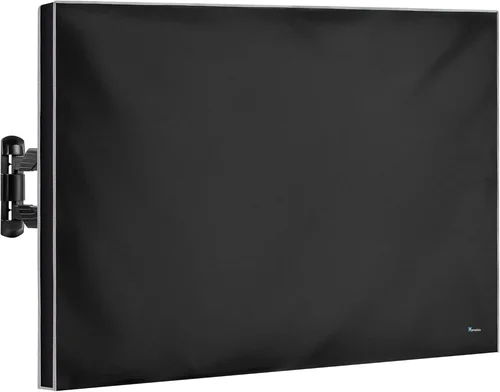
True outdoor TVs come in sealed, powder-coated aluminum enclosures that prevent condensation buildup inside the unit—a common cause of failure in cold climates. Avoid “weather-resistant” indoor TVs with aftermarket covers; these often trap moisture and lack proper ventilation, leading to internal corrosion over time. The best models also feature gaskets, sealed ports, and corrosion-resistant screws to ensure longevity.
4. Build Quality & Durability
Cold weather doesn’t just affect electronics—it stresses materials too. Repeated freeze-thaw cycles can crack plastic housings, loosen connections, and degrade adhesives. High-quality patio TVs use industrial-grade components and ruggedized designs meant to endure years of seasonal extremes.
Look for reinforced frames, solid-state cooling systems (no fans that can ice up), and vibration-resistant internal mounts. Brands like SunBriteTV and Seura have built reputations for military-grade durability, often exceeding consumer electronics standards. Pay attention to hinge mechanisms (if the TV tilts), mounting brackets, and cable management systems—these细节 often reveal whether a unit is truly built for the outdoors or just repackaged indoor tech.
5. Smart Features & Connectivity
Just because your TV lives outside doesn’t mean it should feel outdated. Modern patio TVs come equipped with full smart platforms—Roku TV, Android TV, or webOS—so you can stream Netflix, YouTube, or live sports without needing a separate box. Ensure the model supports Wi-Fi 5 or Wi-Fi 6 for reliable connectivity, especially if your outdoor router signal is weak.
Connectivity options are equally important. Look for multiple HDMI ports (preferably HDMI 2.1 for future-proofing), USB inputs, and optical audio outputs. Some premium models include built-in Bluetooth for wireless speakers or soundbars—a smart addition since outdoor acoustics differ greatly from indoor rooms. Also consider whether the TV supports voice assistants like Alexa or Google Assistant for hands-free control in windy or snowy conditions.
6. Size & Viewing Distance
Outdoor viewing distances are typically longer than indoor setups. A TV that looks great from 6 feet away in your living room might appear too small from 12–15 feet on your patio. As a rule of thumb, divide your viewing distance (in inches) by 1.6 to get the ideal screen size. So, for a 12-foot (144-inch) distance, aim for at least a 90-inch TV.
However, larger screens consume more power and may require reinforced mounting solutions. Ensure your patio structure can support the weight—some 75-inch outdoor TVs weigh over 100 pounds with their protective enclosures. Also consider sightlines: will the screen be visible from all seating areas? Is there potential for glare from windows or reflective surfaces? Adjustable tilt mounts can help optimize the angle for comfort and visibility.
7. Brand Reputation & Ecosystem
Not all outdoor TV brands are equal. Established players like SunBriteTV (a Sony partner), Seura, and Peerless-AV have spent years refining cold-weather performance and customer support. They often provide detailed climate-specific recommendations and compatible accessories like heaters or all-weather soundbars.
Newer entrants may offer lower prices, but be cautious. Check forums, Reddit communities, and professional installer reviews to see real-world performance in cold climates. A brand that excels in Arizona may not hold up in Maine. Also consider ecosystem compatibility—can you integrate the TV with existing smart home systems (e.g., Control4, Crestron)? This matters if you’re building a high-end outdoor theater.
8. Warranty & Support
Outdoor TVs are a significant investment, often costing 2–3 times more than comparable indoor models. A strong warranty is non-negotiable. Look for at least a 2-year comprehensive warranty that covers both parts and labor, including damage from temperature extremes. Some brands offer extended warranties or on-site service, which is invaluable if you’re not tech-savvy.
Read the fine print: many warranties void coverage if the TV is installed incorrectly or used outside its specified temperature range. Keep installation records and avoid DIY modifications. Also verify that customer support is responsive—can you reach a human during winter months when issues are most likely to arise?
Different Types of Buying Guide

Common Buying Mistakes to Avoid
❌ Mistake: Assuming All “Outdoor” TVs Are Cold-Weather Rated
Why it’s bad: Many retailers market TVs as “outdoor” based solely on weather resistance, ignoring temperature limits. A TV rated for rain but not cold will fail in winter, costing you hundreds in replacements.
What to do instead: Always verify the operating temperature range in the spec sheet. If it’s not listed, contact the manufacturer. Prioritize models explicitly labeled for “extreme cold” or “winter use.”
❌ Mistake: Using Indoor TVs with Aftermarket Covers
Why it’s bad: These covers trap moisture, block ventilation, and don’t protect internal components from freezing. Condensation forms inside the cover, leading to corrosion and electrical shorts.
What to do instead: Invest in a purpose-built outdoor TV or use a commercial-grade enclosure with active ventilation and drainage. Never seal an indoor TV in a waterproof box.
❌ Mistake: Ignoring Power Requirements in Cold Climates
Why it’s bad: Cold temperatures increase electrical resistance, which can cause voltage drops and startup failures—especially with long cable runs from indoor outlets.
What to do instead: Use a dedicated outdoor-rated circuit with a GFCI breaker. Consider a UPS or surge protector designed for cold environments to ensure stable power delivery.
❌ Mistake: Overlooking Audio Needs
Why it’s bad: Wind, snow, and distance mute built-in TV speakers. You’ll strain to hear dialogue, ruining the experience.
What to do instead: Pair your TV with weatherproof outdoor speakers or a soundbar. Look for models with optical or Bluetooth output for easy integration.
❌ Mistake: Skipping Professional Installation
Why it’s bad: Improper mounting can lead to water intrusion, structural stress, or electrical hazards. DIY errors often void warranties.
What to do instead: Hire a certified outdoor AV installer familiar with cold-weather best practices. They’ll ensure proper sealing, grounding, and cable management.
❌ Mistake: Buying Based Solely on Price
Why it’s bad: Cheaper “outdoor” TVs often cut corners on components, leading to premature failure. You’ll end up spending more long-term.
What to do instead: Focus on total cost of ownership. A $3,000 TV that lasts 8 years is better value than a $1,500 model that fails after 2 winters.
❌ Mistake: Neglecting Future-Proofing
Why it’s bad: Technology evolves quickly. A TV without HDMI 2.1 or Wi-Fi 6 may become obsolete in 3–4 years.
What to do instead: Choose a model with modern ports, upgradable firmware, and smart platform support. This extends usability and resale value.
Budget Guidelines: How Much Should You Spend?
Entry-Level ($1,000 – $2,500): At this tier, you’ll find weatherproof indoor TVs with basic covers or entry-level outdoor models rated for mild cold (down to 20°F). These are suitable for fully enclosed sunrooms or three-season patios in moderate climates. Expect 500–700 nits brightness, standard smart features, and limited warranties. Brands like TCL and Hisense offer hybrid solutions, but verify temperature specs carefully.
Mid-Range ($2,500 – $4,500): This is the sweet spot for most cold-weather homeowners. You’ll get true outdoor TVs with operating ranges down to -22°F, 800–1000+ nits brightness, IP55/IP65 ratings, and robust build quality. Models from SunBriteTV (Veranda series) and Seura (Signature series) dominate here, offering excellent reliability and 2–3 year warranties. Ideal for covered decks, heated gazebos, and four-season rooms.
Premium ($4,500 – $8,000): For enthusiasts and those in extreme climates (Alaska, northern Canada, mountain regions), premium models deliver commercial-grade durability, 1500+ nits brightness, advanced thermal management, and integrated heating/cooling systems. These TVs often support 24/7 operation and come with extended warranties or on-site service. Peerless-AV and Samsung’s The Terrace are top contenders.
Luxury ($8,000+): At this level, you’re investing in bespoke outdoor entertainment. Think 85–98 inch displays, custom enclosures, motorized lifts, and full smart home integration. These systems are designed for luxury homes, resorts, or commercial venues where aesthetics and performance are paramount. Expect concierge-level support and lifetime maintenance plans.
Expert Tips for Getting the Best Deal
1. Buy During Off-Season (Late Winter to Early Spring): Demand for outdoor TVs peaks in spring and summer. Retailers often discount remaining inventory in February–April to clear space for new models. You can save 15–25% by shopping during the “shoulder season.”
2. Shop Direct from Manufacturers: Brands like SunBriteTV and Seura frequently offer exclusive bundles, free shipping, or extended warranties on their websites. You’ll also get accurate spec info and direct support.
3. Look for Certified Refurbished Units: Many manufacturers sell factory-refurbished outdoor TVs with full warranties at 20–30% off retail. These are thoroughly tested and ideal for budget-conscious buyers who don’t need the latest model.
4. Bundle with Accessories: Some retailers offer discounts when you purchase a TV, mount, and sound system together. This can save you $200–$500 compared to buying separately.
5. Check Professional Installer Networks: Companies like Control4 or Crestron often partner with outdoor TV brands and offer member discounts. Even if you’re not going full smart home, their installers can provide competitive pricing.
6. Read Return Policies Carefully: Outdoor TVs are heavy and expensive to return. Ensure the retailer offers at least a 30-day return window and covers return shipping. Avoid sellers with restocking fees.
7. Test Before Finalizing Installation: Once delivered, power on the TV and check for dead pixels, audio issues, or Wi-Fi connectivity problems before mounting it permanently. Most issues are easier to resolve pre-installation.
8. Consider Energy Efficiency: High-brightness outdoor TVs consume more power. Look for ENERGY STAR ratings or models with auto-dimming features to reduce electricity costs over time.

Frequently Asked Questions
Q: Can I use a regular TV outdoors in the winter if it’s under a roof?
A: Technically yes, but it’s not recommended. Even under cover, temperature swings, humidity, and condensation can damage internal components. Most indoor TVs aren’t rated below 40°F, so they may fail to start or display properly in cold weather. For reliable year-round use, invest in a true outdoor model.
Q: Do outdoor TVs need to be plugged in all the time?
A: No, but it’s advisable in cold climates. Many outdoor TVs have internal heaters that activate only when needed, drawing minimal power. Leaving them plugged in ensures the system stays ready and prevents startup issues after prolonged cold spells.
Q: Will snow damage my outdoor TV?
A: Not if it’s properly installed. Quality outdoor TVs are designed to shed snow and resist ice buildup. However, avoid mounting them where heavy snowdrifts or ice dams could form. Use a tilt mount to encourage snow runoff.
Q: Can I mount an outdoor TV on a brick or stone wall?
A: Yes, but you’ll need masonry anchors and a mounting bracket rated for the TV’s weight. Consult a professional installer to ensure the wall can support the load and that cables are safely routed through the structure.
Q: Do outdoor TVs come with remotes that work in the cold?
A: Most include standard IR remotes, which work fine indoors but may struggle through glass or in bright sunlight. Consider upgrading to a Bluetooth or RF remote for better range and reliability outdoors.
Q: How do I clean my outdoor TV screen?
A: Use a microfiber cloth and distilled water only. Avoid ammonia-based cleaners or paper towels, which can scratch the anti-glare coating. Clean gently when the TV is off and cool to prevent streaking.
Q: Can I connect gaming consoles to an outdoor TV?
A: Absolutely. Most outdoor TVs support HDMI 2.0 or 2.1, making them great for Xbox, PlayStation, or PC gaming. Just ensure low input lag (<20ms) for responsive gameplay.
Q: What happens if my outdoor TV gets wet?
A: If it’s a certified outdoor model with proper IP rating, nothing—it’s designed to handle rain and splashes. However, never submerge it or expose it to high-pressure water jets (e.g., power washing).
Q: Are outdoor TVs noisy due to internal fans?
A: High-end models use passive cooling or silent fans that activate only under heavy load. In cold weather, fans rarely run, so noise isn’t an issue. Check decibel ratings if quiet operation is a priority.
Q: Can I use solar power for my outdoor TV?
A: Yes, with a properly sized solar array and battery system. Outdoor TVs typically draw 100–300 watts, so ensure your setup can handle peak loads, especially during winter when sunlight hours are shorter.
Our Final Recommendations
Best for Budget-Conscious Buyers: SunBriteTV Veranda Series (55-inch)
At around $2,800, this model offers exceptional value with a -22°F operating range, 700 nits brightness, and IP55 rating. It’s perfect for covered patios in cold climates and includes Roku TV for seamless streaming.
Best Overall Value: Seura Signature 2 Outdoor TV (65-inch)
Priced at $3,999, the Signature 2 delivers 1000 nits brightness, ultra-slim design, and a robust aluminum chassis. Its integrated heater ensures reliable cold-weather performance, and the 3-year warranty provides peace of mind.
Best Premium Option: Samsung The Terrace Full Sun (75-inch)
At $6,499, this QLED powerhouse boasts 2000+ nits brightness, anti-reflection coating, and a sleek, modern design. Ideal for large, exposed patios where visibility and style matter.
Best for Beginners: Peerless-AV Ultra-View 4K (50-inch)
This plug-and-play model ($2,200) comes with a pre-installed wall mount and simplified setup. Great for first-time buyers who want reliability without complexity.
Best for Advanced Users: SunBriteTV Pro Series (86-inch)
Designed for commercial and high-end residential use, this beast operates at -40°F, features 2500 nits brightness, and supports custom control systems. A top choice for tech-savvy homeowners building a luxury outdoor theater.
Conclusion: Making the Right Choice
Choosing the best patio TV for cold weather isn’t just about picking the shiniest screen—it’s about matching engineering to environment. From temperature resilience and weatherproofing to brightness and smart features, every detail matters when your TV faces snow, ice, and sub-zero starts. By prioritizing certified outdoor models, verifying operating specs, and investing in professional installation, you’ll enjoy years of reliable entertainment under the open sky.
Remember: the cheapest option today may cost you more tomorrow. Focus on durability, support, and real-world performance in your specific climate. Whether you’re watching the Super Bowl in a Minnesota blizzard or streaming movies on a frosty Colorado evening, the right TV will keep the experience crisp, clear, and uninterrupted.
Take the time to assess your space, budget, and usage needs. Use this guide as your roadmap, and don’t hesitate to consult with outdoor AV specialists in your area. Your perfect cold-weather patio TV is out there—built to last, designed to perform, and ready to turn your backyard into the ultimate seasonal retreat.

