
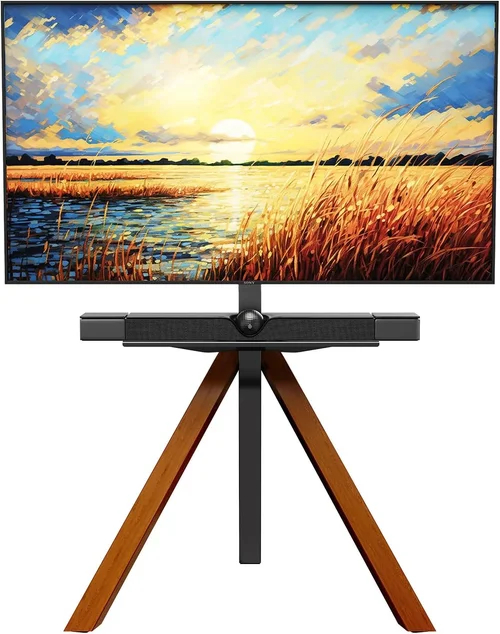
Outdoor sports viewing has evolved dramatically over the past decade. What once meant huddling around a small, weather-beaten portable TV or relying on a projector with questionable brightness has transformed into a full-fledged backyard entertainment experience. Whether you’re hosting a Super Bowl party, cheering on your local team during March Madness, or gathering friends for a summer soccer match under the stars, having the right outdoor TV setup can make all the difference. But with so many options flooding the market—from weatherproof displays to ultra-bright screens and smart streaming capabilities—it’s easy to feel overwhelmed. That’s where this comprehensive buyer’s guide comes in.
This guide is designed to cut through the noise and help you make an informed, confident decision when choosing a backyard TV for outdoor sports watching in 2026. We’ll walk you through every critical factor, from screen brightness and durability to connectivity and budget considerations. You’ll learn how to evaluate performance specs that truly matter in outdoor environments, understand the pros and cons of different TV types, avoid common purchasing pitfalls, and even discover expert tips for getting the best deal. Whether you’re a casual fan looking to upgrade your patio setup or a die-hard sports enthusiast planning a permanent outdoor media zone, this guide equips you with everything you need to choose the perfect TV for your space, lifestyle, and viewing habits.
The outdoor TV market has matured significantly, offering more choices than ever before. Major brands like Samsung, LG, Sony, and TCL now offer models specifically engineered for outdoor use, while niche manufacturers such as SunBriteTV and Seura continue to dominate the premium segment with ruggedized, all-weather designs. At the same time, advancements in display technology—like QLED, OLED, and mini-LED—have made high-quality visuals more accessible, even in bright daylight. Streaming integration, voice control, and smart home compatibility are now standard features, making it easier than ever to access live sports, replays, and highlights without missing a beat. With prices ranging from under $500 to well over $5,000, there’s an option for nearly every budget and use case. By the end of this guide, you’ll know exactly what to prioritize, what to avoid, and how to build a backyard sports-watching experience that’s both immersive and reliable.

What to Look for When Buying Buying Guide
1. Brightness & Anti-Glare Performance
When it comes to outdoor TVs, brightness isn’t just a nice-to-have—it’s essential. Unlike indoor viewing, where ambient light is controlled, backyard environments are subject to direct sunlight, reflections, and shifting shadows throughout the day. A standard indoor TV typically peaks at around 300–500 nits of brightness, which is fine for a dimly lit living room but utterly insufficient for daytime sports viewing outdoors. For reliable visibility in full sun, you’ll want a display that delivers at least 700 nits, with premium outdoor models pushing 2,000 nits or more. Look for terms like “high brightness,” “daylight readable,” or “sunlight viewable” in product descriptions—these indicate the TV is engineered for outdoor conditions.
Equally important is anti-glare technology. Even the brightest screen can be rendered useless if reflections from the sun or surrounding surfaces wash out the image. Many outdoor TVs feature specialized optical filters or matte screen coatings that diffuse ambient light rather than reflecting it directly into your eyes. Some high-end models also include built-in louvers or directional lenses that focus light toward the viewer while minimizing off-axis glare. For example, SunBriteTV’s Veranda series uses a proprietary anti-reflective layer that maintains color accuracy and contrast even under direct sunlight. If you plan to watch games during afternoon kickoffs or early evening matches, prioritize TVs with both high peak brightness and advanced glare reduction.
2. Weather Resistance & Build Quality
Outdoor electronics face a harsh reality: rain, humidity, dust, extreme temperatures, and UV exposure. A TV that works flawlessly indoors can fail within months when exposed to the elements. That’s why weather resistance is non-negotiable. Look for TVs with an IP (Ingress Protection) rating—specifically IP55 or higher. IP55 means the unit is protected against dust ingress and low-pressure water jets from any direction, making it suitable for most covered patios, decks, and pergolas. For fully exposed installations (like open-air backyards), consider IP65 or IP66 ratings, which offer even greater protection against dust and powerful water jets.
Beyond the IP rating, examine the build materials. Premium outdoor TVs use powder-coated aluminum chassis, stainless steel hardware, and sealed ventilation systems to prevent moisture and corrosion. Avoid plastic enclosures unless they’re specifically rated for outdoor use—many budget “outdoor” TVs are just indoor models in weatherproof casings, which can trap heat and degrade over time. Also, check the operating temperature range. Most outdoor TVs function reliably between -22°F and 122°F (-30°C to 50°C), but verify this spec based on your local climate. For instance, if you live in a region with harsh winters or scorching summers, ensure the TV can handle those extremes without performance drops or shutdowns.
3. Screen Size & Viewing Distance
Choosing the right screen size isn’t just about going big—it’s about matching the TV to your seating arrangement and viewing habits. For backyard sports watching, where groups often gather at varying distances, a larger screen enhances immersion and ensures everyone gets a clear view of the action. A general rule of thumb: divide your optimal viewing distance (in inches) by 1.2 to 1.5 to determine the ideal screen diagonal. For example, if your seating is 10 feet (120 inches) away, a 65- to 85-inch TV would be appropriate.
However, outdoor spaces often have unique constraints. A massive 98-inch screen might look impressive, but it could overwhelm a small patio or require excessive mounting hardware. Conversely, a 43-inch TV might be too small for a large backyard with distant seating. Consider your typical audience size—will it be a cozy group of four or a party of 20? Also, factor in ambient light: larger screens with higher brightness perform better in bright conditions, but they also consume more power and may require professional installation. If space is limited, consider ultra-short-throw projectors as an alternative, though they lack the reliability and instant-on convenience of a dedicated outdoor TV.
4. Smart Features & Connectivity
Modern outdoor TVs aren’t just passive displays—they’re full-fledged smart entertainment hubs. For sports fans, this means seamless access to live broadcasts, streaming apps, and on-demand content without needing external devices. Look for TVs running established platforms like Google TV, webOS (LG), or Tizen (Samsung), which offer intuitive interfaces, voice search, and integration with popular sports apps such as ESPN+, fuboTV, YouTube TV, and NFL Game Pass. Built-in Wi-Fi 6 or Ethernet ports ensure stable streaming, especially important for buffer-free 4K broadcasts during high-stakes games.
Connectivity extends beyond streaming. Multiple HDMI 2.1 ports allow you to connect cable boxes, gaming consoles, or soundbars. USB ports let you play media files directly from a flash drive—useful for showing highlight reels or pre-game content. Some models even include Bluetooth for wireless audio pairing with outdoor speakers. If you plan to use the TV year-round (not just for sports), consider models with built-in tuners for over-the-air broadcasts, so you can catch local games without a subscription. Avoid TVs with limited or outdated ports—future-proofing your setup saves headaches down the line.
5. Audio Quality & External Sound Options
While picture quality grabs most of the attention, sound is equally vital for an immersive sports experience. The roar of the crowd, commentator analysis, and stadium ambiance all contribute to the excitement. Unfortunately, many outdoor TVs—especially slim, weatherproof models—have underpowered built-in speakers that struggle to deliver clear audio in open spaces. Wind, distance, and ambient noise can easily drown out dialogue or effects.
For the best experience, plan to pair your TV with external audio. Look for models with optical audio output, HDMI ARC (Audio Return Channel), or Bluetooth connectivity to easily link to outdoor soundbars, wireless speakers, or a full surround sound system. Some premium outdoor TVs, like those from Seura, include enhanced internal speakers with dedicated woofers and tweeters, but even these are best supplemented with external audio for large gatherings. If you’re mounting the TV high on a wall, ensure the audio output is accessible and that cables can be neatly routed. Remember: great visuals deserve great sound—don’t skimp on audio when building your backyard setup.
6. Mounting & Installation Flexibility
How and where you mount your TV significantly impacts both performance and longevity. Outdoor TVs require sturdy, weather-resistant mounts that can withstand wind, vibration, and temperature fluctuations. Fixed mounts are simplest but limit viewing angles; tilt and full-motion articulating mounts offer flexibility for adjusting the screen based on sun position or seating layout. Ensure the mount is rated for your TV’s weight and size, and choose one with a corrosion-resistant finish (e.g., zinc-plated or powder-coated steel).
Installation location matters too. Avoid placing the TV in direct sunlight if possible—even the brightest screens degrade faster under constant UV exposure. A covered patio, pergola with shade cloth, or under an eave provides ideal protection. If mounting on a wall, ensure there’s adequate ventilation around the TV to prevent overheating. Some models include built-in cooling fans, but passive airflow is usually sufficient if the unit isn’t enclosed. For renters or those who want portability, consider TVs with compatible outdoor carts or stands that allow easy movement between locations. Always follow manufacturer guidelines and, when in doubt, hire a professional installer familiar with outdoor AV setups.
7. Brand Reputation & Ecosystem Compatibility
Not all outdoor TV brands are created equal. Established names like Samsung, LG, and Sony bring decades of display expertise, robust customer support, and seamless integration with their broader smart home ecosystems. Their outdoor models often share software and design language with indoor counterparts, making setup and control familiar and intuitive. However, niche specialists like SunBriteTV, Seura, and Avid Focus focus exclusively on outdoor displays, offering deeper weatherproofing, longer warranties, and features tailored to harsh environments.
Consider your existing tech ecosystem. If you already use Samsung SmartThings or LG ThinQ devices, a compatible outdoor TV simplifies control via a single app. Likewise, if you’re invested in Apple HomeKit or Google Assistant, ensure the TV supports voice commands and automation. Brand reputation also affects long-term reliability and repair options. Check warranty terms—premium outdoor TVs often come with 2- to 3-year coverage, while budget models may offer only 1 year. Read user forums and professional reviews to gauge real-world durability and customer service responsiveness.
8. Warranty & Support
Outdoor electronics are an investment, and protecting that investment starts with a solid warranty. Standard indoor TV warranties rarely cover outdoor use, so always verify that the manufacturer explicitly supports outdoor installation. Premium outdoor TVs typically include extended coverage (2–3 years), accidental damage protection, and even on-site service in some regions. Look for brands that offer dedicated outdoor support lines and readily available replacement parts.
Support extends beyond the warranty period. Can you easily find user manuals, firmware updates, or troubleshooting guides online? Does the company provide installation guides or partner with certified installers? For complex setups—like integrating the TV with outdoor lighting, irrigation systems, or smart home hubs—responsive customer service is invaluable. Avoid brands with vague warranty terms or limited service networks. A few extra dollars upfront for better support can save hundreds in repair or replacement costs down the road.
Different Types of Buying Guide
Common Buying Mistakes to Avoid
❌ Mistake: Buying an Indoor TV for Outdoor Use
Why it’s bad: Indoor TVs lack the brightness, weather resistance, and thermal management needed for outdoor environments. Even under cover, they’re vulnerable to humidity, temperature swings, and dust, leading to premature failure, discoloration, or complete shutdown. Many manufacturers void warranties if used outdoors.
What to do instead: Invest in a TV specifically designed for outdoor use—either a dedicated all-weather model or an indoor TV paired with a certified weatherproof enclosure. Verify the IP rating and operating temperature range before purchasing.
❌ Mistake: Ignoring Viewing Angle and Sun Position
Why it’s bad: Placing the TV where direct sunlight hits the screen—even partially—can create blinding glare, wash out colors, and make gameplay impossible to follow. Similarly, mounting too high or at an awkward angle strains necks and reduces immersion.
What to do instead: Observe your backyard’s sun path throughout the day. Choose a shaded or covered location, and use a tilt or swivel mount to adjust the screen angle. Consider installing adjustable outdoor blinds or shade sails for dynamic control.
❌ Mistake: Overlooking Audio Needs
Why it’s bad: Relying solely on built-in TV speakers in an open yard results in tinny, distant sound that fails to capture the energy of live sports. Commentary gets lost, crowd noise fades, and the experience feels flat.
What to do instead: Plan your audio setup from day one. Invest in weather-resistant outdoor speakers or a soundbar with long-range wireless connectivity. Position speakers strategically around seating areas for even coverage.
❌ Mistake: Skimping on Mounting Hardware
Why it’s bad: Using generic indoor mounts or undersized brackets risks TV detachment, especially in windy conditions. Poorly secured units can fall, causing injury or damage.
What to do instead: Purchase mounts specifically rated for outdoor use and your TV’s weight/size. Opt for corrosion-resistant materials and consider professional installation for permanent setups.
❌ Mistake: Neglecting Power and Cable Management
Why it’s bad: Exposed cords create tripping hazards, attract pests, and degrade when exposed to moisture. Running extension cords across lawns is unsafe and unsightly.
What to do instead: Use in-wall rated cables for permanent installations or conceal cords with weatherproof raceways. Ensure all connections are GFCI-protected and consider a dedicated outdoor outlet installed by a licensed electrician.
❌ Mistake: Forgetting About Streaming Reliability
Why it’s bad: Weak Wi-Fi signals in backyards lead to buffering, lag, and missed plays—especially during peak usage times like playoff games.
What to do instead: Extend your network with a weatherproof Wi-Fi mesh node or use a wired Ethernet connection via buried conduit. Test signal strength at the TV location before finalizing your setup.
❌ Mistake: Not Planning for Year-Round Use
Why it’s bad: Buying a TV solely for football season means it sits unused for months, potentially deteriorating from lack of use or seasonal weather changes.
What to do instead: Choose a versatile model you’ll enjoy year-round—for movies, music, or casual viewing. This justifies the investment and keeps the unit in good working order.
Budget Guidelines: How Much Should You Spend?
Entry-Level ($400 – $800): This tier includes portable outdoor displays, basic indoor TVs in weatherproof enclosures, or older-model partial-shade TVs. Expect modest brightness (500–700 nits), limited smart features, and shorter lifespans. Best for occasional use in fully covered areas or small gatherings. Ideal for renters or those testing the waters before committing to a permanent setup.
Mid-Range ($800 – $2,000): The sweet spot for most backyard sports fans. These TVs offer 700–1,500 nits brightness, solid weather resistance (IP55), reliable smart platforms, and decent audio. Models like the SunBriteTV Veranda Series or TCL’s outdoor-compatible QLEDs fall here. They balance performance, durability, and value, suitable for covered patios and frequent use.
Premium ($2,000 – $4,000): For enthusiasts who want top-tier performance and longevity. Expect 1,500+ nits brightness, full weather sealing (IP65), advanced anti-glare coatings, premium build quality, and extended warranties. Brands like Seura and Avid Focus dominate this space. These TVs handle direct sun exposure and extreme climates with ease, making them perfect for permanent, high-use installations.
Luxury ($4,000+): Reserved for luxury homes, commercial venues, or serious tech collectors. Features include 2,000+ nits brightness, OLED or mini-LED panels, integrated cooling systems, custom finishes, and concierge-level support. These units are overkill for most homeowners but deliver unparalleled image quality and reliability in any condition.
Expert Tips for Getting the Best Deal
– Buy during off-seasons: Prices drop significantly in late winter and early spring (February–April) as retailers clear inventory before summer. Avoid peak demand periods like Super Bowl week or March Madness.
– Compare total cost of ownership: Factor in mounting, cables, audio, and potential installation fees—not just the TV price. A cheaper TV may end up costing more with add-ons.
– Check manufacturer rebates: Brands like Samsung and LG often run outdoor TV promotions with cashback or free accessories. Sign up for newsletters to catch limited-time offers.
– Consider refurbished or open-box units: Certified pre-owned outdoor TVs from reputable sellers can save 20–30% with full warranty coverage.
– Negotiate with local AV installers: Many offer bundled pricing for TV + mount + installation. They may also have access to dealer-only models or discounts.
– Verify return policies: Outdoor TVs are harder to resell if you change your mind. Ensure the retailer allows returns within 30–60 days, especially for custom installations.
– Test brightness in person if possible: Visit a showroom or borrow a friend’s setup to see how the screen performs in daylight. Online specs don’t always reflect real-world visibility.
– Invest in surge protection: Outdoor electronics are vulnerable to lightning and power fluctuations. Use a high-quality outdoor surge protector to safeguard your investment.

Frequently Asked Questions
Q: Can I use a regular TV outside if it’s under a covered patio?
A: Technically yes, but it’s not recommended for long-term use. Even under cover, indoor TVs aren’t built to handle humidity, temperature extremes, or dust. Over time, internal components can corrode or overheat. For reliable, warranty-backed performance, choose a TV designed for partial-shade outdoor use (IP55 rated) or use a certified weatherproof enclosure.
Q: Do outdoor TVs consume more power than indoor models?
A: Generally, yes—especially high-brightness models. However, modern outdoor TVs use energy-efficient LED backlights and smart power management. Look for ENERGY STAR certification to minimize electricity costs. The difference is usually modest (10–20% higher) unless you’re running the TV for many hours daily.
Q: How do I clean an outdoor TV screen?
A: Use a microfiber cloth and distilled water only. Avoid ammonia-based cleaners, paper towels, or abrasive materials, which can scratch anti-glare coatings. For stubborn dirt, lightly dampen the cloth—never spray liquid directly on the screen. Clean when the TV is off and cool to prevent streaking.
Q: Can I leave my outdoor TV on during rain?
A: Only if it’s rated for full weather exposure (IP65 or higher). Partial-shade models should be powered off during heavy rain or storms to avoid electrical hazards. Always follow the manufacturer’s guidelines.
Q: Will an outdoor TV work in winter?
A: Yes, most outdoor TVs operate down to -22°F (-30°C). However, extreme cold can temporarily reduce brightness or cause slight lag on startup. Allow the TV to warm up gradually. Avoid placing it where snow or ice can accumulate on the screen.
Q: Do I need a special antenna for outdoor TV?
A: Not necessarily. If you’re streaming via Wi-Fi or cable, no antenna is needed. For over-the-air broadcasts, a high-gain outdoor antenna mounted away from the TV can improve signal strength, especially in rural areas.
Q: Can I control my outdoor TV with my phone?
A: Absolutely. Most smart outdoor TVs support companion apps for iOS and Android, allowing you to change channels, adjust volume, or launch apps remotely. Some also integrate with voice assistants like Alexa or Google Assistant.
Q: How long do outdoor TVs last?
A: With proper care, premium outdoor TVs can last 7–10 years or more. Budget models or indoor TVs in enclosures may last 3–5 years. Regular maintenance, surge protection, and avoiding direct sun exposure extend lifespan.
Q: Are outdoor TVs worth the extra cost?
A: If you plan to use your backyard for regular sports viewing, entertaining, or year-round relaxation, yes. The durability, brightness, and reliability justify the investment. For occasional use, a portable display or projector may suffice.
Our Final Recommendations
Best for Budget-Conscious Buyers: TCL 6-Series QLED (with weatherproof enclosure) – Offers excellent 4K HDR performance, 800+ nits brightness, and Roku TV integration at under $800. Pair with a Sealoc enclosure for outdoor use.
Best Overall Value: SunBriteTV Veranda Series – Combines 1,000+ nits brightness, IP55 rating, robust build, and user-friendly interface. Priced around $1,500–$2,000, it’s ideal for covered patios and frequent use.
Best Premium Option: Seura Outdoor TV – Features 2,000+ nits brightness, OLED panel, full IP65 sealing, and sleek design. At $3,500+, it’s built for luxury outdoor living and direct sun exposure.
Best for Beginners: Samsung The Terrace Partial-Shade – Easy setup, vibrant QLED display, and seamless SmartThings integration. Great for first-time outdoor TV owners.
Best for Advanced Users: Avid Focus Pro Series – Customizable configurations, modular design, and enterprise-grade durability. Perfect for tech-savvy users building a permanent outdoor media zone.
Conclusion: Making the Right Choice
Choosing the right backyard TV for outdoor sports watching isn’t just about picking the biggest or brightest screen—it’s about aligning your purchase with your environment, usage patterns, and long-term goals. From understanding the critical role of brightness and weather resistance to avoiding common pitfalls like inadequate audio or poor mounting, every decision shapes your viewing experience. Whether you’re hosting a neighborhood watch party or enjoying a quiet game under the stars, the right TV transforms your backyard into a vibrant, communal space where every play feels larger than life.
As you weigh your options, remember to prioritize what matters most: reliable performance in your specific conditions, ease of use, and durability that justifies the investment. Don’t rush—take time to compare models, read real user reviews, and consult with professionals if needed. And when you do make your choice, pair it with thoughtful accessories like quality audio, smart lighting, and comfortable seating to create a complete outdoor entertainment ecosystem. With the insights from this guide, you’re now equipped to build a backyard sports setup that delivers excitement, comfort, and years of memorable moments. So grab your snacks, invite your friends, and get ready to cheer louder than ever before—your perfect outdoor TV experience starts now.

