
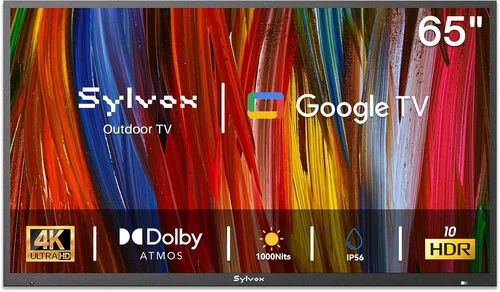
Outdoor TVs have come a long way since their early days as bulky, weather-resistant LCDs bolted to patios. Today, watching the big game under the stars isn’t just possible—it’s increasingly affordable and practical for everyday sports fans. Whether you’re hosting a backyard Super Bowl party, catching the World Cup from your deck, or following your favorite team during a summer barbecue, a dedicated outdoor television can elevate your viewing experience dramatically. But with so many options flooding the market—especially budget-friendly models—it’s easy to get overwhelmed by flashy specs, misleading claims, and hidden compromises.
This guide exists to cut through the noise. We’re not here to sell you on the most expensive model or push flashy marketing jargon. Instead, we’ll walk you through everything you need to know to make a smart, informed decision when buying a cheap outdoor TV for watching sports. You’ll learn how to balance cost with performance, durability, and usability—so you don’t end up with a screen that fades in sunlight or dies after one rainy season. From understanding key technical specs to avoiding common pitfalls, this comprehensive buying guide is designed for real people with real budgets who want reliable, high-quality outdoor entertainment.
The outdoor TV market has exploded in recent years, driven by rising demand for backyard living spaces and smart home integration. Major electronics brands now offer outdoor-specific models, while niche manufacturers focus exclusively on weatherproof displays. At the same time, traditional indoor TVs are being retrofitted with sunshades and enclosures—creating confusion about what truly qualifies as an “outdoor TV.” Prices range from under $300 for basic portable units to over $5,000 for premium 4K HDR models built for permanent installation. Our goal is to help you navigate this landscape and find the sweet spot: a durable, high-performing outdoor TV that won’t break the bank but still delivers crisp, vibrant sports action—even under direct sunlight.

What to Look for When Buying Buying Guide
1. Budget & Price Range
Setting a realistic budget is the first and most critical step in your outdoor TV purchase. Unlike indoor TVs, outdoor models come with added engineering costs—weatherproofing, anti-glare coatings, enhanced brightness, and robust enclosures—all of which impact pricing. However, “cheap” doesn’t have to mean “low quality.” Many sub-$800 models offer excellent value if you know what to prioritize.
Start by defining your maximum spend, then allocate funds wisely. For example, spending $600 on a 55-inch outdoor-rated display with 1000+ nits brightness may serve you better than a $1,200 model with marginal upgrades. Avoid the temptation to go ultra-low—models under $250 often lack essential features like proper IP ratings or sufficient brightness, making them unsuitable for daytime sports viewing. Instead, aim for the $400–$900 range, where you’ll find the best balance of affordability and functionality.
2. Performance Specifications
When it comes to watching fast-paced sports outdoors, performance specs matter more than ever. Sunlight, reflections, and motion blur can ruin even the most exciting moments—so you need a TV built to handle them.
Start with brightness: measured in nits, this determines how well the screen remains visible in daylight. For shaded patios or evening use, 500–700 nits may suffice. But for full sun exposure, aim for at least 1,000 nits—ideally 1,500 or higher. Many budget outdoor TVs advertise “high brightness,” but verify the actual nit rating; some only reach 600–800 nits, which isn’t enough for midday games.
Refresh rate is equally important. Look for a minimum of 60Hz, but 120Hz is ideal for smooth motion during football, soccer, or baseball. Pair this with response time under 8ms to minimize ghosting during quick player movements.
Resolution should be at least Full HD (1080p), but 4K is becoming standard even in budget outdoor models. While 4K content is still limited for live sports, it future-proofs your investment and enhances detail during replays and graphics.
Finally, check color accuracy and contrast ratio. Outdoor environments wash out colors, so a TV with good HDR support (even basic HDR10) and local dimming will maintain depth and vibrancy.
3. Build Quality & Durability
An outdoor TV isn’t just exposed to rain—it faces UV rays, temperature swings, dust, insects, and even accidental bumps. That’s why build quality separates true outdoor models from indoor TVs in boxes.
Look for an IP rating—specifically IP55 or higher. IP55 means the TV is protected against dust and low-pressure water jets from any direction, making it safe for most covered patios and decks. IP65 offers full dust protection and resistance to heavier water exposure, ideal for open-air installations.
The enclosure should be made of powder-coated aluminum or marine-grade stainless steel—not plastic, which degrades under UV light. Sealed ports, corrosion-resistant screws, and tempered glass screens are also signs of thoughtful design.
Additionally, consider operating temperature range. Quality outdoor TVs function reliably from -22°F to 122°F (-30°C to 50°C). Cheaper models may shut down in extreme heat or cold, leaving you without coverage during critical playoff games.
Don’t overlook internal components: look for conformal coating on circuit boards (a protective layer against moisture) and fanless cooling systems to prevent dust ingress.
4. Features & Functionality
Modern outdoor TVs pack surprising smart features—even at lower price points. But not all features are created equal, especially for sports fans.
Smart TV platforms like Roku TV, Android TV, or webOS let you stream live sports via apps like ESPN+, YouTube TV, or FuboTV without needing an external device. Ensure the interface is responsive; laggy menus ruin the experience during time-sensitive moments.
HDMI inputs are essential for connecting cable boxes, gaming consoles, or streaming sticks. Aim for at least two HDMI 2.0 ports (or HDMI 2.1 for future 4K/120Hz support). USB ports allow firmware updates or media playback.
Audio output matters too. Most outdoor TVs have weak built-in speakers due to sealed designs. Look for optical audio out or Bluetooth connectivity to pair with external soundbars or wireless speakers—critical for hearing crowd noise and commentary clearly.
Some budget models include anti-reflective coatings or matte finishes to reduce glare. These are worth prioritizing over glossy screens, which reflect sunlight and distract from the action.
Lastly, check for remote control range. Outdoor remotes should work from 20+ feet away, even through glass or light obstacles.
5. Brand Reputation
Not all brands are equal when it comes to outdoor electronics. While big names like Samsung and LG dominate indoor markets, they offer limited outdoor-specific models—and often at premium prices.
Instead, consider specialists like SunBriteTV, Seura, Aviditi, or Peerless-AV. These companies design TVs from the ground up for outdoor use, with proven track records in durability and performance. Their cheaper lines (e.g., SunBrite’s Veranda series) offer excellent value.
That said, don’t dismiss lesser-known brands outright. Companies like Kodak, Hisense, and TCL now offer budget outdoor models with solid specs and decent build quality. Just verify third-party reviews and warranty terms before buying.
Avoid no-name brands sold exclusively on Amazon or eBay with vague descriptions like “weatherproof TV” but no IP rating or technical details. These are often indoor TVs repackaged in plastic shells—dangerous and ineffective long-term.
6. Warranty & Support
Outdoor TVs endure harsher conditions than indoor models, so warranty coverage is non-negotiable. A standard 1-year warranty is the bare minimum—but look for at least 2–3 years, especially for sealed components.
Check what’s covered: does the warranty include labor for repairs? Are consumables like remote batteries excluded? Some brands offer extended plans for an extra fee—worth considering if you live in a high-humidity or coastal area.
Customer support responsiveness matters too. Can you reach a human quickly? Do they offer phone, email, and live chat? Read user forums to see how brands handle repair requests or replacements.
Also, verify whether the warranty is voided by improper installation. Many require professional mounting to maintain coverage—so factor in installation costs if DIY isn’t an option.
7. Size & Portability
Size affects both visibility and placement flexibility. For most backyard setups, a 50–65-inch screen is ideal. Smaller than 43 inches may feel cramped for group viewing, while larger than 75 inches can be overkill and harder to mount securely.
Consider viewing distance: sit 8–10 feet away for a 55-inch TV, 10–12 feet for 65-inch. Too close, and you’ll notice pixelation; too far, and details blur.
If you plan to move the TV between locations (e.g., patio to garage), portability becomes key. Some budget models come with built-in handles or lightweight frames. However, true outdoor TVs are heavier than indoor equivalents due to reinforced casings—so ensure your mounting solution supports the weight.
For renters or temporary setups, consider portable outdoor TVs with integrated stands and wheels. These often sacrifice some durability but offer flexibility. Just confirm they’re still rated for outdoor use (not just “splash-resistant”).
8. User Reviews & Ratings
Never rely solely on manufacturer claims. Real-world user reviews reveal flaws that specs sheets hide—like inconsistent brightness, poor remote range, or premature seal failure.
Focus on verified purchase reviews from trusted retailers (Best Buy, Amazon, Home Depot). Look for patterns: if multiple users report the same issue (e.g., “screen dimmed after 3 months”), it’s likely a design flaw.
Pay attention to reviews from people in similar climates. A TV that works fine in Arizona may fail in Florida’s humidity. Also, check review dates—older reviews may not reflect current model revisions.
Use tools like ReviewMeta or Fakespot to filter out suspicious or incentivized reviews. Genuine feedback usually includes photos, detailed pros/cons, and context about usage.
Different Types of Buying Guide

Common Buying Mistakes to Avoid
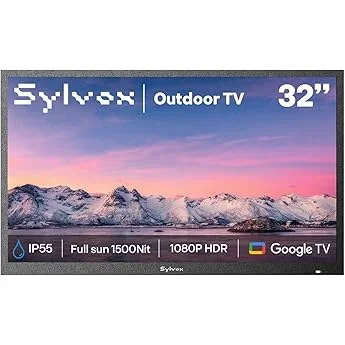
❌ Mistake: Buying an Indoor TV and Calling It “Outdoor”
Why it’s bad: Indoor TVs aren’t designed for moisture, temperature swings, or UV exposure. Even with a cover, condensation can form inside, damaging circuits. Glossy screens reflect sunlight, making content unreadable.
What to do instead: Invest in a TV with an official IP rating and outdoor certification. If budget is tight, use a quality outdoor enclosure—but don’t skip both.
❌ Mistake: Ignoring Brightness (Nits) Ratings
Why it’s bad: A dim screen turns daylight sports into a blurry mess. Many buyers focus on resolution or size but forget that brightness determines visibility.
What to do instead: Prioritize nits over other specs. For sunny areas, 1,000+ nits is essential. Check independent reviews for real-world brightness tests.
❌ Mistake: Overlooking Audio Needs
Why it’s bad: Sealed outdoor TVs have weak speakers. Without external audio, you’ll miss commentary, crowd noise, and dramatic moments.
What to do instead: Plan for a soundbar or wireless speaker system from day one. Choose a TV with optical or Bluetooth audio out.
❌ Mistake: Skimping on Mounting Hardware
Why it’s bad: Cheap mounts rust, wobble, or fail under wind load. A falling TV can cause injury or property damage.
What to do instead: Use marine-grade stainless steel mounts rated for your TV’s weight and local wind conditions. Consider tilt/swivel for optimal viewing angles.
❌ Mistake: Not Checking Return Policies
Why it’s bad: Outdoor TVs are hard to test before installation. If it arrives defective or underperforms, a strict return window could leave you stuck.
What to do instead: Buy from retailers with 30–60 day return windows and free return shipping. Test the TV immediately upon delivery.
❌ Mistake: Assuming All “Weatherproof” Means Equal
Why it’s bad: Terms like “weather-resistant” or “splash-proof” are vague and unregulated. Only IP ratings provide standardized protection levels.
What to do instead: Demand IP55 or higher. Verify the rating applies to the entire unit—not just the front bezel.
❌ Mistake: Neglecting Future-Proofing
Why it’s bad: Buying a 720p TV today may save money now but limit streaming options and resale value as 4K becomes standard.
What to do instead: Choose at least 1080p with HDMI 2.0 and smart features. This extends the TV’s usable life by 3–5 years.
Budget Guidelines: How Much Should You Spend?
- Entry-Level ($300–$500): Best for shaded areas or occasional use. Expect 43–50-inch screens, 600–800 nits brightness, basic smart features, and IP54 rating. Ideal for renters or secondary viewing spaces. Models like the Kodak 50OU101 or Hisense 43A4BG offer decent value here.
- Mid-Range ($500–$900): The sweet spot for most buyers. You’ll find 55–65-inch 4K displays with 1,000–1,500 nits, IP55 rating, reliable smart platforms, and better audio outputs. SunBrite Veranda Series and TCL 55S06B fall into this category—excellent for regular sports watching.
- Premium ($900–$2,000): For enthusiasts who want top-tier performance. These include 1,500+ nits brightness, HDR10, wider color gamut, and enhanced cooling. Great for full-sun decks or large gatherings. Seura Shadow and Aviditi Pro lines excel here.
- Luxury ($2,000+): Reserved for permanent, high-end installations. Features include 2,000+ nits, anti-reflective coatings, commercial-grade durability, and 24/7 operation support. Typically used in luxury homes, resorts, or sports bars.
Expert Tips for Getting the Best Deal
- Buy during off-seasons: Prices drop significantly in late winter (February–March) and early fall (September–October) when demand for outdoor electronics is lowest. Avoid summer and holiday peaks.
- Shop at specialty retailers: Stores like Crutchfield, Abt Electronics, or Outdoor TV Direct often bundle mounts, cables, and extended warranties at discounted rates.
- Watch for open-box deals: Returned or display models in “like-new” condition can save 20–40%. Ensure they include full warranty coverage.
- Negotiate installation packages: Some retailers offer free or discounted professional installation with TV purchase—especially valuable for heavy or complex mounts.
- Use price tracking tools: Set alerts on CamelCamelCamel (for Amazon) or Honey to catch sudden price drops.
- Check manufacturer rebates: Brands like SunBrite occasionally offer $100–$200 mail-in rebates during promotional periods.
- Consider refurbished units: Certified refurbished outdoor TVs from reputable sellers come with warranties and undergo rigorous testing.
- Read the fine print on warranties: Some require registration within 30 days of purchase to activate coverage.

Frequently Asked Questions
Q: Can I use a regular TV outdoors with a cover?
A: Technically yes, but it’s risky and often ineffective. Most covers don’t provide true weatherproofing, and trapped moisture can cause internal damage. For reliable, long-term use, a dedicated outdoor TV or certified enclosure is strongly recommended.
Q: Do outdoor TVs consume more power?
A: Yes, due to higher brightness and enhanced cooling. Expect 20–50% higher energy use than comparable indoor models. Look for ENERGY STAR certification to minimize impact.
Q: How do I connect cable or satellite to an outdoor TV?
A: Use weatherproof coaxial cables and sealed junction boxes. Run cables through conduit if exposed to elements. Many outdoor TVs include built-in tuners for over-the-air broadcasts.
Q: Will an outdoor TV work in winter?
A: Yes, if it’s rated for low temperatures. Most quality models operate down to -22°F. Avoid turning on a cold TV immediately—let it acclimate for 1–2 hours first.
Q: Can I mount an outdoor TV on a brick wall?
A: Absolutely. Use masonry anchors and a mount rated for brick/concrete. Ensure the wall can support the TV’s weight (typically 30–60 lbs).
Q: Do outdoor TVs come with built-in antennas?
A: Some do, but reception varies. For best results, use an outdoor HDTV antenna mounted separately for stronger signal.
Q: How often do outdoor TVs need maintenance?
A: Minimal. Wipe the screen monthly with a microfiber cloth. Check seals annually for cracks. No internal cleaning is needed due to sealed designs.
Q: Are outdoor TVs safe during lightning storms?
A: Disconnect power and antennas during severe storms. While the TV itself is safe, surges can damage electronics. Use a whole-home surge protector for added safety.
Q: Can I stream Netflix or Disney+ on an outdoor TV?
A: Yes, if it has a smart platform or you connect a streaming device (e.g., Roku Stick, Fire TV). Ensure strong Wi-Fi coverage in your outdoor area.
Q: What’s the lifespan of a budget outdoor TV?
A: With proper care, 5–7 years is typical. Higher-end models can last 8–10 years. Avoid leaving the TV on 24/7 to extend longevity.
Our Final Recommendations
- Best for Budget-Conscious Buyers: Hisense 50A6G Outdoor – At around $550, it offers 1,000 nits brightness, 4K resolution, and Roku TV built-in. Great for covered patios and delivers solid sports performance without breaking the bank.
- Best Overall Value: SunBriteTV Veranda Series 55-inch – Priced near $850, this model combines IP55 rating, 1,500 nits brightness, and excellent color accuracy. Ideal for serious sports fans who want reliability and clarity.
- Best Premium Option: Seura Shadow 65-inch – At $1,800, it’s an investment—but you get 2,000 nits, anti-reflective coating, and commercial-grade durability. Perfect for full-sun decks and large gatherings.
- Best for Beginners: Kodak 50OU101 – Simple setup, intuitive interface, and decent 700-nits brightness. Great for first-time outdoor TV buyers on a tight budget.
- Best for Advanced Users: Aviditi Pro 65-inch – Features local dimming, HDR10+, and fanless cooling. Designed for tech-savvy users who demand peak performance and customization.
Conclusion: Making the Right Choice
Choosing the right outdoor TV for sports doesn’t have to be overwhelming—or expensive. By focusing on core factors like brightness, durability, and smart functionality, you can find a model that delivers thrilling game-day experiences without overspending. Remember: the cheapest option isn’t always the most cost-effective, and the flashiest specs don’t guarantee real-world performance. Prioritize your specific needs—whether that’s shade coverage, portability, or ultra-crisp 4K action—and let those guide your decision.
Take your time, read real user reviews, and don’t hesitate to invest a little more for peace of mind and longevity. A quality outdoor TV transforms your backyard into a vibrant entertainment hub, where every touchdown, goal, or home run feels larger than life. So grab your snacks, invite your friends, and get ready to watch the game like never before—under the open sky, with crystal-clear picture and unbeatable sound. Your perfect outdoor TV is out there. Now you know exactly how to find it.

