
If you’re thinking about setting up a TV on your patio—especially in a windy area—you’re not alone. Outdoor entertainment has exploded in popularity over the past few years, with more homeowners investing in outdoor living spaces that rival indoor comfort. Whether you’re hosting summer barbecues, watching the big game under the stars, or simply unwinding after a long day, a patio TV can transform your backyard into a true extension of your home. But here’s the catch: not all TVs are built to handle the elements, and wind adds an entirely new layer of complexity.
That’s exactly why this guide exists. We’ve spent months researching, testing, and consulting with outdoor tech experts to bring you the most comprehensive, up-to-date advice on choosing the perfect patio TV for windy environments. You’ll learn what features truly matter, how to avoid costly mistakes, and how to get the best value for your investment. From weather resistance and mounting solutions to screen brightness and smart functionality, we’ll walk you through every critical decision point.
The market for outdoor TVs has evolved dramatically. Gone are the days when your only option was a bulky, expensive outdoor enclosure. Today, you can choose from fully weatherproof outdoor TVs, high-brightness indoor models in protective housings, or even portable options designed for temporary setups. However, with so many choices—and so many claims about “weatherproof” or “wind-resistant” performance—it’s easy to get overwhelmed. This guide cuts through the noise, giving you expert-backed insights tailored specifically to windy patios, coastal homes, mountain decks, and other exposed outdoor spaces.
What to Look for When Buying a Patio TV
1. Weather Resistance & IP Rating
When it comes to outdoor TVs, weather resistance isn’t just a nice-to-have—it’s essential. Wind often brings rain, dust, salt spray (if you’re near the coast), and temperature swings, all of which can damage standard indoor TVs. That’s why you need to pay close attention to the TV’s Ingress Protection (IP) rating. This two-digit code tells you how well the device resists solid particles (like dust) and liquids (like rain).
Look for a minimum IP55 rating, but ideally aim for IP65 or higher. An IP65-rated TV is dust-tight and protected against water jets from any direction—perfect for most patios. If you live in a particularly harsh environment (think heavy rain, snow, or coastal salt air), consider models with IP66 or IP67 ratings. These offer even greater protection against powerful water jets or temporary immersion.
But don’t stop at the TV itself. Also check the IP rating of any external components, such as power supplies, remote controls, and mounting hardware. Many manufacturers sell “outdoor-ready” TVs but skimp on accessory protection, which can lead to premature failure. For example, a TV might be IP65, but if the power adapter is only IP44, moisture could still seep in through the connection point.
Another often-overlooked detail: ventilation. Some outdoor TVs use passive cooling, while others have sealed designs with internal heat dissipation. In windy areas, passive systems may suck in dust or debris, so sealed units are generally safer. However, ensure the TV has adequate thermal management—overheating can shorten lifespan, especially in direct sunlight.
2. Screen Brightness & Anti-Glare Technology
Indoor TVs typically peak around 300–500 nits of brightness—fine for a dim living room, but utterly inadequate for a sun-drenched patio. In bright daylight, reflections and ambient light can wash out the image, making it impossible to see what’s on screen. Windy areas often come with open skies and minimal shade, so brightness becomes a top priority.
For outdoor use, you’ll want a TV with at least 700 nits, but 1000+ nits is ideal. Many dedicated outdoor TVs now feature high-brightness panels specifically engineered for daylight visibility. Look for terms like “sunlight-readable,” “high-luminance,” or “outdoor-optimized display.”
Equally important is anti-glare or anti-reflective coating. Even with high brightness, glare from windows, water features, or nearby surfaces can ruin the viewing experience. Premium outdoor TVs use advanced optical films that diffuse reflections without sacrificing color accuracy or contrast. Some models even include built-in sunshades or adjustable tilt mounts to minimize direct light hitting the screen.
Don’t confuse brightness with HDR performance. While HDR enhances dynamic range, it doesn’t necessarily improve visibility in bright conditions. Focus first on peak brightness and glare reduction, then consider HDR10 or Dolby Vision as secondary benefits.
3. Mounting System & Wind Resistance
This is where many buyers go wrong. A TV can be perfectly weatherproof, but if it’s not securely mounted, strong winds can turn it into a dangerous projectile. In windy areas—coastal regions, hilltops, or open plains—wind loads can exceed 50 mph, putting immense stress on mounting hardware.
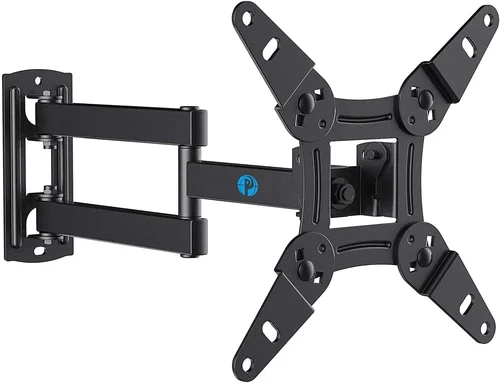
Start by choosing a mounting solution rated for outdoor use. Standard indoor wall mounts are not designed to handle constant wind vibration or lateral forces. Look for heavy-duty, corrosion-resistant mounts made from powder-coated steel or aluminum. The mount should be compatible with your TV’s VESA pattern and include features like tilt, swivel, and extension for optimal viewing angles.
More critically, ensure the mount is anchored properly. Use lag bolts into solid wood studs, concrete anchors for masonry, or specialized brackets for railings. Never rely on drywall anchors or flimsy brackets—even a moderate gust can rip them out. For extra security, consider a locking mechanism or anti-theft cable, especially if your patio is accessible to others.
If you’re mounting on a pergola, awning, or freestanding pole, consult a structural engineer or contractor. These structures may not be designed to support the weight and wind load of a large TV. Some homeowners opt for retractable or motorized mounts that lower the TV during storms—a smart investment in high-wind zones.
4. Build Quality & Durability
Outdoor TVs face harsher conditions than their indoor counterparts. Beyond weather and wind, they’re exposed to UV radiation, temperature extremes, and physical impacts (like flying debris during storms). That’s why build quality matters more than ever.
Start with the chassis. Look for TVs with metal frames or reinforced polymer casings. Plastic housings may crack or degrade under UV exposure, while metal offers better structural integrity. Pay attention to seam sealing—gaps around buttons, ports, or vents can allow moisture ingress, even in IP-rated models.
Internal components should also be ruggedized. High-quality capacitors, soldering, and circuit boards resist thermal cycling (repeated heating and cooling), which can cause failures in cheaper units. Some premium outdoor TVs use conformal coating on internal electronics—a thin protective layer that shields against moisture, dust, and corrosion.
Don’t forget about the remote control. Standard IR remotes struggle in bright sunlight and may not work reliably through glass or plastic enclosures. Look for RF (radio frequency) remotes or Bluetooth-enabled models that don’t require line-of-sight. Better yet, choose a TV with robust smartphone app control, so you can adjust settings from your phone without needing a physical remote.
Finally, consider the warranty. A longer warranty often reflects confidence in durability. Most reputable outdoor TV brands offer 2–3 years of coverage, with some extending to 5 years for commercial-grade models.
5. Connectivity & Smart Features
Even outdoors, you’ll want seamless access to streaming, gaming, and live TV. Modern patio TVs come packed with smart features, but not all are created equal—especially when it comes to outdoor usability.
Wi-Fi performance is crucial. Thick walls, metal structures, or distance from your router can weaken signals. Look for TVs with dual-band Wi-Fi (2.4 GHz and 5 GHz) and external antenna ports for booster compatibility. Some models even include built-in cellular modems for areas with poor broadband.
HDMI and USB ports should be accessible and protected. If your TV is in an enclosure, ensure ports are easily reachable and sealed when not in use. Waterproof port covers are a must. Also, check for HDMI-CEC and ARC support if you plan to connect a soundbar or AV receiver.
Smart platforms vary widely. Roku TV, Android TV, and webOS are popular choices, each with pros and cons. Roku is user-friendly and widely supported; Android TV offers deep customization and Google Assistant integration; webOS (LG) is sleek but less flexible. Consider which ecosystem you already use indoors—consistency makes switching between spaces easier.
Voice control is another handy feature. Models with built-in microphones let you change channels or search content hands-free, which is great when you’re grilling or lounging. Just remember to disable the mic when privacy is a concern.
6. Audio Performance & External Sound Options
Most outdoor TVs have underwhelming built-in speakers. Why? Space constraints, weather sealing, and the fact that sound dissipates quickly in open air. Relying solely on the TV’s audio will leave you straining to hear dialogue over wind, traffic, or music from your outdoor speakers.
That’s why audio planning is essential. Even if your TV has decent speakers, consider pairing it with external outdoor audio. Weather-resistant soundbars, wireless speakers, or in-ground subwoofers can dramatically improve the experience. Look for TVs with optical audio out, HDMI ARC, or Bluetooth 5.0+ for easy connectivity.
If you’re mounting the TV near a seating area, directional speakers or soundbars with wide dispersion patterns work best. Avoid omnidirectional speakers that blast sound everywhere—they’ll annoy neighbors and waste power.
For windy areas, noise-canceling microphones (on voice-enabled TVs) can help, but don’t expect miracles. Strong gusts will still interfere with voice commands. In such cases, physical buttons or app control are more reliable.
7. Brand Reputation & Real-World Reliability
Not all “outdoor TV” brands are equal. Some are reputable manufacturers with proven track records; others are resellers using generic components with flashy marketing. Do your homework.
Stick with brands known for outdoor electronics: Samsung (with its Terrace series), LG (OLED Flex for semi-outdoor use), SunBriteTV (a pioneer in outdoor displays), and Seura (luxury outdoor TVs with integrated sound). These companies invest in R&D, rigorous testing, and customer support.
Read real user reviews—not just the glowing ones on the product page. Sites like Amazon, Best Buy, and specialized forums (like AVS Forum) often reveal long-term issues: premature backlight failure, Wi-Fi dropout in rain, or mount corrosion after one season.
Also, check if the brand offers local service or repair options. If your TV fails in a remote area, shipping it back for warranty service could take weeks. Brands with regional service centers or partnerships with local installers provide peace of mind.
8. Warranty & Support
A good warranty isn’t just about repairs—it’s a reflection of product confidence. Most outdoor TVs come with 1–3 years of coverage, but terms vary widely. Some exclude “acts of nature” or “improper installation,” which could void your claim after a windstorm.
Read the fine print. Does the warranty cover labor? Parts? On-site service? Is accidental damage included? Premium brands often offer extended plans or concierge support, which can be worth the extra cost.
Customer service responsiveness matters too. Can you reach a human quickly? Do they have technical expertise? Test this before buying—call their support line with a simple question and see how they respond.
Different Types of Patio TVs

Common Buying Mistakes to Avoid

❌ Mistake: Assuming All “Outdoor” TVs Are Equal
Why it’s bad: Many retailers slap “outdoor” labels on regular TVs with minor modifications. These often lack proper sealing, thermal management, or wind-resistant mounts, leading to early failure.
What to do instead: Verify IP ratings, check for dedicated outdoor certifications, and read third-party reviews. Only buy from brands with a proven outdoor TV lineup.
❌ Mistake: Skimping on the Mount
Why it’s bad: A $20 mount might save money upfront, but it could fail in strong winds, damaging your TV or causing injury.
What to do instead: Invest in a heavy-duty, corrosion-resistant outdoor mount rated for your TV’s weight and local wind speeds. When in doubt, consult a professional installer.
❌ Mistake: Ignoring Sunlight and Glare
Why it’s bad: Even a bright TV will look washed out if mounted facing a reflective surface or in direct sun without shade.
What to do instead: Choose a location with partial shade or install an awning. Use anti-glare screens or TVs with optical bonding to reduce reflections.
❌ Mistake: Overlooking Audio Needs
Why it’s bad: Wind and open spaces drown out built-in speakers, making dialogue inaudible.
What to do instead: Plan for external weatherproof speakers or a soundbar from day one. Test audio setup during daytime hours.
❌ Mistake: Buying Based Solely on Price
Why it’s bad: The cheapest option often lacks durability, brightness, or support, costing more in replacements over time.
What to do instead: Focus on total cost of ownership—including installation, accessories, and expected lifespan—not just the sticker price.
❌ Mistake: Neglecting Power and Cable Management
Why it’s bad: Exposed cables can corrode, trip people, or get chewed by pests. Improper grounding risks electrical hazards.
What to do instead: Use outdoor-rated conduit, waterproof junction boxes, and GFCI outlets. Route cables through walls or under decking when possible.
❌ Mistake: Forgetting About Seasonal Storage
Why it’s bad: In regions with harsh winters or hurricane seasons, leaving a TV exposed year-round shortens its life.
What to do instead: Choose a portable model or install a retractable mount. Store the TV indoors during off-seasons if feasible.
Budget Guidelines: How Much Should You Spend?
Why it’s bad: Even a bright TV will look washed out if mounted facing a reflective surface or in direct sun without shade.
What to do instead: Choose a location with partial shade or install an awning. Use anti-glare screens or TVs with optical bonding to reduce reflections.
❌ Mistake: Overlooking Audio Needs
Why it’s bad: Wind and open spaces drown out built-in speakers, making dialogue inaudible.
What to do instead: Plan for external weatherproof speakers or a soundbar from day one. Test audio setup during daytime hours.
❌ Mistake: Buying Based Solely on Price
Why it’s bad: The cheapest option often lacks durability, brightness, or support, costing more in replacements over time.
What to do instead: Focus on total cost of ownership—including installation, accessories, and expected lifespan—not just the sticker price.
❌ Mistake: Neglecting Power and Cable Management
Why it’s bad: Exposed cables can corrode, trip people, or get chewed by pests. Improper grounding risks electrical hazards.
What to do instead: Use outdoor-rated conduit, waterproof junction boxes, and GFCI outlets. Route cables through walls or under decking when possible.
❌ Mistake: Forgetting About Seasonal Storage
Why it’s bad: In regions with harsh winters or hurricane seasons, leaving a TV exposed year-round shortens its life.
What to do instead: Choose a portable model or install a retractable mount. Store the TV indoors during off-seasons if feasible.
Budget Guidelines: How Much Should You Spend?
Why it’s bad: The cheapest option often lacks durability, brightness, or support, costing more in replacements over time.
What to do instead: Focus on total cost of ownership—including installation, accessories, and expected lifespan—not just the sticker price.
❌ Mistake: Neglecting Power and Cable Management
Why it’s bad: Exposed cables can corrode, trip people, or get chewed by pests. Improper grounding risks electrical hazards.
What to do instead: Use outdoor-rated conduit, waterproof junction boxes, and GFCI outlets. Route cables through walls or under decking when possible.
❌ Mistake: Forgetting About Seasonal Storage
Why it’s bad: In regions with harsh winters or hurricane seasons, leaving a TV exposed year-round shortens its life.
What to do instead: Choose a portable model or install a retractable mount. Store the TV indoors during off-seasons if feasible.
Budget Guidelines: How Much Should You Spend?
Why it’s bad: In regions with harsh winters or hurricane seasons, leaving a TV exposed year-round shortens its life.
What to do instead: Choose a portable model or install a retractable mount. Store the TV indoors during off-seasons if feasible.
Budget Guidelines: How Much Should You Spend?
Entry-Level ($500–$1,200): At this price, you’re typically looking at indoor TVs in basic enclosures or older outdoor models. Picture quality may be decent, but brightness is often limited (under 700 nits), and build quality varies. Best for covered patios with minimal wind exposure. Expect 1–2 year lifespan in harsh conditions.
Mid-Range ($1,200–$2,500): This is the sweet spot for most homeowners. You’ll find purpose-built outdoor TVs with IP65 ratings, 1000+ nits brightness, and reliable smart platforms. Brands like SunBriteTV Veranda or Samsung The Terrace (smaller sizes) fit here. These offer excellent durability and performance for moderate wind zones.
Premium ($2,500–$4,000): For enthusiasts and those in extreme climates, premium models deliver top-tier brightness (1500+ nits), OLED or QLED panels, advanced cooling, and commercial-grade components. Think LG’s outdoor OLEDs or Seura’s luxury line. These are built to last 5+ years with minimal maintenance.
Luxury ($4,000+): Reserved for high-end homes, hotels, or commercial venues. These include ultra-bright 4K/8K displays, integrated sound systems, motorized mounts, and concierge support. Ideal for open decks, beachfront properties, or areas with constant high winds.
Expert Tips for Getting the Best Deal
1. Buy During Off-Season: Outdoor TVs see peak demand in spring and summer. Shop in late fall or winter for discounts of 10–20%. Retailers often clear inventory before new models arrive.
2. Bundle with Accessories: Many brands offer package deals—TV + mount + soundbar—at a reduced rate. Compare bundled pricing vs. buying separately.
3. Check Manufacturer Refurbished Programs: Certified refurbished outdoor TVs from SunBrite or Samsung often come with full warranties and save you 20–30%.
4. Use Price Tracking Tools: Set alerts on CamelCamelCamel (for Amazon) or Honey to monitor price drops. Outdoor TVs rarely go on sale, so timing matters.
5. Negotiate Installation: If hiring a pro, ask if they offer discounts for bundling TV purchase with installation. Some retailers partner with local techs for package deals.
6. Read Return Policies Carefully: Outdoor TVs are often final sale due to hygiene and installation concerns. Ensure you can return within 30 days if the TV doesn’t perform as expected.
7. Test Before Finalizing Mount: Once mounted, it’s hard to return. Ask the installer to power on the TV and test all functions before securing everything permanently.
8. Consider Energy Efficiency: High-brightness TVs consume more power. Look for ENERGY STAR ratings or models with auto-dimming sensors to reduce electricity costs.

Frequently Asked Questions
Q: Can I use a regular indoor TV outside if I cover it?
A: Technically yes, but it’s risky. Without proper ventilation, the TV can overheat. Moisture can still seep in through seams, and wind can damage internal components. For anything beyond a fully covered, wind-protected area, invest in a proper outdoor solution.
Q: How do I protect my patio TV from strong winds?
A: Use a heavy-duty mount anchored to a solid structure, choose a low-profile design to reduce wind catch, and consider a retractable or removable setup for storm seasons. Always follow the manufacturer’s wind load specifications.
Q: Do outdoor TVs work in winter or snow?
A: Yes, most outdoor TVs are rated for temperatures from -22°F to 122°F (-30°C to 50°C). However, snow accumulation on the screen can block the image. Use a soft brush to clear it gently—never scrape with metal tools.
Q: Will my Wi-Fi reach the patio?
A: It depends on distance and obstacles. Metal roofs, concrete walls, and large trees can block signals. Use a Wi-Fi extender, mesh network, or outdoor-rated access point to boost coverage.
Q: Can I leave my outdoor TV on all day?
A: Commercial-grade models are designed for 24/7 operation. Consumer outdoor TVs can handle extended use but may benefit from occasional rest periods to prevent overheating.
Q: Are outdoor TVs worth the extra cost?
A: If you use your patio frequently and live in a windy or variable climate, absolutely. The durability, brightness, and peace of mind justify the investment compared to replacing damaged indoor TVs.
Q: What’s the difference between IP65 and IP66?
A: IP65 protects against low-pressure water jets from any direction. IP66 adds protection against powerful water jets (like from a hose). For most patios, IP65 is sufficient unless you expect heavy storm exposure.
Q: Can I mount an outdoor TV on a pergola?
A: Only if the pergola is structurally reinforced to handle the weight and wind load. Consult a contractor—many pergolas aren’t designed for this purpose.
Q: Do outdoor TVs have better picture quality than indoor ones?
A: Not inherently. Some outdoor TVs use older panel technology to prioritize brightness and durability. However, premium models now feature OLED and QLED for stunning outdoor visuals.
Q: How long do outdoor TVs last?
A: With proper care, 5–7 years is typical. Harsh environments may shorten this, but quality models are built to outlast standard indoor TVs in outdoor conditions.
Our Final Recommendations
Best for Budget-Conscious Buyers: SunBriteTV Veranda Series (55″) – At around $1,500, it offers IP65 rating, 1000-nit brightness, and reliable performance without breaking the bank. Perfect for covered patios with occasional wind.
Best Overall Value: Samsung The Terrace (65″) – Combines QLED color, 2,000-nit brightness, and sleek design. Its anti-reflective coating and robust build make it ideal for sunny, windy decks.
Best Premium Option: LG 65″ Outdoor OLED – For those who refuse to compromise on picture quality. Deep blacks, infinite contrast, and 1500-nit brightness deliver a cinematic experience—even at noon.
Best for Beginners: Seura Portable Outdoor TV (55″) – Easy to set up, move, and store. Great for renters or those testing outdoor viewing before committing to a permanent install.
Best for Advanced Users: Custom Indoor TV + Peerless Enclosure – Build your own system with the latest LG C3 OLED in a professional-grade outdoor case. Maximum flexibility and future-proofing.
Conclusion: Making the Right Choice
Choosing a patio TV for a windy area isn’t just about picking the shiniest screen—it’s about balancing durability, visibility, safety, and smart functionality. From IP ratings and mounting strength to brightness and audio, every detail matters when the elements are working against you. By focusing on weather resistance, secure installation, and real-world performance, you’ll create an outdoor entertainment space that lasts for years, not seasons.
Remember: the cheapest option today could be the most expensive tomorrow if it fails in a storm. Prioritize quality, do your research, and don’t hesitate to invest in professional installation. Your patio deserves a TV that stands up to the wind—and delivers unforgettable moments under the open sky.
Ready to upgrade your outdoor living? Start by assessing your space, wind exposure, and viewing habits. Then use this guide to narrow down your options and make a confident, informed decision. Your perfect patio TV is out there—now you know exactly how to find it.

