
Outdoor living spaces have evolved far beyond simple patios and decks. Today’s homeowners are transforming their gazebos, pergolas, and covered porches into fully functional entertainment zones—complete with outdoor kitchens, fire pits, sound systems, and yes, even televisions. But not just any TV will do. Standard indoor models aren’t built to withstand the elements, and installing one outdoors without proper protection can lead to costly damage or even safety hazards. That’s where outdoor TVs come in—specially engineered for year-round performance under sun, rain, snow, and temperature extremes.
This comprehensive buying guide is designed to help you navigate the growing market of outdoor TVs with confidence. Whether you’re upgrading your backyard oasis or building a new gazebo setup from scratch, we’ll walk you through every critical decision point: from understanding key performance specs and durability ratings to comparing price tiers and avoiding common pitfalls. By the end, you’ll know exactly what to look for, how much to budget, and which models deliver the best value for your specific needs.
The outdoor TV market has matured significantly over the past decade. Once dominated by a handful of niche manufacturers, it now includes offerings from major consumer electronics brands as well as specialized outdoor tech companies. Options range from weatherproof enclosures that house standard TVs to fully integrated all-weather displays with anti-glare screens, enhanced brightness, and ruggedized components. With so many choices—and so many claims about “weather resistance” and “all-season use”—it’s easy to get overwhelmed. Our goal is to cut through the marketing noise and give you actionable, expert-backed advice so you can make a smart, long-lasting investment in your outdoor lifestyle.

What to Look for When Buying an Outdoor TV for Your Gazebo
1. Weather Resistance & IP Rating
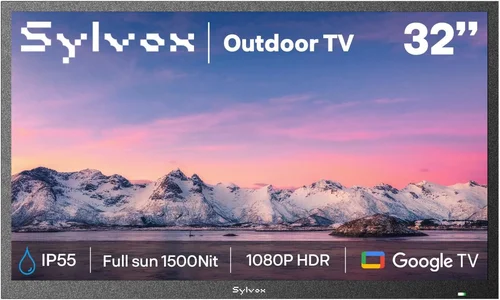
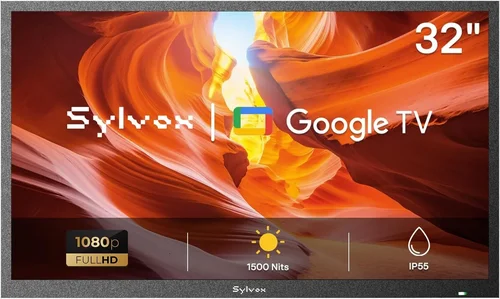
The single most important factor when choosing an outdoor TV is its ability to resist environmental damage. Unlike indoor TVs, outdoor models must endure rain, humidity, dust, pollen, and extreme temperatures—sometimes all in the same day. Look for an official Ingress Protection (IP) rating, which indicates how well the TV resists solids (like dust) and liquids (like rain). For gazebo installations, an IP55 or higher rating is ideal. IP55 means the TV is protected against low-pressure water jets from any direction and limited dust ingress. Some premium models boast IP65 or IP66 ratings, offering near-total protection against dust and powerful water jets—perfect if your gazebo is partially exposed or located in a rainy climate.
Don’t confuse “weather-resistant” with “weatherproof.” Many retailers use these terms interchangeably, but only certified IP-rated units meet standardized testing protocols. Also, check whether the rating applies to the entire unit or just certain components. A TV with an IP55 screen but unsealed ports or speakers won’t survive a downpour. Always verify that the manufacturer specifies the full unit’s rating, not just partial coverage.
2. Screen Brightness & Anti-Glare Technology
Indoor TVs typically operate at 300–500 nits of brightness—fine for dim living rooms but hopelessly washed out under direct sunlight. Outdoor TVs need significantly higher luminance to remain visible during daytime viewing. Aim for a minimum of 700 nits, though 1,000+ nits is preferable for south-facing gazebos or areas with minimal shade. High brightness alone isn’t enough; glare from the sun can still ruin the experience. That’s why top outdoor TVs feature anti-reflective coatings, optically bonded glass, and matte finishes that diffuse ambient light rather than reflecting it.
Some manufacturers go further by incorporating adaptive brightness sensors that automatically adjust screen output based on ambient light conditions. This not only improves visibility but also extends panel life by reducing unnecessary power consumption on cloudy days. If your gazebo has large windows or is surrounded by light-colored surfaces (like white pavers or limestone), prioritize models with advanced anti-glare tech—even if it means paying a premium.
3. Temperature Tolerance & Thermal Management
Outdoor TVs must function reliably across a wide thermal range—from sub-freezing winters to scorching summer afternoons. Most quality outdoor models are rated for operation between -22°F and 122°F (-30°C to 50°C), though storage limits may be broader. Internal components like LCD panels, LEDs, and circuit boards degrade faster when exposed to extreme heat or cold, so robust thermal management is essential. Look for units with passive cooling systems (no fans, which can suck in moisture) and heat-dissipating chassis designs.
Pay special attention to the display technology. While most outdoor TVs use LCD/LED panels, some high-end models employ OLED. However, OLED screens are more susceptible to image retention and burn-in under constant bright conditions and are generally not recommended for permanent outdoor installation unless specifically engineered for it (which is rare). Stick with LED-backlit LCDs with local dimming for the best balance of brightness, longevity, and reliability.
4. Build Quality & Materials
A gazebo TV isn’t just exposed to weather—it’s also vulnerable to physical wear from wind-blown debris, accidental bumps, or curious pets. The housing should be constructed from corrosion-resistant materials like powder-coated aluminum or marine-grade stainless steel. Avoid plastic casings, which can become brittle over time and crack under UV exposure. Sealed cable glands, rubberized gaskets, and fully enclosed ventilation ports are signs of thoughtful engineering.
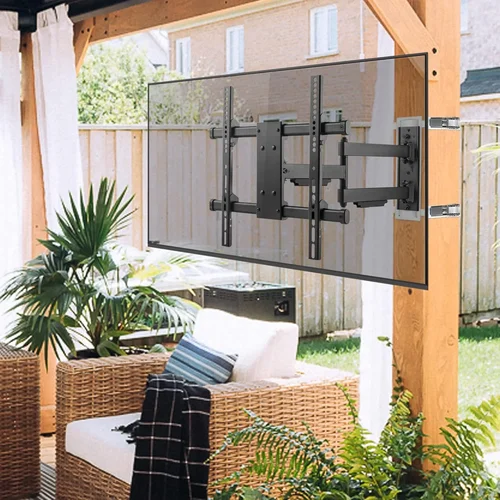
Mounting hardware matters too. Ensure the TV includes or is compatible with VESA-standard outdoor mounts rated for your TV’s weight and size. Many manufacturers offer proprietary mounting kits designed to integrate seamlessly with their weatherproofing systems. If you’re retrofitting an existing gazebo, measure clearance carefully—some outdoor TVs are thicker than indoor equivalents due to added insulation and shielding.
5. Audio Performance & Speaker Design
Outdoor acoustics are tricky. Sound dissipates quickly in open air, and background noise from traffic, birds, or wind can drown out dialogue. While many users pair their TV with external speakers or soundbars, built-in audio shouldn’t be an afterthought. Look for TVs with front-firing or upward-firing speakers (not rear-firing, which can be muffled against a wall) and a minimum output of 20W. Some models include weatherproof tweeters and bass radiators tuned for open-air environments.
If you plan to use wireless audio (e.g., Bluetooth headphones or outdoor speaker systems), confirm the TV supports modern codecs like aptX or AAC for low-latency streaming. HDMI ARC or eARC ports are also valuable for connecting to external amplifiers or sound systems without signal degradation.
6. Smart Features & Connectivity
Modern outdoor TVs aren’t just dumb displays—they’re full-fledged smart platforms. Most run on Android TV, webOS, or Roku OS, giving you access to streaming apps like Netflix, YouTube, and Disney+. This eliminates the need for external streaming devices, reducing cable clutter and potential failure points. However, ensure the OS receives regular security updates and app support, as outdated software can become a vulnerability.
Connectivity options should include multiple HDMI 2.1 ports (for 4K/120Hz gaming or future-proofing), USB inputs, Ethernet (for stable Wi-Fi alternatives), and optical audio out. Wi-Fi 6 support is a nice-to-have for faster, more reliable streaming in areas with congested networks. If your gazebo lacks power outlets near the TV, consider models with low standby power consumption or optional solar-compatible power inputs (though these are still niche).
7. Warranty & Manufacturer Support
Outdoor electronics are inherently higher-risk investments. A strong warranty isn’t just a perk—it’s a necessity. Reputable brands typically offer 2–3 years of coverage, sometimes extendable to 5 years with registration. Read the fine print: some warranties exclude “acts of nature” or require professional installation to remain valid. Check if the manufacturer provides on-site service or requires you to ship the unit back (which can be costly for large screens).
Customer support responsiveness is equally important. Search forums and review sites for reports of slow response times or denied claims. Brands with dedicated outdoor product lines (like SunBriteTV or Seura) often have better-trained support teams than general electronics retailers. Don’t hesitate to call before you buy and ask technical questions—their answers will reveal a lot about their expertise.
8. Size & Viewing Distance
Choosing the right screen size depends on your gazebo’s dimensions and typical seating arrangement. As a rule of thumb, multiply your viewing distance (in inches) by 0.84 to get the ideal diagonal screen size. For example, if viewers sit 8 feet (96 inches) away, aim for an 80-inch TV. However, outdoor viewing benefits from larger screens due to ambient light and potential glare—so don’t undersize.
Consider sightlines from multiple angles. Gazebos often accommodate group seating, so a TV with wide viewing angles (178° horizontal/vertical) is preferable. IPS panels offer better off-axis color accuracy than VA panels, though they may sacrifice some contrast. If your gazebo has a sloped roof or uneven walls, ensure the TV’s bezel design allows for flexible mounting without obstructing the screen.
Different Types of Outdoor TVs

Common Buying Mistakes to Avoid
❌ Mistake: Assuming All “Outdoor” TVs Are Created Equal
Why it’s bad: The term “outdoor TV” is unregulated. Some products are merely indoor TVs sold with a waterproof cover—offering minimal real protection. Installing such a setup in a gazebo can lead to condensation buildup, overheating, or electrical shorts during storms.
What to do instead: Always verify IP ratings, check for third-party certifications (like UL Listed for outdoor use), and read independent reviews. If a product lacks detailed specs or uses vague language like “weather-resistant,” treat it with skepticism.
❌ Mistake: Ignoring Local Climate Conditions
Why it’s bad: A TV rated for mild coastal climates may fail in desert heat or alpine cold. Humidity, salt air, pollen density, and UV intensity vary widely by region and affect component longevity.
What to do instead: Match your TV’s specs to your local environment. Coastal homeowners should prioritize corrosion resistance; desert dwellers need superior heat dissipation; snowy regions require cold-start capability. Consult manufacturer climate guides before purchasing.
❌ Mistake: Overlooking Power and Connectivity Logistics
Why it’s bad: Running extension cords across your yard creates tripping hazards and voltage drops. Poorly routed cables can degrade signal quality or become chewed by pests.
What to do instead: Plan your wiring during gazebo construction or renovation. Use in-wall rated (CL2/CL3) cables for HDMI and power, and install GFCI-protected outdoor outlets within 6 feet of the TV. Consider wireless HDMI transmitters if trenching isn’t feasible.
❌ Mistake: Choosing Based Solely on Screen Size
Why it’s bad: A massive 85-inch TV looks impressive but may overwhelm a small gazebo or exceed structural limits. Oversized screens also consume more power and generate excess heat.
What to do instead: Measure your space, assess weight limits for mounting surfaces, and calculate optimal viewing distance. Sometimes a well-placed 65-inch TV delivers a better experience than a cramped 75-inch model.
❌ Mistake: Skipping Professional Installation
Why it’s bad: Improper mounting can void warranties, cause water intrusion, or lead to TV detachment during high winds. DIY errors are common and often invisible until it’s too late.
What to do instead: Hire a certified installer familiar with outdoor AV systems. They’ll ensure proper sealing, grounding, and cable management while maintaining your warranty coverage.
❌ Mistake: Neglecting Audio Needs
Why it’s bad: Relying solely on built-in TV speakers in an open gazebo results in tinny, distant sound that ruins movie nights or sports events.
What to do instead: Budget for a companion outdoor sound system—either wired in-ceiling speakers or weatherproof wireless options. Sync audio latency with video using HDMI ARC or optical connections.
Budget Guidelines: How Much Should You Spend?
Entry-Level ($600–$1,200): This tier typically includes weatherproof enclosures paired with mid-range indoor TVs (e.g., TCL 5-Series or Hisense U6). Ideal for covered gazebos in mild climates with limited direct sun exposure. Expect basic smart features, 500–700 nits brightness, and IP54 ratings. Great for casual viewing but may struggle in harsh conditions.
Mid-Range ($1,200–$2,500): The sweet spot for most homeowners. These are true partial-shade or all-weather TVs from brands like SunBriteTV Veranda series or Samsung The Terrace (partial shade model). Offer 700–1,000 nits, IP55+ ratings, robust smart platforms, and better thermal management. Perfect for year-round use in moderately protected gazebos.
Premium ($2,500–$4,500): Designed for full outdoor exposure or luxury installations. Models like SunBriteTV Pro Series or Seura Outdoor feature 1,000+ nits, anti-glare direct-lit LEDs, commercial-grade components, and 3-year warranties. Built to last 7–10 years with minimal maintenance.
Luxury ($4,500+): Reserved for high-end estates, resorts, or commercial applications. Includes custom finishes, motorized lift systems, integrated heating/cooling, and 24/7 operation capability. Often sold through specialty AV integrators with white-glove installation.
Expert Tips for Getting the Best Deal
- Buy during off-season: Prices drop significantly in late fall and winter (October–February) when demand for outdoor gear declines. Many retailers clear inventory before spring.
- Check manufacturer refurbished programs: Brands like SunBriteTV offer certified refurbished units with full warranties at 20–30% off retail. These are thoroughly tested and often indistinguishable from new.
- Bundle with accessories: Some dealers offer discounts when you purchase mounts, cables, or sound systems together. Ask about package deals.
- Negotiate with local AV integrators: Unlike big-box stores, local specialists may discount labor or throw in free calibration if you buy the TV through them.
- Verify return policies: Outdoor TVs are bulky and expensive to return. Ensure the seller offers at least 30 days to test in your actual gazebo environment.
- Register for alerts: Use price-tracking tools like Honey or CamelCamelCamel to monitor fluctuations on Amazon, Best Buy, or specialty sites like OutdoorTVSource.com.
- Consider total cost of ownership: A cheaper TV that fails after 2 years costs more long-term than a durable model that lasts 8+. Factor in replacement risk and downtime.

Frequently Asked Questions
Q: Can I use a regular indoor TV in my gazebo if it’s covered?
A: Technically yes—but it’s not recommended. Even covered gazebos experience humidity swings, temperature extremes, and dust accumulation that indoor TVs aren’t designed to handle. Condensation can form inside the panel, and components may corrode over time. For anything beyond occasional, short-term use, invest in a proper outdoor model.
Q: Do outdoor TVs consume more power than indoor ones?
A: Not necessarily. While they often have brighter backlights (which use more energy), many modern outdoor TVs include energy-saving modes and adaptive brightness that reduce consumption when full output isn’t needed. Look for ENERGY STAR certification to compare efficiency.
Q: How do I protect my outdoor TV from theft?
A: Use security screws on the mount, install motion-sensor lighting, and consider a lockable enclosure. Some high-end models offer built-in security slots for Kensington locks. Never leave remotes or cables visible—they signal an easy target.
Q: Can I mount an outdoor TV on a wooden gazebo beam?
A: Only if the beam is structurally sound and properly treated against rot. Use lag bolts (not screws) and reinforce with a backing plate if needed. Avoid mounting directly to thin lattice or decorative trim.
Q: Will my Wi-Fi reach the gazebo?
A: Possibly not. Concrete, metal roofs, and distance weaken signals. Test with your phone first. If weak, install a weatherproof Wi-Fi extender or run an Ethernet cable. Mesh networks with outdoor nodes (like Eero Outdoor) are another reliable option.
Q: Are outdoor TVs compatible with voice assistants?
A: Most smart outdoor TVs support Alexa, Google Assistant, or both via built-in mics or companion apps. Confirm compatibility before buying, especially if you rely on voice control for hands-free operation.
Q: What happens if it rains while the TV is on?
A: A properly rated outdoor TV (IP55 or higher) is designed to operate safely in rain. However, avoid spraying water directly into ports or vents. If storms are severe, consider a retractable cover or simply turn it off as a precaution.
Q: How often do I need to clean an outdoor TV?
A: Wipe the screen monthly with a microfiber cloth and mild cleaner (never ammonia-based). Check seals and vents quarterly for debris. In pollen-heavy areas, clean weekly during spring.
Our Final Recommendations
Best for Budget-Conscious Buyers: SunBriteTV Veranda Series (55″) – At around $1,600, it offers true all-weather performance, 700 nits brightness, and a 2-year warranty. A no-compromise entry into outdoor viewing.
Best Overall Value: Samsung The Terrace (65″ Partial Shade) – Combines Samsung’s reliable smart platform with IP55 rating and excellent color accuracy. Priced under $2,200, it’s perfect for covered gazebos with some sun exposure.
Best Premium Option: SunBriteTV Pro Series (75″) – Built for full outdoor use with 2,000 nits brightness, anti-reflective direct-lit LED, and military-grade durability. Ideal for luxury installations where performance is non-negotiable.
Best for Beginners: Seura Outdoor TV (50″) – User-friendly interface, elegant design, and excellent customer support. Great for first-time buyers who want a hassle-free experience.
Best for Advanced Users: Peerless-AV Xtreme Outdoor Display (86″) – Commercial-grade with modular design, optional heating/cooling, and customizable bezels. For tech-savvy homeowners building a smart outdoor ecosystem.
Conclusion: Making the Right Choice
Choosing the right outdoor TV for your gazebo isn’t just about picking the biggest screen or the lowest price—it’s about aligning technology with your environment, usage patterns, and long-term goals. From understanding IP ratings and brightness requirements to avoiding installation pitfalls and planning for audio, every decision impacts your enjoyment and the lifespan of your investment.
Remember: your gazebo is an extension of your home, and the TV should enhance—not compromise—that experience. Prioritize durability over flashy features, verify specs over marketing claims, and don’t skimp on professional installation. With the insights from this guide, you’re now equipped to select an outdoor TV that delivers stunning visuals season after season, rain or shine.
Take the time to assess your space, define your must-have features, and compare models within your budget. The perfect outdoor TV isn’t the most expensive one—it’s the one that fits your life. So go ahead, upgrade your gazebo, and start enjoying movie nights under the stars with confidence. Your backyard deserves it.

