
If you’ve ever dreamed of sipping hot cocoa on your patio while catching up on your favorite show, or watching the sunrise with a cup of coffee and the morning news playing in the background, then a garden TV might be exactly what you need. But here’s the catch: not all outdoor TVs are built to handle cold weather—and even fewer fit comfortably into a tight budget. That’s where this guide comes in.
In this comprehensive buying guide, we’ll walk you through everything you need to know to choose a budget-friendly garden TV that can stand up to chilly temperatures, damp conditions, and the occasional snow flurry—without breaking the bank. Whether you live in a four-season climate with freezing winters or just want peace of mind during those brisk autumn evenings, we’ve got you covered. You’ll learn how to evaluate key specs, avoid common pitfalls, compare different types of outdoor displays, and ultimately find the best value for your needs.
The market for outdoor TVs has exploded in recent years, but it’s still rife with confusion. Many so-called “outdoor TVs” are actually indoor models slapped with weatherproof casings—fine for covered patios but risky in exposed or cold environments. True garden TVs designed for cold weather go beyond basic weather resistance; they feature specialized components like low-temperature-rated capacitors, anti-condensation seals, and robust enclosures that prevent internal freezing. And while premium brands like SunBrite and Samsung’s outdoor line dominate headlines, there are surprisingly capable budget options emerging from lesser-known manufacturers who prioritize function over flash. Our goal is to help you cut through the marketing noise and make a smart, informed decision—even if you’re working with under $500.

What to Look for When Buying Buying Guide
1. Operating Temperature Range
The single most critical factor for a garden TV in cold climates is its operating temperature range. Most standard indoor TVs are only rated to function down to around 32°F (0°C)—and even then, performance may degrade significantly. In contrast, a true cold-weather garden TV should operate reliably at temperatures as low as -4°F (-20°C) or lower. Look for explicit specifications from the manufacturer stating the minimum and maximum operating temperatures. Avoid vague terms like “weather-resistant” without concrete data—those are red flags.
Why does this matter? When temperatures drop, LCD panels can become sluggish, backlights may flicker or fail to turn on, and internal electronics can suffer permanent damage. Some budget models claim cold-weather capability but use cheaper components that degrade faster in sub-zero conditions. Always check the fine print: if the manual says “store above freezing” but doesn’t specify operation below 32°F, assume it’s not safe for winter use.
2. Weatherproof Rating (IP Code)
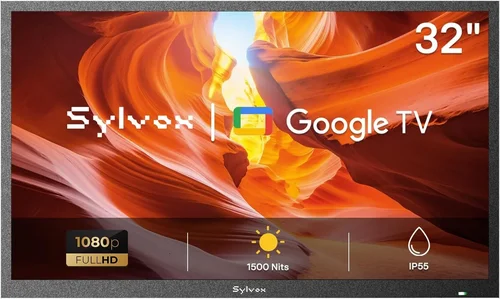
While cold tolerance is essential, moisture protection is equally vital—especially in regions where snow melts and refreezes or where morning dew is common. The Ingress Protection (IP) rating tells you how well the TV resists dust and water. For garden use, aim for at least IP55 (protected against dust and low-pressure water jets from any direction). If your setup is fully exposed—like on an open deck—consider IP65 or higher.
Note that IP ratings apply to the entire unit, including ports and ventilation areas. Many budget outdoor TVs skimp on sealing around HDMI inputs or power connections, which can lead to corrosion over time. Look for models with rubber grommets, sealed cable glands, or removable rear panels designed for conduit wiring. Also, ensure the screen itself has an anti-reflective, tempered glass layer to prevent condensation buildup and improve visibility in overcast winter skies.
3. Display Technology & Brightness
Not all screens perform equally in low-light winter conditions. While OLED offers stunning contrast, it’s generally not ideal for outdoor use due to lower peak brightness and susceptibility to image retention in cold temps. Instead, look for LED-LCD panels with high nits ratings—ideally 700 nits or more. This ensures the image remains visible even on gray, overcast days when ambient light is minimal.
Budget garden TVs often use matte finishes instead of glossy ones to reduce glare, which is a smart trade-off for outdoor viewing. However, beware of ultra-low-cost models that cut corners by using dimmer panels (under 400 nits)—they’ll look washed out and hard to see during daylight hours. Also, check refresh rate: 60Hz is standard and sufficient for most content, but if you plan to watch sports or fast-action shows, a 120Hz panel will deliver smoother motion.
4. Build Quality & Materials
A garden TV isn’t just about surviving the cold—it’s about enduring years of seasonal shifts, UV exposure, and physical wear. The housing should be made of powder-coated aluminum or marine-grade stainless steel, not plastic. Plastic enclosures may crack in extreme cold or warp under summer heat, compromising seals and internal components.
Pay attention to hinge mechanisms (if wall-mounted), mounting compatibility (VESA standards), and cable management. A well-built unit will include drainage holes, corrosion-resistant screws, and internal airflow design that prevents moisture accumulation. Budget models sometimes omit these details, so inspect product images carefully or read detailed reviews that mention long-term durability.
5. Smart Features & Connectivity
Even on a budget, you shouldn’t have to sacrifice modern conveniences. Most garden TVs now come with built-in smart platforms like Roku TV, Android TV, or webOS, allowing you to stream Netflix, YouTube, or live TV without extra devices. This is especially useful in winter when you don’t want to run long HDMI cables from your indoor media center.
Check for Wi-Fi 5 (802.11ac) or Wi-Fi 6 support for stable streaming in outdoor areas where signal strength may be weaker. Also, ensure there are enough HDMI ports (at least two), USB inputs for firmware updates or media playback, and possibly an optical audio out if you’re connecting external speakers. Some budget models remove Ethernet ports to save cost—fine if your Wi-Fi reaches, but risky if your garden is far from the router.
6. Power Consumption & Energy Efficiency
Cold weather can affect power delivery and efficiency. Cheaper TVs often use less efficient power supplies that struggle in low temperatures, leading to startup delays or unexpected shutdowns. Look for ENERGY STAR certification or similar efficiency ratings—these indicate the TV is designed to operate reliably across a range of conditions while keeping electricity costs down.
Additionally, consider whether the TV includes a sleep timer or automatic shutoff feature. Leaving a garden TV running overnight in freezing temps wastes energy and increases wear. Some models even have thermal sensors that adjust brightness or enter low-power mode when temperatures drop too low—a handy feature for unattended setups.
7. Warranty & Customer Support
Outdoor electronics are inherently more prone to failure than indoor ones, so a solid warranty is non-negotiable. Aim for at least a 2-year limited warranty that covers both parts and labor, with explicit mention of outdoor or cold-weather use. Avoid brands that void warranties if the TV is installed “in an unconditioned space”—that’s a loophole waiting to happen.
Research customer support responsiveness before buying. Read user forums or Reddit threads to see how quickly companies respond to issues like frozen screens or failed heaters. A budget TV with poor support can end up costing more in repairs or replacements down the line. Brands like Seura, Sylvane, and even some newer entrants like Outdoor TV Direct offer decent support for sub-$800 models.
8. Size & Viewing Distance
Don’t let excitement override practicality. A 75-inch TV might seem tempting, but if your seating is only 6 feet away, you’ll strain your eyes—especially in dim winter light. As a rule of thumb, multiply your viewing distance (in inches) by 0.84 to get the ideal screen diagonal. So, at 8 feet (96 inches), a 55–65 inch TV is optimal.
Budget garden TVs often max out at 65 inches, which is plenty for most patios or small decks. Larger screens also consume more power and are harder to mount securely in windy conditions. If space is tight, consider a 43-inch or 50-inch model—they’re lighter, cheaper, and easier to protect during off-seasons.
Different Types of Buying Guide
Common Buying Mistakes to Avoid
❌ Mistake: Assuming All “Outdoor” TVs Are Cold-Weather Rated
Why it’s bad: Many retailers label any TV in a weatherproof case as “outdoor ready,” but that doesn’t guarantee cold tolerance. These units often use standard indoor components that fail below freezing, leaving you with a dead screen in January.
What to do instead: Always verify the operating temperature range in the technical specifications—not just the marketing copy. If it’s not clearly stated, contact the manufacturer or choose a different model.
❌ Mistake: Skimping on Mounting Hardware
Why it’s bad: A budget TV mounted with flimsy brackets can detach in high winds or become misaligned due to thermal expansion/contraction. This not only risks damage but can create safety hazards.
What to do instead: Invest in a heavy-duty, corrosion-resistant outdoor mount rated for your TV’s weight and size. Look for tilt and swivel options to adjust for winter sun angles.
❌ Mistake: Ignoring Condensation Risks
Why it’s bad: Rapid temperature changes (e.g., bringing a cold TV into a warm garage) can cause internal condensation, leading to short circuits or mold growth inside the panel.
What to do instead: Choose models with anti-condensation design features like sealed vents, silica gel packs, or gradual warm-up cycles. Never store a cold TV in a heated space without acclimating it slowly.
❌ Mistake: Overlooking Audio Needs
Why it’s bad: Most budget garden TVs have weak built-in speakers that get drowned out by wind or ambient noise. Relying on them leads to frustrating, muffled audio.
What to do instead: Plan for external weatherproof speakers or a Bluetooth soundbar from day one. Many models include audio outputs specifically for this purpose.
❌ Mistake: Buying Based Solely on Screen Size
Why it’s bad: A massive screen looks impressive online but may be impractical for your space, overpower your seating area, and cost more to operate—especially if it lacks efficiency features.
What to do instead: Measure your viewing distance and choose a size that balances immersion with comfort. Remember: clarity and brightness matter more than sheer size in outdoor settings.
❌ Mistake: Neglecting Off-Season Storage
Why it’s bad: Even cold-rated TVs benefit from seasonal care. Leaving them exposed year-round accelerates wear from UV rays, pollen, and temperature swings.
What to do instead: If possible, use a weatherproof cover or remove the TV during extreme seasons. For permanent installs, choose models with protective hoods or sunshades.
Budget Guidelines: How Much Should You Spend?
- Entry-Level ($200–$400): These are typically indoor TVs in basic weatherproof enclosures or low-end “covered patio” models. They may work in mild winters but often lack true cold-weather certification. Expect limited smart features, lower brightness (400–500 nits), and shorter warranties. Best for temporary or sheltered use only.
- Mid-Range ($400–$700): This is the sweet spot for most buyers. You’ll find fully enclosed, IP55+ rated TVs with operating ranges down to 0°F or lower, decent brightness (600+ nits), and reliable smart platforms. Brands like RCA Outdoor, Element, and newer lines from TCL offer solid value here. Ideal for decks, screened porches, and four-season climates.
- Premium ($700–$1,200): Designed for harsh winters and full exposure. These include heated models, marine-grade materials, and advanced thermal management. Expect 700+ nits brightness, robust warranties (2–3 years), and premium audio options. Great for mountain cabins, lakeside homes, or professional installations.
- Luxury ($1,200+): Top-tier commercial or custom units with 24/7 operation capability, ultra-high brightness (1,000+ nits), and extensive customization. Overkill for most homeowners but justified for hospitality venues or extreme environments.
Expert Tips for Getting the Best Deal
- Buy in Spring or Early Summer: Retailers often discount last year’s outdoor models to clear inventory before the peak season. You can save 15–25% compared to fall/winter pricing.
- Check Refurbished or Open-Box Options: Certified refurbished garden TVs from reputable sellers (like Amazon Renewed or manufacturer outlets) often come with full warranties and significant savings—sometimes up to 40% off.
- Compare Total Cost of Ownership: A $300 TV that fails after one winter costs more than a $500 model that lasts five years. Factor in energy use, repair likelihood, and warranty coverage.
- Read Long-Term User Reviews: Look for reviews older than 6 months—they reveal real-world durability, cold-start performance, and customer service experiences that specs alone can’t show.
- Test Before Committing: If buying locally, ask to see the TV powered on in-store. Check for brightness uniformity, input lag, and menu responsiveness. Online? Look for unboxing videos that demonstrate cold startup.
- Negotiate Installation Bundles: Some retailers offer free mounting or cable management when you buy the TV and accessories together—especially during promotional periods.
- Verify Return Policies: Ensure you have at least 30 days to return the TV if it doesn’t perform as expected in cold conditions. Some outdoor units can’t be returned once installed due to hygiene or damage policies.
- Join Outdoor Living Forums: Communities like Reddit’s r/OutdoorTV or GardenWeb often share exclusive promo codes, flash sales, or group-buy opportunities you won’t find elsewhere.

Frequently Asked Questions
Q: Can I use a regular indoor TV outside in winter if it’s under a roof?
A: Technically yes—but it’s risky. Even under cover, temperature fluctuations, humidity, and indirect moisture can damage internal components over time. Indoor TVs aren’t designed for thermal cycling, and warranties typically exclude outdoor use. For anything beyond occasional summer use, invest in a proper garden TV.
Q: Do I need a heated TV for cold climates?
A: Not always. If your TV is in a semi-protected area (like a three-season room) and temperatures rarely drop below 20°F, a non-heated model with a good operating range may suffice. But if you regularly see sub-zero temps or want 24/7 reliability, a heated unit is worth the extra cost.
Q: How do I prevent my garden TV from freezing overnight?
A: Choose a model with a low-temperature startup feature, use a timer to turn it on briefly each morning, or install it in a location shielded from direct wind and snow. Some users also add a small, low-wattage heater nearby (with proper ventilation)—but never place heat sources directly against the TV.
Q: Are solar-powered garden TVs available on a budget?
A: Not really. While solar setups are possible, they require significant investment in panels, batteries, and inverters—pushing the total cost well above $1,000. For now, grid-powered or extension-cord-connected models remain the most practical budget choice.
Q: Can I leave my garden TV on all winter?
A: Only if it’s specifically rated for continuous outdoor operation and has thermal protection. Most consumer-grade models are designed for intermittent use. Leaving them on 24/7 increases wear and energy costs. Use a smart plug with scheduling to automate on/off times.
Q: What’s the difference between “weatherproof” and “all-weather”?
A: “Weatherproof” usually means resistant to rain and dust but not necessarily extreme temperatures. “All-weather” implies broader environmental tolerance, including cold, heat, and humidity. Always check the IP rating and operating temp range to be sure.
Q: Will my Wi-Fi reach the garden TV?
A: It depends on distance and obstacles. Thick walls, metal siding, and distance over 50 feet can weaken signals. Consider a Wi-Fi extender, mesh network, or powerline adapter if streaming is important. Wired Ethernet is more reliable but requires trenching or conduit.
Q: How often should I clean my garden TV?
A: Every 2–3 months, gently wipe the screen and vents with a microfiber cloth and mild cleaner. Avoid ammonia-based products. In pollen-heavy seasons, clean monthly to prevent buildup that can trap moisture.
Q: Can I use a projector instead of a garden TV in winter?
A: Projectors struggle in low light and cold temps—most aren’t rated below 40°F, and image quality degrades in dim conditions. They’re better suited for summer movie nights than year-round use.
Our Final Recommendations
- Best for Budget-Conscious Buyers: RCA 50″ Outdoor Smart TV (RO5001) – Priced under $450, this model offers IP55 rating, operates down to 14°F, and includes Roku TV built-in. Great for covered patios in moderate climates.
- Best Overall Value: Element 55″ All-Weather Outdoor TV – At around $650, it delivers 700-nit brightness, -4°F operation, and a sturdy aluminum chassis. Excellent balance of price, performance, and durability.
- Best Premium Option: Sylvane Pro 65″ Heated Outdoor Display – With internal heating, IP66 rating, and 1,000-nit brightness, this $1,100 model is built for serious winter warriors who refuse to compromise.
- Best for Beginners: TCL 43″ Class 4-Series Outdoor Edition – Simple setup, intuitive Google TV interface, and reliable cold-weather performance down to 23°F. Perfect for first-time outdoor TV owners.
- Best for Advanced Users: Outdoor TV Direct Custom Enclosure + LG C3 OLED – For tech-savvy DIYers, pairing a high-end indoor OLED with a custom-built, climate-controlled enclosure offers unmatched picture quality—if you’re willing to invest time and ~$1,500.
Conclusion: Making the Right Choice
Choosing a budget garden TV for cold weather isn’t just about finding the cheapest option—it’s about finding the smartest one. By prioritizing operating temperature range, weatherproofing, build quality, and real-world reliability, you can enjoy your outdoor space year-round without constant repairs or replacements. Remember: a few hundred dollars saved upfront could cost you thousands in the long run if your TV fails during a harsh winter.
Start by assessing your specific needs: How cold does it get where you live? Is your TV fully exposed or under cover? How often will you use it? Once you answer these questions, refer back to our key factors, avoid the common pitfalls, and lean on our expert tips to stretch your budget further. And don’t forget to factor in accessories—they’re part of the total investment.
Ultimately, the best garden TV is the one that lets you unwind outdoors, rain or shine, snow or sleet. With the right research and a clear understanding of what truly matters in cold-weather performance, you’ll find a model that delivers both value and peace of mind. So go ahead—grab that blanket, fire up the heater, and press play. Your perfect winter viewing experience is just a smart purchase away.

