
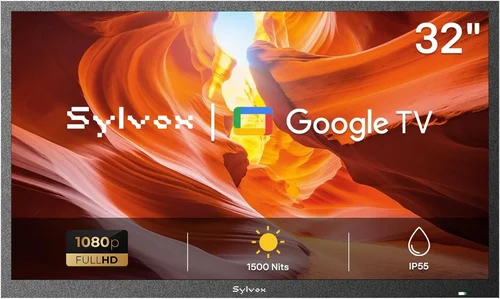
If you’ve ever tried to enjoy a movie night under the stars or catch the big game while grilling on your balcony, you know how quickly the experience can be ruined by glare, weather damage, or a TV that simply wasn’t built for outdoor use. That’s where a budget deck TV comes in—a smart, practical solution for anyone who wants to bring entertainment outdoors without breaking the bank. Whether you have a small urban balcony, a spacious patio, or a cozy rooftop deck, having a television designed (or at least suitable) for outdoor conditions can transform your outdoor space into a true extension of your living room.
This guide is designed to help you navigate the often-confusing world of outdoor TVs—especially when you’re working with a limited budget. We’ll cut through the marketing jargon and focus on what really matters: performance, durability, value, and real-world usability. You’ll learn how to identify which features are essential, which specs are overhyped, and how to avoid common pitfalls that can lead to buyer’s remorse. By the end, you’ll have a clear understanding of what to look for, how much to spend, and which models offer the best balance of affordability and functionality.
The market for outdoor TVs has evolved significantly in recent years. While fully weatherproof, commercial-grade outdoor displays can cost thousands of dollars, there’s now a growing segment of “budget deck TVs”—indoor TVs that are affordable, portable, and capable of handling mild outdoor conditions when used responsibly. These aren’t meant to sit uncovered in a thunderstorm, but with proper placement, covers, or enclosures, they can deliver excellent performance for seasonal or covered outdoor use. This guide focuses on that sweet spot: high-value, low-cost options that give you outdoor viewing without the premium price tag.

What to Look for When Buying Buying Guide
1. Budget & Price Range
When shopping for a budget deck TV, your first consideration should always be how much you’re willing to spend. Unlike indoor TVs, which can range from $200 to $5,000+, outdoor-capable models—even budget ones—often come with a slight premium due to added features like brighter screens, better contrast, or enhanced durability. However, you don’t need to spend a fortune to get a great outdoor viewing experience.
For most buyers, a realistic budget falls between $300 and $800. At this price point, you can find 40- to 55-inch smart TVs with decent brightness, weather-resistant designs (or at least compatibility with outdoor enclosures), and modern features like built-in streaming apps. Going below $300 may limit your options to smaller screens (32 inches or less) or older models with outdated interfaces and lower brightness—critical drawbacks for outdoor use where ambient light is a major factor.
It’s also important to factor in additional costs. A budget TV might save you upfront, but if you need to buy a separate outdoor enclosure, mounting hardware, or a protective cover, those expenses can add up. Some retailers bundle these accessories, so look for packages that include a weatherproof case or stand. Always calculate the total cost of ownership, not just the sticker price.
2. Performance Specifications
Performance is where many budget outdoor TVs fall short—but it doesn’t have to. The key specs to focus on are brightness (measured in nits), contrast ratio, refresh rate, and resolution. For outdoor use, brightness is arguably the most important. Indoor TVs typically range from 250 to 400 nits, which is fine for a dim living room but nearly invisible in direct sunlight. For a deck or patio, you’ll want a minimum of 500 nits, with 700+ nits being ideal for sunny days.
Look for TVs labeled as “high-brightness” or “outdoor-viewable.” These models often use advanced backlighting or anti-glare coatings to improve visibility. Some budget brands, like TCL and Hisense, offer “Daylight Viewable” modes that boost brightness when needed. Avoid TVs with only 300 nits or less—they’ll be hard to see even in partial shade.
Resolution should be at least Full HD (1920×1080), but 4K UHD is becoming standard even in budget models. A 4K screen provides sharper images, especially on larger screens (50 inches and up), and future-proofs your purchase as more content becomes available in ultra-high definition. Refresh rate matters too—60Hz is standard, but 120Hz models offer smoother motion for sports and action movies. While not essential for casual viewing, it’s a nice upgrade if you’re a sports fan.
Color accuracy and contrast ratio also play a role. Look for TVs with HDR (High Dynamic Range) support, such as HDR10 or Dolby Vision. HDR enhances color depth and contrast, making images pop even in bright conditions. However, not all HDR is created equal—cheap implementations may not deliver noticeable improvements. Check reviews to see if the HDR performance is genuinely good.
3. Build Quality & Durability
Even if you’re not buying a fully weatherproof outdoor TV, build quality matters—especially if your deck is exposed to wind, rain, or temperature swings. A budget TV with a flimsy plastic casing or weak stand may not hold up over time, particularly if it’s moved frequently or exposed to the elements.
Start by examining the materials. Look for TVs with reinforced frames, metal backplates, or sturdy stands. Avoid models with all-plastic construction, especially if they feel lightweight or wobbly. The power cord and ports should be well-protected; some budget models have exposed inputs that can collect dust or moisture.
While most budget deck TVs aren’t rated for full outdoor use (like IP55 or IP65), many are designed to resist minor splashes and humidity when used under cover. Check the product description for terms like “weather-resistant,” “outdoor-ready,” or “suitable for covered patios.” These indicate the manufacturer has considered outdoor conditions, even if the TV isn’t fully sealed.
Another durability factor is heat management. Outdoor spaces can get much hotter than indoors, especially in direct sunlight. TVs with poor ventilation may overheat, leading to shutdowns or reduced lifespan. Look for models with rear or side vents and avoid placing the TV in enclosed spaces without airflow.
Finally, consider the screen itself. Some budget TVs use glossy finishes that reflect sunlight, making them hard to see. Matte or anti-reflective screens are better for outdoor use, though they may cost slightly more. If the TV you like has a glossy screen, consider using a shade or canopy to reduce glare.
4. Features & Functionality
Modern budget TVs come packed with features that can greatly enhance your outdoor experience. The most important is smart functionality. A smart TV with built-in Wi-Fi and apps like Netflix, YouTube, Hulu, and Disney+ means you don’t need a separate streaming device. This is especially convenient on a deck where running cables is impractical.
Look for TVs with popular platforms like Roku TV, Android TV, or webOS. Roku is user-friendly and widely supported, while Android TV offers more customization and Google Assistant integration. Avoid proprietary systems with limited app support—they can become outdated quickly.
Connectivity is another key feature. Ensure the TV has enough HDMI ports (at least two, preferably three) for devices like game consoles, soundbars, or streaming sticks. USB ports are useful for playing media files or updating firmware. Some models also include optical audio out or headphone jacks for private listening.
Voice control is becoming standard, even in budget models. Support for Alexa, Google Assistant, or Siri allows you to change channels, adjust volume, or search for content without touching the remote. This is especially handy when you’re lounging outdoors with drinks in hand.
Gaming features are worth considering if you plan to use the TV for console gaming. Look for low input lag (under 20ms), VRR (Variable Refresh Rate), and ALLM (Auto Low Latency Mode). These reduce lag and screen tearing, making gameplay smoother. While not all budget TVs support these, some mid-range models do.
Lastly, check for built-in tuners if you want to watch over-the-air broadcasts. Most modern TVs include ATSC 3.0 (NextGen TV) support, which offers better picture quality and more channels. This is a great way to access local news and sports without a cable subscription.
5. Brand Reputation
Not all budget TV brands are created equal. While you can find good deals from lesser-known manufacturers, sticking with reputable brands increases your chances of getting a reliable, well-supported product. Brands like TCL, Hisense, Samsung, and LG dominate the budget TV market and offer strong performance at competitive prices.
TCL, for example, is known for its Roku-powered TVs that deliver excellent value. Their 4-Series and 5-Series models are popular for outdoor use due to their brightness and durability. Hisense offers similar value with its ULED technology, which enhances color and contrast. Both brands have strong customer support and regular firmware updates.
Samsung and LG tend to be slightly more expensive but offer better build quality and design. Samsung’s Crystal UHD series and LG’s UQ75 series are solid choices for outdoor use, especially if you want a sleek, modern look. These brands also have better warranty coverage and service networks.
Avoid no-name brands or ultra-cheap imports sold on auction sites. These often lack proper certifications, have poor quality control, and offer little to no customer support. If something goes wrong, you may be out of luck. Stick to brands you recognize and trust.
Reading user reviews on retail sites like Amazon, Best Buy, or Crutchfield can give you insight into real-world performance. Look for patterns—if multiple users report the same issue (e.g., overheating, poor Wi-Fi), it’s likely a genuine flaw. Pay attention to reviews from people using the TV outdoors, as they’ll highlight issues you might not encounter indoors.
6. Warranty & Support
A good warranty can save you hundreds of dollars in repair or replacement costs. Most budget TVs come with a standard one-year limited warranty, but some brands offer extended coverage or accidental damage protection. Check the warranty terms before buying—some exclude outdoor use, which could void your coverage if you install the TV on your deck.
Look for brands that offer at least a one-year warranty with in-home service or easy return policies. Samsung and LG often provide better support, including phone and chat assistance. TCL and Hisense have improved their customer service in recent years, but response times can vary.
If you’re buying from a third-party seller (like Amazon Marketplace or eBay), verify that the warranty is still valid. Some sellers offer refurbished or open-box units with reduced coverage. Always buy from authorized retailers to ensure full warranty protection.
Consider purchasing an extended warranty if you plan to use the TV heavily outdoors. While not always necessary, it can provide peace of mind, especially if the TV is exposed to harsh conditions. Just make sure the extended plan covers outdoor use and accidental damage.
Finally, keep your receipt and register the product as soon as you receive it. This ensures you’re covered from day one and makes it easier to file a claim if needed.
7. Size & Portability
The size of your TV should match your deck’s dimensions and viewing distance. A general rule of thumb is that the optimal screen size is about one-third to one-half the distance (in inches) from your seating area. For example, if you’re sitting 8 feet (96 inches) away, a 40- to 50-inch TV is ideal.
Smaller decks or balconies may only accommodate a 32- to 43-inch screen, while larger patios can handle 50 inches or more. Keep in mind that larger screens are harder to move and may require stronger mounting hardware. If you plan to store the TV indoors during winter, portability becomes important.
Weight and design affect portability. TVs under 25 pounds are easier to move and mount. Look for models with VESA-compatible mounting patterns (e.g., 200×200 or 400×400) so you can use standard wall or ceiling mounts. Some budget TVs come with detachable stands, making them easier to store.
If you’re using the TV on a balcony with limited space, consider a compact design with slim bezels. This maximizes screen real estate without taking up too much room. Wall-mounting is often the best option for small decks, as it frees up floor space and reduces tripping hazards.
For renters or those who move frequently, a portable TV with a carrying handle or lightweight build is a smart choice. Some models even include built-in batteries for true off-grid use, though these are rare in the budget category.
8. User Reviews & Ratings
User reviews are one of the most reliable ways to gauge a TV’s real-world performance. While manufacturer specs can be misleading, customer feedback reveals how a TV holds up over time, especially in outdoor conditions. Look for reviews that mention brightness, durability, ease of setup, and smart features.
Pay attention to the overall rating (aim for 4 stars or higher) and the number of reviews (100+ is a good benchmark). A high rating with few reviews may not be trustworthy. Read both positive and negative reviews to get a balanced perspective. Negative reviews often highlight common flaws, such as poor remote range, weak Wi-Fi, or overheating.
Look for verified purchase reviews, as these are more likely to be genuine. Some sites, like Amazon, highlight “most helpful” reviews, which can save you time. Videos and photos in reviews are especially useful—they show the TV in action and can reveal issues not mentioned in text.
If possible, check reviews on multiple platforms. A TV might have great ratings on one site but poor feedback elsewhere. This could indicate biased reviews or inconsistent quality. Cross-referencing gives you a more accurate picture.
Finally, consider the date of the reviews. TV technology evolves quickly, and a model from two years ago may have been updated or discontinued. Focus on recent reviews (within the last 6-12 months) to ensure the information is current.
Different Types of Buying Guide

Common Buying Mistakes to Avoid
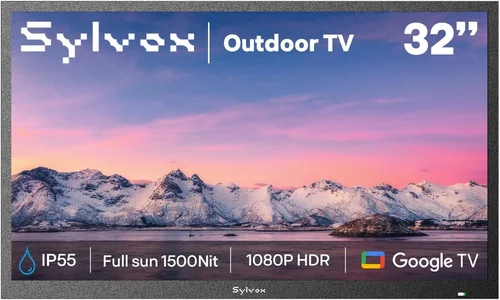
❌ Mistake: Buying a Standard Indoor TV for Full Outdoor Exposure
Why it’s bad: Most indoor TVs aren’t designed to handle rain, humidity, or temperature extremes. Using one uncovered on a deck can lead to corrosion, screen damage, or electrical failure—even if it’s just for a few hours. Many warranties explicitly exclude outdoor use, so you won’t be covered if something goes wrong.
What to do instead: Only use indoor TVs under cover—such as a screened porch, awning, or pergola with a roof. If your deck is fully exposed, invest in a weatherproof enclosure or choose a TV specifically rated for outdoor use.
❌ Mistake: Ignoring Brightness Requirements
Why it’s bad: A dim screen is the fastest way to ruin an outdoor viewing experience. Even on a cloudy day, ambient light can wash out a TV with low nits. You’ll end up squinting or watching with the brightness maxed out, which drains power and reduces lifespan.
What to do instead: Aim for at least 500 nits, with 700+ being ideal. Look for models labeled “high-brightness” or “outdoor-viewable.” Check reviews to confirm real-world performance.
❌ Mistake: Overlooking Mounting and Placement
Why it’s bad: Poor placement can lead to glare, obstructed views, or safety hazards. Mounting a TV too high or at the wrong angle makes it uncomfortable to watch. Using weak mounts or improper hardware can result in the TV falling and causing injury or damage.
What to do instead: Plan your setup before buying. Measure your space, choose a mount rated for the TV’s weight, and position the screen at eye level when seated. Use anti-glare screens or shades if needed.
❌ Mistake: Skipping Smart Features
Why it’s bad: Without built-in apps, you’ll need to connect a streaming device, which adds cost, cables, and complexity. On a deck, running wires is inconvenient and can create tripping hazards.
What to do instead: Choose a smart TV with Wi-Fi and popular apps. This simplifies setup and gives you instant access to content without extra hardware.
❌ Mistake: Not Checking Warranty Terms
Why it’s bad: Many warranties don’t cover outdoor use. If your TV fails due to moisture or heat, you could be stuck with a costly repair or replacement.
What to do instead: Read the warranty carefully. Look for coverage that includes outdoor or seasonal use. Consider an extended plan if needed.
❌ Mistake: Buying Based on Price Alone
Why it’s bad: The cheapest TV may lack essential features like brightness, smart functionality, or durability. You might end up replacing it sooner, costing more in the long run.
What to do instead: Focus on value, not just price. Compare specs, reviews, and total cost of ownership. A slightly more expensive model with better performance is often a smarter investment.
❌ Mistake: Forgetting About Audio
Why it’s bad: Outdoor environments are noisy—wind, traffic, and nature can drown out TV speakers. Built-in TV audio is often weak and muffled, especially at a distance.
What to do instead: Pair your TV with outdoor speakers or a soundbar. Look for models with optical or Bluetooth output for easy connectivity.
Budget Guidelines: How Much Should You Spend?
Entry-Level ($250 – $400): At this price, expect 32- to 43-inch screens with basic smart features and moderate brightness (300-500 nits). These are best for small, covered spaces or seasonal use. Brands like TCL and Hisense offer solid options, but build quality may be lower. Ideal for casual viewers on a tight budget.
Mid-Range ($400 – $600): This is the sweet spot for most buyers. You’ll find 43- to 55-inch 4K TVs with high brightness (500-700 nits), HDR support, and reliable smart platforms. Models like the TCL 5-Series or Hisense U6H deliver excellent value. Perfect for regular outdoor use under cover.
Premium ($600 – $800): Here, you get better build quality, enhanced durability, and advanced features like 120Hz refresh rate, Dolby Vision, and voice control. Samsung and LG models in this range offer sleek designs and strong performance. Great for dedicated outdoor entertainment spaces.
Luxury ($800+): While still budget-friendly compared to commercial outdoor displays, these TVs offer top-tier specs, weather-resistant designs, and premium materials. Some include outdoor enclosures or are specifically built for deck use. Best for enthusiasts who want the best possible experience.
Expert Tips for Getting the Best Deal
- Shop during seasonal sales: Look for deals during Black Friday, Prime Day, or back-to-school season. Retailers often discount TVs by 20-40%.
- Compare prices across retailers: Check Amazon, Best Buy, Walmart, and Costco. Use price-tracking tools like Honey or CamelCamelCamel to find the lowest price.
- Consider open-box or refurbished models: These can save you 15-30% and often come with full warranties. Just verify the condition and return policy.
- Bundle accessories: Some retailers offer free mounts, cables, or streaming devices with TV purchases. This can add significant value.
- Check for rebates: Manufacturers and utility companies sometimes offer rebates for energy-efficient TVs. These can reduce your net cost.
- Test before you buy: If possible, view the TV in person to check brightness, color, and interface. Online reviews can’t replace hands-on experience.
- Read the return policy: Ensure you can return the TV if it doesn’t meet your needs. Some retailers charge restocking fees, so know the terms upfront.
- Register for alerts: Sign up for deal alerts from your favorite retailers. You’ll be notified of price drops and limited-time offers.
Frequently Asked Questions
Q: Can I use a regular indoor TV on my deck?
A: Yes, but only under cover—such as a screened porch, awning, or pergola with a roof. Direct exposure to rain, snow, or extreme temperatures can damage the TV and void the warranty. For full outdoor use, consider a weatherproof enclosure or an outdoor-rated model.
Q: What brightness do I need for outdoor viewing?
A: Aim for at least 500 nits, with 700+ nits being ideal for sunny days. Indoor TVs typically range from 250-400 nits, which is insufficient for most outdoor settings.
Q: Do I need a special mount for outdoor use?
A: A standard VESA-compatible mount is usually fine, but ensure it’s rated for the TV’s weight and can withstand wind. For exposed decks, consider a weatherproof mount or enclosure.
Q: How do I protect my TV from the weather?
A: Use a weatherproof enclosure, install the TV under cover, or use a protective cover when not in use. Avoid placing the TV in direct sunlight or near sprinklers.
Q: Can I leave my outdoor TV on all the time?
A: It’s not recommended. Continuous use can overheat the TV, especially in hot weather. Turn it off when not in use and use a timer or smart plug for convenience.
Q: What’s the difference between outdoor-ready and fully outdoor TVs?
A: Outdoor-ready TVs are indoor models with enhanced brightness and durability, suitable for covered areas. Fully outdoor TVs are weatherproof, sealed, and built for year-round exposure.
Q: Are budget outdoor TVs worth it?
A: Absolutely. With proper care and placement, budget models can deliver excellent performance for a fraction of the cost of commercial displays. Focus on brightness, smart features, and build quality.
Q: How long do budget outdoor TVs last?
A: With proper care, 5-7 years is typical. Exposure to harsh conditions can shorten lifespan, so use covers and enclosures to extend usability.
Q: Can I use my outdoor TV for gaming?
A: Yes, if it has low input lag and supports features like VRR and ALLM. Check the specs and reviews to ensure it’s gaming-friendly.
Q: What’s the best size for a small balcony?
A: A 32- to 43-inch TV is ideal for small spaces. Wall-mounting saves floor space and improves viewing angles.
Our Final Recommendations
Best for Budget-Conscious Buyers: TCL 43S450G (43-inch, 4K, Roku TV, 500 nits) – Excellent value with smart features and decent brightness for under $400.
Best Overall Value: Hisense 50U6H (50-inch, 4K ULED, 700 nits, Dolby Vision) – High brightness, great color, and strong performance for around $500.
Best Premium Option: Samsung QN50Q60C (50-inch, QLED, 800 nits, Smart TV) – Superior brightness and color accuracy for serious outdoor viewers.
Best for Beginners: LG 43UQ7500 (43-inch, 4K, webOS, 550 nits) – User-friendly interface and reliable performance for first-time buyers.
Best for Advanced Users: Sony XR-55X90L (55-inch, 4K, HDR, 750 nits) – Top-tier picture quality and gaming features for enthusiasts.
Conclusion: Making the Right Choice
Choosing the right budget deck TV doesn’t have to be overwhelming. By focusing on key factors like brightness, build quality, smart features, and proper placement, you can find a model that delivers great performance without exceeding your budget. Remember, the goal isn’t to buy the most expensive TV—it’s to find the best value for your specific needs.
Start by assessing your deck’s conditions: Is it covered or exposed? How far will you be sitting from the screen? What kind of content will you watch most? These questions will guide your decision and help you avoid common pitfalls.
Don’t forget to factor in accessories like mounts, enclosures, and speakers. A little planning goes a long way in creating a comfortable, enjoyable outdoor entertainment space. And always read reviews, compare prices, and check warranty terms before making a purchase.
With the right TV, your balcony or patio can become the ultimate spot for movie nights, game days, or relaxing with a favorite show under the open sky. Invest wisely, protect your purchase, and enjoy the freedom of outdoor viewing—without the premium price tag.

