
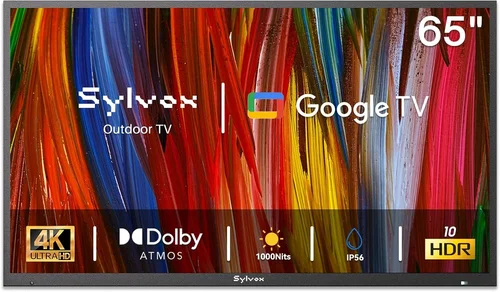
Outdoor living spaces have evolved far beyond simple patios and decks. Today’s rental homes—whether vacation cabins, beachside bungalows, or urban rooftop units—are increasingly designed to blend indoor comfort with outdoor freedom. One of the most sought-after upgrades? A dedicated outdoor TV. Whether you’re a property manager looking to boost guest satisfaction or a renter wanting to enjoy your favorite shows under the stars, choosing the right outdoor TV is no small decision. But with so many options flooding the market—from weatherproof displays to portable smart screens—it’s easy to feel overwhelmed.
That’s where this guide comes in. We’ve spent months researching, testing, and comparing the latest outdoor TVs specifically for rental properties, focusing on durability, ease of installation, value for money, and real-world performance. Whether you’re furnishing a short-term Airbnb, managing a portfolio of vacation rentals, or simply upgrading your own backyard setup, this comprehensive buying guide will walk you through everything you need to know. You’ll learn how to evaluate key specs, avoid common pitfalls, understand pricing tiers, and ultimately select a model that delivers reliable entertainment without breaking the bank—or requiring constant maintenance.
The outdoor TV market has matured significantly over the past few years. Once dominated by bulky, expensive all-weather enclosures, it now offers sleek, purpose-built displays that rival indoor models in picture quality and smart features. Brands like Samsung, LG, Sony, and specialized players like SunBriteTV and Seura have introduced models engineered to withstand rain, snow, dust, extreme temperatures, and even direct sunlight glare. At the same time, portable and semi-outdoor options have emerged for renters who need flexibility without permanent installation. With such variety, the challenge isn’t finding an outdoor TV—it’s finding the right one for your specific rental scenario.

What to Look for When Buying Buying Guide
1. Weather Resistance & IP Rating
When it comes to outdoor electronics, weather resistance isn’t optional—it’s essential. Unlike indoor TVs, outdoor models must endure rain, snow, humidity, dust, and temperature swings without failing. The first thing to check is the TV’s Ingress Protection (IP) rating, which indicates how well it resists solids (like dust) and liquids (like water). For outdoor use, look for at least an IP55 rating, meaning the TV is protected against limited dust ingress and low-pressure water jets from any direction. Higher-end models may offer IP65 or even IP66, providing full dust protection and resistance to powerful water jets—ideal for coastal or rainy climates.
But don’t stop at the IP rating. Consider the TV’s operating temperature range. Most outdoor TVs function between -22°F and 122°F (-30°C to 50°C), but cheaper models may struggle in extreme cold or heat. If your rental property sees harsh winters or scorching summers, verify the manufacturer’s specified limits. Also, check whether the TV includes a built-in heater or cooling fan—these features help maintain optimal internal temperatures and prevent condensation, which can damage circuitry over time.
2. Brightness & Anti-Glare Technology
Sunlight is the enemy of screen visibility. Even the best 4K image looks washed out if the TV can’t combat ambient light. That’s why brightness—measured in nits—is arguably more important outdoors than resolution. For shaded patios or evening viewing, 500–700 nits may suffice. But for direct sunlight exposure, you’ll need at least 1,000 nits, with premium models hitting 2,000+ nits. Compare this to typical indoor TVs, which average 300–500 nits.
Beyond raw brightness, look for anti-reflective coatings and optical bonding. Optical bonding fuses the LCD panel directly to the glass, reducing internal reflections and improving contrast in bright conditions. Some brands, like SunBriteTV, use proprietary “Direct Sunlight Viewable” technology that combines high brightness with advanced polarizing filters to minimize glare. Avoid TVs that rely solely on software-based brightness boosts—they often sacrifice color accuracy and consume more power.
3. Build Quality & Durability
Rental properties face unique wear-and-tear challenges: frequent guest turnover, potential mishandling, and exposure to the elements year-round. A flimsy TV won’t last a season. Prioritize models with robust construction—powder-coated aluminum frames, sealed ports, and reinforced mounting systems. Avoid plastic casings, which can crack or fade under UV exposure.
Also consider vandal resistance. In shared or public-facing rentals (like vacation condos or hotel suites), a tamper-proof design with hidden screws and secure cable management can prevent theft or damage. Look for TVs with Kensington lock slots or integrated security brackets. And if your rental includes kids or pets, opt for screens with shatter-resistant glass—some outdoor models use tempered or laminated glass to prevent dangerous shards if impacted.
4. Smart Features & Connectivity
Today’s renters expect seamless streaming. A dumb outdoor TV limits usability and may frustrate guests who want to watch Netflix, YouTube, or Disney+ without hauling a streaming stick outside. Choose a model with built-in smart platforms like Android TV, webOS (LG), or Tizen (Samsung). These allow direct app access, voice control via Google Assistant or Alexa, and regular firmware updates.
Connectivity matters too. Ensure the TV has multiple HDMI ports (at least two), USB inputs, and Wi-Fi/Bluetooth support. For rentals with outdoor sound systems, optical audio output or ARC (Audio Return Channel) via HDMI is useful. Avoid models that require proprietary dongles for smart functionality—they add cost and complexity. Also, check if the TV supports screen mirroring (Miracast, AirPlay 2) for guest convenience.
5. Size & Viewing Distance
Outdoor spaces vary wildly—from compact balconies to sprawling terraces. A 75-inch TV might overwhelm a small deck but feel undersized on a large lawn. Use the 1.5x rule: your viewing distance (in inches) should be about 1.5 times the screen size (in inches). For example, sit 9 feet (108 inches) away from a 72-inch TV for optimal immersion.
For rental homes, versatility is key. Consider a mid-sized option (55–65 inches) that fits most spaces without dominating the area. If the TV will be mounted on a movable stand or cart, ensure it’s lightweight enough to reposition but stable enough to resist wind. Some models come with optional rolling bases—great for renters who host events or change layouts seasonally.
6. Installation & Mounting Flexibility
Permanent wall mounts aren’t always feasible in rentals—landlords may prohibit drilling, or you might need to relocate the TV between units. Look for TVs compatible with VESA-standard mounts (most are), and consider whether you need a tilt, swivel, or full-motion arm. Full-motion mounts allow angle adjustments to reduce glare and improve viewing from different seating areas.
If drilling isn’t allowed, explore alternatives: freestanding outdoor TV cabinets with built-in ventilation, ceiling mounts (for covered patios), or even weatherproof TV carts. Some brands sell matching outdoor enclosures that house indoor TVs—a budget-friendly option, though less elegant than purpose-built models. Always confirm weight limits: outdoor TVs are heavier due to reinforced builds, so ensure your mount or stand can handle the load.
7. Power Consumption & Energy Efficiency
Outdoor TVs often run longer hours than indoor ones—think sunset movie nights or all-day sports viewing. High brightness and built-in heaters/coolers can spike energy use. Check the TV’s Energy Star rating or annual kWh estimate. While outdoor models generally consume more power than indoor equivalents, efficient designs with automatic brightness adjustment (based on ambient light) can cut usage significantly.
For off-grid or solar-powered rentals, consider low-wattage models or those with optional DC power inputs. Also, look for sleep timers and motion sensors—some premium TVs turn off automatically when no one’s detected, saving energy and extending panel life.
8. Warranty & Support
Outdoor electronics face harsher conditions than indoor gear, so a strong warranty is non-negotiable. Most reputable brands offer 2–3 years of coverage, but read the terms carefully. Some exclude damage from “acts of nature” or improper installation. SunBriteTV, for instance, provides a 3-year warranty that covers weather-related failures—a rarity in the industry.
Customer support matters too. Can you get help via phone, chat, or on-site service? For rental managers, quick replacement programs are invaluable. Avoid no-name brands with vague return policies or overseas support centers that delay repairs. Stick to companies with U.S.-based service teams and clear escalation paths.
Different Types of Buying Guide

Common Buying Mistakes to Avoid
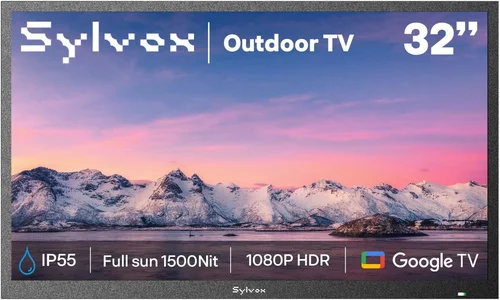
❌ Mistake: Buying an Indoor TV for Outdoor Use
Why it’s bad: Indoor TVs lack weatherproofing, UV protection, and sufficient brightness. Even under a roof, moisture, temperature changes, and dust can cause premature failure. You’ll likely void the warranty and face costly replacements.
What to do instead: Invest in a true outdoor-rated model or use a certified outdoor enclosure. The upfront cost saves money long-term.
❌ Mistake: Ignoring Viewing Angle and Glare
Why it’s bad: A TV mounted too high, too low, or facing direct sun will be unwatchable. Guests won’t enjoy their stay, leading to negative reviews.
What to do instead: Test sightlines before mounting. Use anti-glare screens, adjustable mounts, or position the TV perpendicular to the sun’s path.
❌ Mistake: Overlooking Power and Cable Management
Why it’s bad: Exposed cords are tripping hazards and invite tampering. Outdoor outlets may not be GFCI-protected, risking electrical shock.
What to do instead: Use in-ground conduit, wireless streaming where possible, and ensure all outdoor electrical work meets local codes. Hire an electrician if needed.
❌ Mistake: Choosing Based Solely on Price
Why it’s bad: Cheap “outdoor” TVs often cut corners on sealing, brightness, or build quality. They fail faster, costing more in replacements and guest dissatisfaction.
What to do instead: Balance budget with durability. Mid-range models often offer the best value for rental properties.
❌ Mistake: Skipping the Warranty Check
Why it’s bad: Without coverage, a single storm or power surge could leave you with a $2,000 paperweight.
What to do instead: Always verify warranty length, what’s covered, and whether professional installation is required for validity.
❌ Mistake: Assuming All “Weatherproof” TVs Are Equal
Why it’s bad: Marketing terms like “weather-resistant” can be misleading. Some only handle light drizzle, not heavy rain or snow.
What to do instead: Demand IP ratings and real-world test data. Read independent reviews from users in similar climates.
❌ Mistake: Forgetting About Sound
Why it’s bad: Outdoor acoustics are tricky—wind, distance, and ambient noise drown out built-in speakers.
What to do instead: Pair your TV with weatherproof outdoor speakers or a soundbar. Many outdoor TVs support Bluetooth audio for wireless setups.
Budget Guidelines: How Much Should You Spend?
- Entry-Level ($500–$1,000): Best for shaded areas or short-term rentals. Look for partial-weather models like the Seura Shadow series or portable options with 500–700 nits brightness. Expect basic smart features and limited durability. Ideal for covered patios in mild climates.
- Mid-Range ($1,000–$2,500): The sweet spot for most rental properties. Models like the SunBriteTV Veranda Series or Samsung The Terrace offer full weatherproofing, 1,000+ nits brightness, and robust smart platforms. Great for uncovered decks in moderate climates.
- Premium ($2,500–$4,500): For high-end vacation rentals or extreme environments. Features include 2,000+ nits brightness, optical bonding, built-in heaters/coolers, and commercial-grade materials. Brands like SunBriteTV Pro Series dominate here.
- Luxury ($4,500+): Reserved for luxury resorts, yachts, or permanent outdoor theaters. These include ultra-bright 4K HDR panels, integrated sound systems, and custom mounting solutions. Overkill for most rentals but unmatched in performance.
Expert Tips for Getting the Best Deal
- Buy during off-season: Prices drop in late fall and winter when demand is low. Retailers clear inventory before spring launches.
- Check rental-specific bundles: Some brands offer packages with mounts, covers, and extended warranties at discounted rates for property managers.
- Compare online vs. local dealers: Online retailers (Amazon, Crutchfield) often have better prices, but local AV specialists may include free installation or support.
- Negotiate for bulk purchases: Managing multiple units? Ask for volume discounts—many manufacturers offer 5–15% off orders of 3+ TVs.
- Read return policies carefully: Outdoor TVs are heavy and expensive to ship back. Ensure you have 30+ days to test and return if needed.
- Test before committing: If possible, rent or borrow a model for a weekend to assess visibility, ease of use, and guest feedback.
- Consider refurbished models: Certified pre-owned outdoor TVs from reputable sellers can save 20–30% with full warranties.
- Monitor flash sales: Black Friday, Prime Day, and Memorial Day often feature deep discounts on premium outdoor displays.

Frequently Asked Questions
Q: Can I use a regular TV outside if it’s under a roof?
A: Technically yes, but it’s risky. Even covered areas experience humidity, temperature swings, and dust. Without proper sealing, internal components corrode over time. For longevity and safety, use an outdoor-rated model or a certified enclosure.
Q: Do outdoor TVs need special mounting hardware?
A: Yes. Standard indoor mounts aren’t designed for the weight and environmental stress of outdoor TVs. Use VESA-compatible outdoor mounts rated for your TV’s weight and wind load. Many manufacturers sell matching mounts.
Q: How do I protect my outdoor TV during winter?
A: If your TV is rated for cold weather (check specs), it can stay outside. Otherwise, use a weatherproof cover or store it indoors. Never cover a TV while it’s warm—trapped heat causes condensation.
Q: Will an outdoor TV work with my existing streaming devices?
A: Most do, but built-in smart platforms are more convenient. If using external devices (Fire Stick, Apple TV), ensure they’re protected from moisture—use waterproof HDMI extenders or place the device indoors with a long cable.
Q: Are outdoor TVs energy hogs?
A: They use more power than indoor TVs due to higher brightness and climate control features. However, modern models with auto-dimming and efficient LEDs are much better. Look for Energy Star certification.
Q: Can I leave my outdoor TV on all day?
A: Commercial-grade models are built for 24/7 operation. Consumer outdoor TVs can handle long hours but may benefit from occasional rest to prolong panel life. Use sleep timers to automate shutdowns.
Q: What’s the difference between “all-weather” and “partial-weather” TVs?
A: All-weather TVs are fully sealed (IP65+) and designed for direct exposure to rain, snow, and sun. Partial-weather models are for covered areas only and may lack full waterproofing or extreme-temperature tolerance.
Q: Do I need a professional to install an outdoor TV?
A: For permanent wall mounts, especially on stucco, brick, or concrete, yes—a pro ensures secure anchoring and proper cable routing. Portable or freestanding units can often be set up DIY.
Q: How long do outdoor TVs typically last?
A: With proper care, 7–10 years is realistic. Harsh climates or poor maintenance can shorten this. Regular cleaning and using a cover during storms helps.
Q: Can outdoor TVs get damaged by lightning?
A: Yes. Always use a surge protector and consider unplugging during storms. For high-risk areas, install a whole-house surge suppressor.
Our Final Recommendations
- Best for Budget-Conscious Buyers: Seura Shadow 55″ – Excellent value for covered patios, 700 nits brightness, and reliable smart features under $1,200.
- Best Overall Value: SunBriteTV Veranda Series 65″ – Full weatherproofing, 1,000+ nits, and robust build quality around $2,200. Perfect for most rental scenarios.
- Best Premium Option: Samsung The Terrace 75″ Full Sun – 2,000 nits brightness, anti-glare coating, and premium design for $3,800. Ideal for luxury rentals.
- Best for Beginners: LG Outdoor Smart TV (Partial Weather) 55″ – Easy setup, intuitive webOS interface, and good app support for under $1,500.
- Best for Advanced Users: SunBriteTV Pro Series 86″ – Commercial-grade durability, 2,500 nits, and customizable mounting for $6,500+. Built for demanding environments.
Conclusion: Making the Right Choice
Choosing an outdoor TV for a rental home isn’t just about picking the shiniest screen—it’s about balancing durability, usability, and value in a way that enhances the guest experience without creating ongoing headaches. From understanding IP ratings and brightness needs to avoiding common installation pitfalls, every decision shapes how reliably your TV performs season after season. Remember: the cheapest option often costs more in the long run, while the most expensive may be overkill for your space.
Prioritize your specific needs—climate, usage frequency, guest expectations, and budget—and let those guide your selection. Whether you’re outfitting a cozy cabin or a high-traffic vacation complex, the right outdoor TV transforms outdoor spaces into inviting entertainment zones that guests will rave about. Use this guide as your roadmap, take advantage of seasonal deals, and don’t hesitate to invest in quality where it counts. Your renters—and your bottom line—will thank you.

