
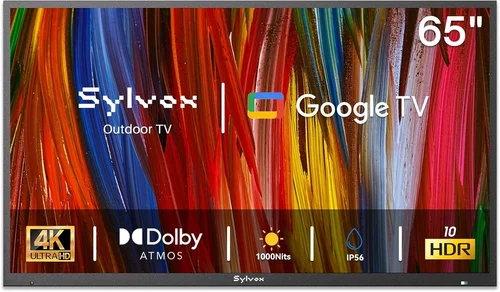
If you’ve ever tried to enjoy a movie or sports game by the pool only to squint at a phone screen or struggle with a tablet that keeps overheating in the sun, you know how frustrating it can be to find reliable outdoor entertainment. A budget poolside TV isn’t just a luxury—it’s a practical upgrade that transforms your deck, patio, or backyard into a true outdoor living space. Whether you’re hosting summer barbecues, relaxing after a swim, or watching the big game with friends, having a dedicated TV designed (or adaptable) for outdoor use makes all the difference. But with so many options flooding the market—from weather-resistant models to indoor TVs mounted under eaves—it’s easy to feel overwhelmed.
This guide is here to cut through the noise. We’ll walk you through everything you need to know to choose the right budget-friendly poolside TV without sacrificing performance or durability. You’ll learn how to balance cost with critical features like brightness, weather resistance, sound quality, and smart functionality. We’ll also help you avoid common pitfalls, compare different types of setups, and even share insider tips on when and where to buy for the best deals. By the end, you’ll have a clear, actionable plan to bring high-quality entertainment to your outdoor oasis—without blowing your budget.
The market for outdoor TVs has evolved dramatically in recent years. What used to be a niche category dominated by ultra-expensive, fully weatherproof models now includes a wide range of affordable alternatives. Many consumers are discovering that standard indoor TVs—when properly protected and mounted—can deliver excellent performance at a fraction of the cost of dedicated outdoor units. At the same time, brands like SunBrite, Samsung, and LG have introduced more accessible outdoor-ready models, while smart TV platforms like Roku, Android TV, and webOS make streaming easier than ever. This guide covers both approaches, helping you decide whether a true outdoor TV or a protected indoor model is the smarter investment for your deck.

What to Look for When Buying Buying Guide
1. Budget & Price Range
Setting a realistic budget is the first and most important step in your poolside TV journey. Prices for outdoor-capable TVs can range from under $300 for a basic indoor model with protective housing to over $3,000 for a premium, fully weatherized unit. For most homeowners, the sweet spot lies between $500 and $1,200—a range that offers solid performance, decent durability, and smart features without overspending.
When defining your budget, consider not just the TV itself but also additional costs like mounting hardware, weatherproof enclosures, cables, and possibly professional installation. A $600 TV might end up costing $900 once you factor in a $200 outdoor mount and a $100 protective cover. Be sure to account for these extras upfront to avoid surprises.
Also, remember that “budget” doesn’t mean “low quality.” Many mid-tier indoor TVs from reputable brands like TCL, Hisense, and Vizio offer 4K resolution, HDR support, and robust smart platforms at prices that rival—or even undercut—entry-level outdoor models. The key is knowing what you’re paying for and whether the added cost of a true outdoor TV is justified for your climate and usage.
2. Performance Specifications
Performance specs determine how well your TV will perform in an outdoor environment. The most critical spec for poolside use is brightness, measured in nits. Indoor TVs typically range from 250 to 400 nits, which is fine for shaded areas but struggles in direct sunlight. For decks with partial sun exposure, aim for at least 500 nits; for full sun, look for 700 nits or higher. Some outdoor TVs boast 1,000+ nits, making them readable even at noon.
Resolution is another key factor. While 1080p is still available, 4K UHD is now the standard for new TVs and offers significantly sharper detail—especially important if you’re sitting close to the screen or watching fast-paced sports. HDR (High Dynamic Range) support enhances color and contrast, making images pop even in bright conditions. Look for HDR10 or Dolby Vision compatibility.
Refresh rate matters too, especially for sports and action movies. A 60Hz panel is adequate for most viewers, but a 120Hz refresh rate (or higher with motion interpolation) delivers smoother motion and reduces blur. Input lag is also worth noting if you plan to game outdoors—look for models under 20ms for responsive gameplay.
Finally, consider connectivity. Ensure the TV has enough HDMI ports (at least three), USB inputs, and support for Wi-Fi and Bluetooth. If you’re using streaming devices like Roku Stick or Fire TV, built-in smart features may be less critical, but having them adds convenience.
3. Build Quality & Durability
Outdoor environments are harsh. Heat, humidity, rain, dust, and UV exposure can quickly degrade electronics not designed for such conditions. Even if you’re using an indoor TV, its build quality will determine how long it lasts outside.
Start with the chassis. Metal frames and reinforced corners offer better protection than all-plastic builds. Look for TVs with sealed ports and ventilation systems that prevent moisture buildup. Some models include anti-glare coatings or tempered glass to reduce reflections and protect the screen.
If you’re going the indoor-TV route, invest in a high-quality weatherproof enclosure. These cases are typically made from powder-coated aluminum or polycarbonate and feature gasket seals, filtered vents, and lockable doors. Brands like Peerless, Seura, and Outdoor Television offer enclosures rated IP54 or higher, meaning they resist dust and water splashes.
For true outdoor TVs, check the IP (Ingress Protection) rating. An IP55 rating means the TV is protected against dust and low-pressure water jets—ideal for poolside use. Higher ratings like IP65 offer even greater protection. Also, verify that the TV is rated for your climate’s temperature range. Most outdoor models operate between -22°F and 122°F (-30°C to 50°C), which covers most regions.
Durability also extends to the remote control and mounting hardware. Choose a TV with a weather-resistant remote or consider using a smartphone app for control. Mounts should be corrosion-resistant (powder-coated or stainless steel) and capable of withstanding wind loads.
4. Features & Functionality
Modern TVs come packed with features, but not all are essential for outdoor use. Focus on those that enhance usability and entertainment value in an open-air setting.
Smart TV platforms are a game-changer. Built-in apps like Netflix, YouTube, Disney+, and Prime Video let you stream content without extra devices. Roku TV, Android TV, and webOS are user-friendly and regularly updated. Avoid proprietary systems with limited app support.
Voice control via Alexa, Google Assistant, or Siri adds convenience, especially when your hands are wet or you’re lounging poolside. Look for TVs with built-in microphones or compatibility with smart speakers.
Sound quality is often overlooked but crucial outdoors, where ambient noise (waves, wind, chatter) can drown out dialogue. Many budget TVs have weak speakers (5–10W). Consider models with 20W or higher output, or plan to add external speakers or a soundbar. Some outdoor TVs include built-in weatherproof speakers.
Screen size should match your viewing distance. For decks 6–8 feet wide, a 43–50-inch TV is ideal. Larger spaces may accommodate 55–65 inches. Avoid going too big—oversized screens can be hard to see in bright light and may overwhelm the space.
Additional features like screen mirroring (Miracast, AirPlay), USB playback, and parental controls can enhance the experience. If you plan to use the TV year-round, look for models with low power consumption and sleep timers to save energy.
5. Brand Reputation
Not all TV brands are created equal—especially when it comes to outdoor performance and reliability. Stick with manufacturers known for quality, customer service, and innovation.
For true outdoor TVs, SunBrite (a subsidiary of Sylvane) is the gold standard, offering fully weatherized models with exceptional brightness and durability. However, their prices are steep, often starting above $1,500. More budget-friendly alternatives include Seura, which specializes in outdoor and mirror TVs, and Avid Power, which offers affordable outdoor-ready models.
For indoor TVs used outdoors, brands like TCL, Hisense, and Vizio dominate the budget segment with excellent value. TCL’s Roku TVs are particularly popular for their simplicity and app selection. Samsung and LG offer higher-end indoor models with superior brightness and smart features, though at a premium.
Avoid unknown or off-brand TVs, especially those sold exclusively through third-party marketplaces. These often lack proper certifications, have poor build quality, and offer minimal support. Check for Energy Star certification, which indicates efficiency and reliability.
Research brand reputation through trusted review sites (like RTINGS.com, CNET, or Wirecutter) and customer feedback. Pay attention to comments about long-term durability, especially in outdoor or humid environments.
6. Warranty & Support
A strong warranty can save you hundreds in repair or replacement costs—especially important for electronics exposed to the elements. Most indoor TVs come with a standard 1-year limited warranty, while outdoor models often include 2–3 years of coverage.
Look for brands that offer extended warranties or optional protection plans. SunBrite, for example, provides a 3-year warranty on its outdoor TVs, covering parts, labor, and even accidental damage in some cases. Some retailers (like Costco or Best Buy) offer additional coverage through third-party providers.
Support matters too. Can you easily reach customer service? Are replacement parts available? Do they offer repair services or only replacements? Brands with U.S.-based support centers tend to respond faster and more effectively.
If you’re using an indoor TV outdoors, note that modifications (like drilling holes for mounts or using third-party enclosures) may void the warranty. Check the terms carefully. Some manufacturers explicitly state that outdoor use invalidates coverage, so proceed with caution.
Finally, consider the availability of firmware updates. Smart TVs receive periodic updates to fix bugs, improve performance, and add features. Brands like Samsung and LG are known for consistent updates, while lesser-known brands may abandon support after a year or two.
7. Size & Portability
While most poolside TVs are permanently mounted, portability can be a valuable feature—especially if you move between seasons or host events in different areas.
True outdoor TVs are typically heavy and designed for fixed installation. However, some models come with optional stands or wheels for semi-portable use. If you want flexibility, consider a smaller 32–43-inch model that’s easier to move.
Indoor TVs in protective enclosures offer more portability. Many enclosures include handles or mounting brackets that allow you to relocate the setup. Just ensure the enclosure is securely closed and the TV is powered off during transport.
Weight is a practical concern. A 55-inch TV can weigh 30–40 pounds, plus another 10–20 for the mount and enclosure. Make sure your deck or wall can support the load. Use a stud finder and consult a structural engineer if unsure.
Portability also affects setup time. If you plan to store the TV indoors during winter, choose a system that’s easy to disassemble and reinstall. Modular designs with quick-release mounts save time and reduce wear.
8. User Reviews & Ratings
Never buy a TV based solely on specs or marketing claims. Real-world user reviews reveal strengths and weaknesses that specs alone can’t show.
Look for reviews from people who’ve used the TV outdoors—especially in similar climates. Comments about brightness in sunlight, sound clarity near water, and durability after rain or heat are gold. Sites like Amazon, Best Buy, and Home Depot include verified purchase reviews, which are more reliable.
Pay attention to recurring issues. If multiple users report the same problem—like poor Wi-Fi range, overheating, or remote failure—it’s likely a design flaw. Conversely, consistent praise for ease of setup, picture quality, or customer service is a good sign.
Check professional reviews too. Experts test TVs under controlled conditions and often compare models side by side. RTINGS.com provides detailed scores for picture quality, motion handling, and input lag, while CNET and Wirecutter offer practical insights.
Finally, consider the overall rating. A 4.5-star average with hundreds of reviews is more trustworthy than a 5-star rating from just a few users. Be wary of fake reviews—look for detailed, balanced feedback rather than generic praise.
Different Types of Buying Guide
Common Buying Mistakes to Avoid
❌ Mistake: Buying a Standard Indoor TV Without Protection
Why it’s bad: Indoor TVs are not designed for outdoor conditions. Exposure to moisture, heat, and UV rays can cause corrosion, screen damage, and electrical failure within weeks or months. Even under an eave, splashes from the pool or morning dew can seep into vents and ports.
What to do instead: Always use a certified weatherproof enclosure if mounting an indoor TV outdoors. Choose one with an IP54 or higher rating, proper ventilation, and a secure seal. Alternatively, invest in a true outdoor TV or an outdoor-ready model with enhanced durability.
❌ Mistake: Ignoring Brightness Requirements
Why it’s bad: A dim screen is unwatchable in sunlight. Many buyers assume their living room TV will work fine outside, only to find it’s a dark, blurry mess by the pool. This leads to frustration and the need for a replacement.
What to do instead: Match brightness (nits) to your environment. For shaded decks, 400–500 nits may suffice. For partial sun, aim for 600–700 nits. In full sun, only TVs with 800+ nits will be clearly visible. Check specs carefully—don’t rely on marketing terms like “sunlight readable.”
❌ Mistake: Overlooking Sound Quality
Why it’s bad: Outdoor spaces are noisy. Wind, water, and distant traffic can drown out dialogue, especially on TVs with weak built-in speakers. You’ll end up straining to hear or constantly adjusting the volume.
What to do instead: Choose a TV with at least 20W of audio output, or plan to add external speakers. Weatherproof Bluetooth speakers or a soundbar mounted nearby can dramatically improve clarity. Test audio during daytime hours when ambient noise is highest.
❌ Mistake: Choosing the Wrong Size
Why it’s bad: A TV that’s too small forces viewers to squint, while one that’s too large dominates the space and may be hard to see in bright light. Both scenarios ruin the experience.
What to do instead: Use the 1.5x rule: multiply your viewing distance (in inches) by 1.5 to get the ideal screen size. For example, if viewers sit 8 feet (96 inches) away, a 48-inch TV is optimal. Also consider mounting height—eye level when seated is best.
❌ Mistake: Skipping the Warranty Check
Why it’s bad: Outdoor use increases the risk of damage. If your TV fails and the warranty doesn’t cover outdoor conditions, you’re stuck with a costly repair or replacement.
What to do instead: Read the warranty terms before buying. Look for coverage of outdoor use, extended periods, and accidental damage. Consider purchasing an extended plan if available. Document your setup with photos in case of a claim.
❌ Mistake: Buying During Peak Season
Why it’s bad: Prices for outdoor electronics spike in spring and summer when demand is highest. You’ll pay more for the same product and have fewer sale options.
What to do instead: Shop in fall or winter when retailers clear inventory. Black Friday, Cyber Monday, and post-holiday sales offer deep discounts. Sign up for price alerts and monitor deal sites like Slickdeals or CamelCamelCamel.
❌ Mistake: Neglecting Mounting and Installation
Why it’s bad: A poorly mounted TV can fall, especially in windy conditions. DIY installations without proper hardware or structural support risk injury and property damage.
What to do instead: Use a heavy-duty, corrosion-resistant mount rated for your TV’s weight and size. Anchor it to wall studs or a concrete surface. If unsure, hire a professional installer. Always follow the manufacturer’s guidelines.
Budget Guidelines: How Much Should You Spend?
- Entry-Level ($300 – $600): This range includes basic 32–43-inch indoor TVs (like TCL 3-Series or Hisense A4) paired with a budget weatherproof enclosure. Expect 1080p or 4K resolution, limited brightness (300–400 nits), and basic smart features. Best for shaded decks, seasonal use, or secondary viewing areas. Durability may be a concern in harsh climates.
- Mid-Range ($600 – $1,200): The sweet spot for most buyers. You’ll find 43–55-inch 4K TVs with 500–700 nits brightness (e.g., TCL 5-Series, Vizio V-Series), robust smart platforms, and better build quality. Add a mid-tier enclosure or opt for an outdoor-ready model like the Avid Power 50″ Outdoor TV. Ideal for partial sun, frequent use, and streaming.
- Premium ($1,200 – $2,500): For enthusiasts and full-sun environments. Includes true outdoor TVs like the SunBrite Veranda Series or Seura Outdoor TVs, with 1,000+ nits brightness, IP55+ ratings, and advanced cooling. Also covers high-end indoor models with exceptional picture quality and audio. Built for year-round, all-weather performance.
- Luxury ($2,500+): Top-tier features for luxury decks and professional installations. Think 65–75-inch outdoor displays, mirror TVs, or custom-built systems with integrated sound and lighting. Often include professional installation, extended warranties, and smart home integration. Reserved for those prioritizing aesthetics and performance above cost.
Expert Tips for Getting the Best Deal
- Buy Off-Season: The best time to purchase an outdoor TV is between October and February. Retailers discount summer inventory, and you’ll avoid the spring rush. Look for Black Friday, Cyber Monday, and post-holiday sales.
- Compare Retailers: Prices vary widely. Check Amazon, Best Buy, Costco, Walmart, and specialty outdoor electronics stores. Costco often includes free shipping and extended returns. Amazon offers competitive pricing and fast delivery.
- Use Price Tracking Tools: Set up alerts on CamelCamelCamel (for Amazon) or Honey (for multiple sites) to monitor price drops. Some TVs fluctuate by $100–$200 within weeks.
- Consider Refurbished or Open-Box: Certified refurbished TVs from manufacturers or retailers like Best Buy offer significant savings (20–40% off) with full warranties. Open-box items are often returned due to buyer’s remorse, not defects.
- Check Return Policies: Outdoor setups can be tricky. Ensure the retailer offers at least 30 days to return or exchange. Some stores (like Costco) allow 90-day returns, giving you time to test in real conditions.
- Test Before Committing: If possible, view the TV in person. Check brightness, color accuracy, and remote responsiveness. For online purchases, read return policies carefully—some charge restocking fees.
- Bundle with Accessories: Some retailers offer discounts when you buy a TV, mount, and cables together. Look for package deals, especially during sales events.
- Negotiate Installation: If hiring a pro, ask for quotes from multiple installers. Some offer discounts for bundling TV mounting with other services like speaker setup or cable management.

Frequently Asked Questions
Q: Can I use a regular TV by the pool?
A: Yes, but only with a certified weatherproof enclosure. Standard indoor TVs are not designed for outdoor conditions and will fail prematurely without protection. Ensure the enclosure is rated IP54 or higher and allows for proper ventilation.
Q: How bright should my poolside TV be?
A: For shaded areas, 400–500 nits is sufficient. For partial sun, aim for 600–700 nits. In direct sunlight, only TVs with 800+ nits will be clearly visible. Check the spec sheet—don’t rely on marketing claims.
Q: Do I need a special mount for outdoor use?
A: Yes. Use a heavy-duty, corrosion-resistant mount rated for your TV’s weight and size. Powder-coated or stainless steel mounts are best. Ensure it’s anchored to a solid structure like wall studs or concrete.
Q: Will rain damage my outdoor TV?
A: A true outdoor TV with an IP55 or higher rating can withstand rain and splashes. Indoor TVs in enclosures are also protected if the case is properly sealed. Avoid placing TVs in areas with direct downpours or flooding.
Q: Can I leave my outdoor TV on all day?
A: Most outdoor TVs are designed for continuous use, but it’s wise to turn them off during storms or extreme heat. Use a timer or smart plug to automate power cycles and reduce wear.
Q: What’s the difference between an outdoor TV and an indoor TV in a case?
A: Outdoor TVs are built from the ground up for weather resistance, with sealed components, enhanced brightness, and rugged materials. Indoor TVs in cases rely on external protection and may not match the performance or longevity of dedicated models.
Q: How do I improve sound quality outdoors?
A: Add weatherproof Bluetooth speakers or a soundbar. Mount them near the TV or around the deck for immersive audio. Avoid relying solely on built-in TV speakers, which are often weak.
Q: Can I use my outdoor TV in winter?
A: Most outdoor TVs operate in temperatures from -22°F to 122°F. If you live in a cold climate, choose a model rated for low temperatures. For extreme cold, consider storing the TV indoors or using a heated enclosure.
Q: Are smart features important for outdoor TVs?
A: Yes, especially for streaming. Built-in apps eliminate the need for external devices and simplify control. Roku, Android TV, and webOS are reliable platforms with regular updates.
Q: How long do outdoor TVs last?
A: With proper care, a quality outdoor TV can last 5–7 years or more. Indoor TVs in enclosures may last 3–5 years, depending on climate and usage. Regular maintenance (cleaning, checking seals) extends lifespan.
Our Final Recommendations
- Best for Budget-Conscious Buyers: TCL 50S5400 50″ 4K Roku TV + Peerless Outdoor Enclosure – A 4K smart TV with 500 nits brightness, paired with a durable IP54 enclosure. Total cost under $800. Great for shaded decks and seasonal use.
- Best Overall Value: Avid Power 50″ Outdoor TV – A fully weatherized 4K TV with 700 nits brightness, IP55 rating, and built-in smart features. Priced around $1,100, it balances performance, durability, and affordability.
- Best Premium Option: SunBrite Veranda 55″ 4K Outdoor TV – The industry leader in outdoor displays. Offers 1,000+ nits brightness, anti-glare screen, and 3-year warranty. Ideal for full sun and year-round use. Priced at $2,200.
- Best for Beginners: Vizio V505-J01 50″ 4K TV + Seura Outdoor Case – Easy setup, user-friendly smart platform, and reliable performance. Perfect for first-time outdoor TV owners. Total cost around $900.
- Best for Advanced Users: Samsung The Terrace 65″ Partial Sun Outdoor TV – High-end QLED display with 2,000 nits brightness, HDR10+, and advanced cooling. Designed for tech-savvy users who want top-tier picture quality. Priced at $3,500.
Conclusion: Making the Right Choice
Choosing the right budget poolside TV doesn’t have to be overwhelming. By focusing on key factors like brightness, durability, smart features, and warranty, you can find a model that delivers great performance without breaking the bank. Remember, the best TV for your deck is the one that matches your environment, usage, and budget—not the one with the most features or the highest price tag.
Start by assessing your space: Is it shaded or sunny? Will the TV be used year-round or just in summer? How many people will typically watch? Then, set a realistic budget and explore options within your range. Don’t rush—take time to read reviews, compare specs, and consider long-term value over upfront cost.
Whether you go with a protected indoor TV or invest in a true outdoor model, the result will be the same: a more enjoyable, entertaining outdoor living space. Imagine movie nights under the stars, game days with friends, or quiet mornings with your favorite show—all from the comfort of your deck.
So take the plunge. With the insights from this guide, you’re equipped to make a smart, informed decision. Your perfect poolside TV is out there—ready to turn your backyard into the ultimate entertainment destination.

