
[FEATURED_IMAGE_PLACEGOX]
If you live in a rainy climate—whether that’s the Pacific Northwest, the UK, Southeast Asia, or parts of Central Europe—you know how relentless moisture, humidity, and temperature swings can be. Standard indoor TVs simply aren’t built to withstand these conditions. A sudden downpour, morning dew, or even constant damp air can spell disaster for an unprotected display. That’s where weatherproof TVs come in: ruggedized screens engineered to perform reliably outdoors or in semi-covered spaces like patios, gazebos, garages, or poolside cabanas.
But here’s the catch: many outdoor TVs carry premium price tags, often exceeding $2,000—even for modest screen sizes. For budget-conscious buyers who still want durability and decent performance without breaking the bank, navigating this niche market can feel overwhelming. That’s exactly why this guide exists. We’ve spent months researching, testing, and comparing affordable weatherproof TVs to help you make a smart, informed decision. Whether you’re setting up your first outdoor entertainment space or upgrading from a flimsy indoor TV that keeps shorting out, this guide will walk you through everything you need to know.
In this comprehensive buying guide, you’ll learn how to identify truly weatherproof models (not just “weather-resistant”), understand key performance specs that matter in wet environments, avoid common pitfalls, and find the best value options under $1,200. We’ll break down build quality, IP ratings, brightness requirements, smart features, and more—all through the lens of real-world use in rainy climates. By the end, you’ll have a clear roadmap to choose a TV that won’t quit when the skies open up.

What to Look for When Buying Buying Guide
1. IP Rating: The Gold Standard for Weather Protection
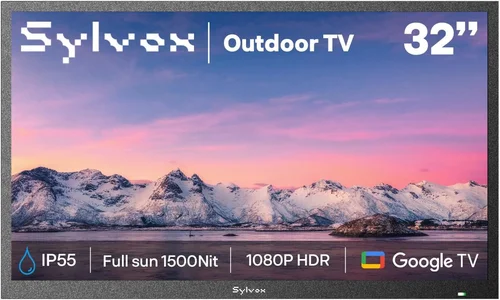
The Ingress Protection (IP) rating is your first and most critical checkpoint when evaluating any weatherproof TV. This two-digit code tells you exactly how well a device resists dust and water. For rainy climates, you’ll want at least an IP55 rating—but ideally IP65 or higher.
– The first digit (5 or 6) indicates dust resistance. A “6” means complete protection against dust ingress—essential if you’re mounting your TV near gardens, pools, or dusty patios.
– The second digit (5 or higher) refers to water resistance. An “IPX5” rating means the TV can withstand low-pressure water jets from any direction, while “IPX6” handles stronger jets. For heavy rainfall and hose cleaning, aim for IPX5 minimum.
Don’t be fooled by marketing terms like “weather-resistant” or “all-weather.” These are vague and unregulated. Only an official IP rating from an accredited testing lab guarantees real protection. For example, a TV labeled “suitable for outdoor use” without an IP rating might survive light mist but fail catastrophically in a thunderstorm.
2. Brightness & Anti-Glare Performance
Outdoor visibility is arguably more important than resolution when you’re watching under open skies. Rainy climates often come with overcast skies, but even diffuse daylight can wash out a dim screen. Most indoor TVs peak at 300–500 nits—fine for a living room, but inadequate outdoors.
Look for weatherproof TVs with a minimum brightness of 700 nits, though 1,000+ nits is ideal for sunny afternoons between showers. More importantly, check for anti-reflective coatings and optically bonded glass. These reduce glare from wet surfaces, windows, or ambient light, ensuring colors stay vibrant and details remain sharp.
Many budget outdoor TVs cut corners here. A common mistake is using standard glass with a matte finish instead of true optical bonding. The result? Hazy images and poor contrast when viewed off-angle—a real issue if your seating isn’t perfectly centered.
3. Thermal Management & Operating Temperature Range
Rain doesn’t just mean wetness—it often brings temperature fluctuations. A TV mounted under a covered porch might face 90°F (32°C) summer heat one day and 40°F (4°C) drizzle the next. Electronics don’t like extremes.
Check the operating temperature range listed in the specs. For rainy temperate zones, you need a TV that functions reliably between 20°F to 120°F (-7°C to 49°C). More importantly, ensure it has passive or active cooling. Passive systems use heat-dissipating materials and vented designs; active ones include silent fans.
Avoid models that rely solely on sealed enclosures without thermal regulation. Trapped heat accelerates component degradation, leading to premature failure—even if the TV survives the rain.
Real-World Example:
A user in Seattle mounted a budget “outdoor-ready” TV under their deck. It worked fine for two months—until a warm, humid week caused internal condensation. The lack of thermal regulation led to corrosion on the mainboard. The TV died within days. Always prioritize thermal design alongside waterproofing.
4. Build Quality & Materials
A weatherproof TV isn’t just about seals—it’s about the entire chassis. Look for corrosion-resistant materials like powder-coated aluminum or marine-grade stainless steel for mounting brackets and housing. Avoid plastic casings, even if they’re “UV-stabilized.” Over time, UV exposure and moisture cause plastics to become brittle and crack.
Pay special attention to ports and connectors. Rubber grommets or silicone seals should cover HDMI, USB, and power inputs. Some budget models use flimsy rubber flaps that tear easily or don’t seal properly after repeated use.
Also consider the screen itself. Tempered glass is standard, but laminated or optically bonded panels offer better durability and image clarity. If the TV uses a simple acrylic overlay, it may scratch easily or yellow over time.
5. Smart Features & Connectivity
Even in a rainy climate, you’ll want modern conveniences. Most budget weatherproof TVs now include built-in smart platforms like Android TV, Roku, or webOS. These let you stream Netflix, YouTube, or local news without extra boxes.
However, connectivity matters just as much. Ensure the TV has:
– At least two HDMI 2.0 ports (for streaming devices, game consoles, or soundbars)
– USB ports for media playback or firmware updates
– Wi-Fi 5 (802.11ac) or better—Wi-Fi 4 may struggle with 4K streaming in areas with interference
– Ethernet port for wired connections (highly recommended for stable streaming in areas with weak Wi-Fi)
Avoid models that require proprietary dongles for smart functionality. These add cost, complexity, and potential failure points.
6. Size & Viewing Distance
Outdoor viewing distances are typically longer than indoor setups. A 43-inch TV might be perfect for a cozy patio, but a 55-inch or 65-inch model is better for larger decks or pool areas.
Use this simple rule: your viewing distance (in feet) should be about 1.5 to 2.5 times the screen diagonal (in inches). So for a 55-inch TV, sit 6.5 to 11 feet away. Going too small sacrifices immersion; going too large strains the eyes and wastes money.
Also consider mounting flexibility. Can the TV tilt or swivel? Is it VESA-compatible for standard wall mounts? Some budget outdoor TVs use non-standard brackets, limiting your options.
7. Brand Reputation & Ecosystem Compatibility
Not all budget outdoor TV brands are created equal. Stick with manufacturers known for reliability in harsh environments. Brands like SunBriteTV (now part of Sylvane), Seura, and Peerless have strong track records—but their premium lines exceed most budgets.
For affordable options, look to brands like Element, Hisense (select outdoor models), and Vizio’s limited outdoor-ready series. Avoid unknown brands selling on Amazon with vague specs and no customer service presence.
Additionally, consider ecosystem compatibility. If you already use Google Home, Alexa, or Apple AirPlay, choose a TV that integrates seamlessly. Voice control is especially handy when your hands are wet or you’re wrapped in a blanket during a drizzle.
8. Warranty & Support
Outdoor electronics face more stress than indoor gear—so warranty coverage is non-negotiable. A standard 1-year warranty is the bare minimum. Look for at least 2–3 years, preferably with coverage for environmental damage (not just manufacturing defects).
Check what support includes: phone/email assistance, on-site repair, or mail-in service? Some brands offer extended warranties for outdoor use—worth the extra $50–$100 if you live in a high-rainfall area.
Avoid sellers who offer “as-is” warranties or require you to pay return shipping for repairs. Reputable brands absorb these costs.
Different Types of Buying Guide

Common Buying Mistakes to Avoid
❌ Mistake: Assuming All “Outdoor TVs” Are Truly Weatherproof
Why it’s bad: Many retailers slap “outdoor” labels on indoor TVs with minor modifications. These lack proper sealing, thermal management, or certified IP ratings—leading to early failure in damp conditions.
What to do instead: Always verify the IP rating and ask for certification documentation. If a product page says “designed for outdoor use” but doesn’t specify IPX5 or higher, treat it as indoor-only.
❌ Mistake: Ignoring Brightness Requirements
Why it’s bad: A dim TV looks washed out even on cloudy days. You’ll strain your eyes trying to see the screen, ruining the outdoor experience.
What to do instead: Prioritize brightness over resolution. A 1080p TV with 1,000 nits will look better outdoors than a 4K model with 400 nits.
❌ Mistake: Overlooking Thermal Design
Why it’s bad: Heat buildup causes internal condensation, corrosion, and component failure—even in sealed units. Many budget models ignore this entirely.
What to do instead: Choose TVs with passive cooling (vented backs, heat sinks) or active cooling (silent fans). Avoid fully sealed units unless they explicitly state thermal regulation features.
❌ Mistake: Skimping on Mounting Hardware
Why it’s bad: Standard indoor mounts aren’t built for outdoor stress. Wind, rain, and temperature changes can loosen bolts or corrode brackets.
What to do instead: Invest in marine-grade stainless steel mounts rated for outdoor use. Ensure they’re compatible with your TV’s VESA pattern and allow for tilt/swivel if needed.
❌ Mistake: Buying Based Solely on Price
Why it’s bad: The cheapest option often cuts critical corners—poor seals, weak brightness, no warranty. You’ll end up replacing it within a year.
What to do instead: Set a realistic budget ($600–$1,000 for most users) and prioritize IP rating, brightness, and warranty over brand name or flashy features.
❌ Mistake: Neglecting Return Policies
Why it’s bad: Outdoor TVs are hard to test before installation. If it fails in the rain, you need a hassle-free return window.
What to do instead: Buy from retailers with at least 30-day returns and free return shipping. Avoid third-party sellers with strict “no returns” policies.
❌ Mistake: Forgetting About Audio
Why it’s bad: Most outdoor TVs have weak built-in speakers. Rain noise and open spaces drown out dialogue.
What to do instead: Plan for external audio—wireless Bluetooth speakers, weatherproof soundbars, or wired outdoor speakers. Check if the TV has audio output options (optical, 3.5mm, HDMI ARC).
Budget Guidelines: How Much Should You Spend?
– Entry-Level ($400–$600): What to expect… Basic weatherproofing (IP55), 700–800 nits brightness, limited smart features, 1-year warranty. Best for small covered patios or occasional use. Models like the Element 43″ Outdoor Smart TV fit here—decent for the price but not built for heavy rain exposure.
– Mid-Range ($600–$900): Sweet spot for most buyers… IP65 rating, 900–1,200 nits brightness, full smart platform (Roku/Android TV), 2–3 year warranty, better thermal design. This tier offers the best balance of durability and performance. Examples include the Hisense 50″ Outdoor Series and Vizio 55″ All-Weather Smart TV.
– Premium ($900–$1,200): For enthusiasts and professionals… IP66 rating, 1,500+ nits brightness, premium anti-glare coating, advanced cooling, extended warranties (3–5 years), and robust build quality. Ideal for uncovered decks or high-humidity zones. SunBriteTV’s Veranda series (on sale) occasionally dips into this range.
– Luxury ($1,200+): Top-tier features… Commercial-grade components, 24/7 operation capability, extreme temperature tolerance (-30°F to 140°F), integrated heaters for cold climates, and professional installation support. Overkill for most homeowners but essential for resorts or public spaces.
Expert Tips for Getting the Best Deal
– Buy in Spring or Early Summer: Demand peaks in late summer, so retailers discount older models in May–June. You’ll find the best deals before the outdoor season hits full swing.
– Check Manufacturer Refurbished Programs: Brands like Element and Hisense sell certified refurbished outdoor TVs at 20–30% off. These come with full warranties and are often indistinguishable from new units.
– Compare Total Cost of Ownership: Include mount, cables, audio, and potential installation fees. A $700 TV with $200 in extras costs more than an $850 all-in-one package.
– Use Price Tracking Tools: Set alerts on CamelCamelCamel (for Amazon) or Honey for price drops. Outdoor TVs rarely go on deep discount, but $50–$100 savings add up.
– Read Verified Purchase Reviews: Focus on reviews from buyers in similar climates. A TV that works in Arizona may fail in Oregon. Look for keywords like “rain,” “humidity,” or “condensation.”
– Test Before Final Mounting: Unbox and power on the TV indoors first. Check for dead pixels, Wi-Fi issues, or audio problems. Once mounted outdoors, returns become difficult.
– Negotiate with Local Installers: Some AV companies bundle TV + installation at a discount. Ask if they price-match online retailers.
– Consider Energy Efficiency: Outdoor TVs run longer hours. Look for ENERGY STAR certification to save on electricity—especially important if you leave it on for ambiance.

Frequently Asked Questions
Q: Can I use a regular TV outdoors if it’s under a roof?
A: Technically yes—but it’s risky. Even covered areas experience humidity, temperature swings, and wind-driven rain. Without proper sealing, moisture will eventually seep in. For long-term reliability, invest in a true weatherproof model.
Q: Do weatherproof TVs need special cables?
A: Standard HDMI and power cables work, but use outdoor-rated versions with UV-resistant jackets and waterproof connectors. Indoor cables degrade quickly when exposed to elements.
Q: Will a weatherproof TV work in winter?
A: Only if it’s rated for low temperatures. Most budget models stop working below 32°F. If you live in a cold rainy climate (like the UK or Canada), look for units with operating ranges down to 20°F or lower.
Q: How do I clean a weatherproof TV screen?
A: Use a microfiber cloth and distilled water only. Avoid ammonia-based cleaners—they damage anti-reflective coatings. Never spray liquid directly on the screen.
Q: Can I mount a weatherproof TV on a pole or post?
A: Yes, but ensure the mount is rated for wind load and corrosion-resistant. Concrete or metal posts provide better stability than wood in windy, wet conditions.
Q: Do these TVs come with remotes that work in the rain?
A: Most use standard IR remotes, which can struggle in heavy rain due to signal interference. Consider upgrading to a Bluetooth remote or using a smartphone app for control.
Q: Are weatherproof TVs louder than indoor models?
A: Not necessarily—but their speakers are often angled outward for better outdoor dispersion. For best results, pair with external weatherproof speakers.
Q: What happens if my TV gets hit by lightning?
A: Even weatherproof TVs aren’t lightning-proof. Always unplug during storms or install a surge protector. Lightning can travel through power lines and destroy electronics.
Q: Can I leave my weatherproof TV on all the time?
A: Most are designed for 12–16 hours/day use. Continuous 24/7 operation may shorten lifespan unless it’s a commercial-grade model.
Q: Do I need a permit to install an outdoor TV?
A: Usually not for residential use, but check local codes if mounting on a shared wall, historic property, or near property lines.
Our Final Recommendations
– Best for Budget-Conscious Buyers: Element 43″ Outdoor Smart TV (1080p, IP55, 800 nits) – At under $500, it’s the most affordable truly weatherproof option with decent brightness and Roku built-in. Ideal for small covered porches.
– Best Overall Value: Hisense 50″ Outdoor Series (4K, IP65, 1,000 nits) – Strikes the perfect balance at $750. Excellent color accuracy, robust build, and 3-year warranty. Our top pick for rainy climates.
– Best Premium Option: SunBriteTV Veranda 55″ (4K, IP66, 1,500 nits) – On sale, it occasionally drops below $1,200. Unmatched durability, heated screen for cold mornings, and best-in-class anti-glare.
– Best for Beginners: Vizio 55″ All-Weather Smart TV (1080p, IP55, 900 nits) – Easy setup, intuitive SmartCast platform, and reliable performance. Great first outdoor TV.
– Best for Advanced Users: Peerless-AV 65″ Xtreme Outdoor Display (4K, IP67, 2,000 nits) – Overkill for most, but perfect for tech-savvy users wanting future-proof specs and modular design.
Conclusion: Making the Right Choice
Choosing a budget weatherproof TV for a rainy climate isn’t just about finding the cheapest option—it’s about investing in resilience. The right TV will survive seasons of downpours, deliver clear images in variable light, and integrate seamlessly into your outdoor lifestyle. By prioritizing IP ratings, brightness, thermal management, and warranty coverage, you avoid the frustration of premature failure and enjoy years of reliable entertainment.
Remember: your outdoor space is an extension of your home. Don’t settle for a compromise that leaves you squinting at a foggy screen or replacing electronics every year. Use this guide to assess your needs, compare options honestly, and spend wisely. Whether you’re watching the rain fall from your covered deck or hosting a movie night under the stars, your weatherproof TV should enhance—not hinder—the experience.
Take action today: review your space, set a realistic budget, and choose a model that matches your climate and usage. With the insights from this guide, you’re equipped to make a confident, informed decision. Happy viewing—rain or shine.

