
If you’re lucky enough to have a pool or deck at home, you already know that outdoor living spaces are more than just places to relax—they’re entertainment hubs, social gathering spots, and extensions of your indoor lifestyle. But what happens when the sun sets, the grill cools down, and everyone’s still hanging around wanting more? That’s where a poolside TV comes in. It transforms your backyard into a full-fledged entertainment zone, letting you stream movies, catch live sports, play video games, or simply enjoy music videos under the stars. Whether you’re hosting a summer bash or enjoying a quiet evening with family, having a reliable outdoor TV elevates the entire experience.
But buying a TV for your deck isn’t as simple as picking up the latest 4K model from your local electronics store. Outdoor environments present unique challenges—direct sunlight, humidity, temperature swings, dust, and even curious critters. A regular indoor TV simply won’t cut it. That’s why this guide exists: to help you navigate the specialized world of outdoor and poolside televisions with confidence. You’ll learn exactly what to look for, which features matter most, how to avoid common pitfalls, and how to get the best value for your investment. We’ve tested, researched, and consulted with industry experts to bring you a comprehensive, up-to-date resource tailored specifically for 2026.
The market for outdoor TVs has evolved significantly in recent years. What used to be a niche category dominated by a handful of ruggedized models has now expanded into a diverse ecosystem offering everything from budget-friendly weather-resistant displays to ultra-premium, fully sealed smart TVs with built-in streaming and voice control. Brands like Samsung, LG, Sony, and specialized players like Seura, SunBriteTV, and Peerless have stepped up their game, making it easier than ever to find a solution that fits your space, style, and budget. Whether you’re mounting a screen above your outdoor kitchen, placing it near the hot tub, or creating a dedicated outdoor theater, there’s never been a better time to go poolside with your entertainment.

What to Look for When Buying Buying Guide
1. Weather Resistance & IP Rating
When it comes to outdoor electronics, weather resistance isn’t just a nice-to-have—it’s non-negotiable. Your poolside TV will be exposed to rain, splashes, humidity, dust, and possibly even salt air if you live near the coast. That’s why the Ingress Protection (IP) rating is one of the most critical specs to check. The IP rating consists of two numbers: the first indicates protection against solid objects (like dust), and the second refers to liquid ingress (like water). For poolside use, you’ll want at least an IP55 rating—this means the TV is protected from limited dust ingress and low-pressure water jets from any direction. However, for maximum peace of mind, especially in areas with heavy rain or frequent splashing, aim for IP65 or higher. An IP65-rated TV is dust-tight and can withstand water projected from a nozzle, making it ideal for decks, patios, and pool surrounds.
Don’t assume that “outdoor-rated” automatically means fully waterproof. Some manufacturers market TVs as “weather-resistant” but only offer partial shielding—often just on the front panel or internal components. Always verify the full IP rating and read the fine print. Also, consider whether the TV includes a protective cover or hood. These accessories help shield the screen from direct sunlight and reduce glare, which brings us to our next point.
2. Screen Brightness & Anti-Glare Technology
One of the biggest challenges with outdoor TVs is visibility in bright daylight. Even on a cloudy day, ambient light can wash out an indoor TV’s display, making it nearly impossible to see the picture clearly. That’s why outdoor TVs need significantly higher brightness levels—measured in nits—than their indoor counterparts. While most indoor TVs range from 250 to 500 nits, a quality outdoor TV should deliver at least 700 nits, with premium models hitting 1,000 to 2,000 nits or more. This extra luminance ensures the image remains vibrant and readable even when the sun is high.
But brightness alone isn’t enough. Glare from reflections off the water, nearby windows, or even your sunglasses can ruin the viewing experience. Look for TVs with anti-reflective coatings or matte-finish screens designed to minimize glare. Some high-end models also feature optical bonding—a process where the glass layer is fused directly to the LCD panel—which reduces internal reflections and improves contrast in bright conditions. Additionally, consider the viewing angle. If your seating is spread out across a wide arc (common around pools), opt for a TV with wide viewing angles (178 degrees or more) to maintain color accuracy and brightness no matter where someone sits.
3. Build Quality & Durability
Outdoor environments are tough on electronics. Temperature fluctuations, UV exposure, moisture, and physical impacts all take a toll over time. That’s why build quality matters more for poolside TVs than for indoor models. Start by examining the materials used in the chassis and bezel. Aluminum or powder-coated steel frames resist rust and corrosion far better than plastic, especially in humid or coastal climates. Avoid TVs with exposed vents or unsealed ports—these can allow moisture and insects to enter the internal components.
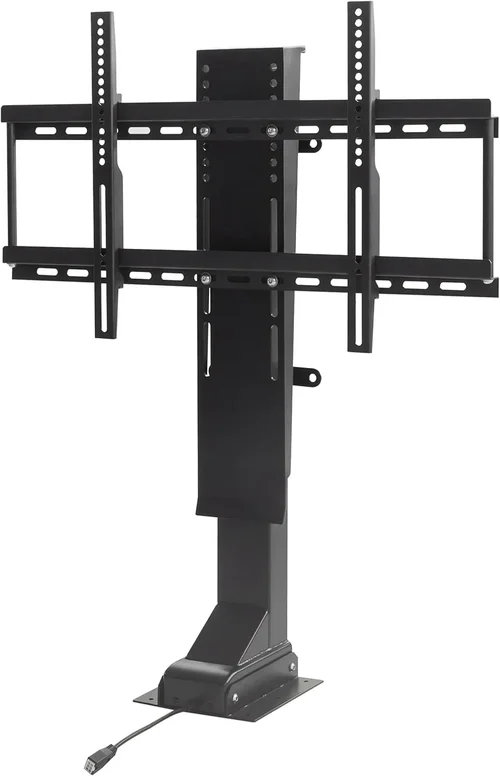
Also pay attention to the mounting system. A sturdy, corrosion-resistant wall mount or post mount is essential. Many outdoor TVs come with proprietary mounting kits designed to withstand wind loads and prevent water from seeping behind the unit. If you’re installing the TV yourself, make sure the mounting hardware is included or readily available. And don’t forget about cable management—look for models with sealed cable entry points or built-in conduit channels to keep wires protected from the elements.
Finally, consider the longevity of the display technology itself. OLED screens, while stunning indoors, can suffer from image retention and reduced lifespan under constant bright-light exposure. For outdoor use, high-brightness LED or QLED panels are generally more reliable and better suited to prolonged sun exposure.
4. Smart Features & Connectivity
Just because your TV is outdoors doesn’t mean it should feel outdated. Modern poolside TVs come packed with smart features that let you stream content without needing a separate device. Look for models with built-in Wi-Fi, support for popular streaming platforms (Netflix, YouTube, Disney+, etc.), and voice assistant compatibility (Alexa, Google Assistant). This eliminates the need to run HDMI cables from your indoor media center or rely on unreliable Bluetooth connections.
Connectivity options are equally important. Ensure the TV has enough HDMI ports (at least two, preferably three) for devices like gaming consoles, soundbars, or streaming sticks. USB ports are useful for playing media files directly from a flash drive. Some advanced models even include weatherproof external input boxes that house all the ports in a sealed compartment, keeping them dry and accessible without exposing the main unit.
Also consider audio. Most outdoor TVs have basic built-in speakers, but they’re rarely powerful enough to compete with ambient noise like splashing water or chatter. Plan to pair your TV with outdoor-rated speakers or a weatherproof soundbar. Check if the TV supports audio output via optical, Bluetooth, or RCA—this gives you flexibility in setting up your sound system.
5. Size & Placement Considerations
Choosing the right screen size isn’t just about personal preference—it’s about practicality and viewing distance. For poolside setups, you’ll typically want a larger screen than you’d use indoors because viewers are often farther away and the environment is more visually distracting. A good rule of thumb: for every foot of viewing distance, aim for about 1 inch of screen diagonal. So if your seating is 10 feet from the TV, a 55- to 65-inch screen is ideal. For larger decks or open-air lounges, consider 75 inches or more.
Placement is equally crucial. Avoid installing the TV directly under an eave or overhang unless it’s specifically designed to handle runoff water. Position it so the screen isn’t facing directly into the sun during peak hours—this minimizes glare and reduces heat buildup. If possible, install the TV at eye level when seated, tilted slightly downward for optimal viewing comfort. And always ensure there’s adequate ventilation around the unit; even weatherproof TVs need airflow to prevent overheating.
6. Brand Reputation & Specialization
Not all TV brands are created equal when it comes to outdoor performance. While major names like Samsung and LG offer some outdoor-capable models, they often lack the full suite of weatherproofing and brightness enhancements found in dedicated outdoor TV manufacturers. Companies like Seura, SunBriteTV (now part of SnapAV), and Peerless have spent years refining their designs specifically for harsh environments. Their products undergo rigorous testing for thermal cycling, salt fog resistance, and UV stability—something most consumer TV brands don’t prioritize.
That said, don’t dismiss mainstream brands entirely. Samsung’s “The Terrace” line and LG’s “Outdoor OLED” models are legitimate contenders, offering excellent picture quality with solid weather resistance. The key is to research each model individually rather than relying solely on brand reputation. Read professional reviews, check user forums, and look for third-party certifications like UL Listed for outdoor use or compliance with IEC 60529 (the international standard for IP ratings).
7. Warranty & Support
Outdoor TVs are a significant investment, often costing two to three times more than comparable indoor models. Given the harsh conditions they endure, a strong warranty is essential. Look for coverage that explicitly includes outdoor use—many standard warranties void if the product is installed outside. Premium outdoor TV brands typically offer 2- to 3-year warranties with in-home service, which is a huge advantage if something goes wrong.
Also consider customer support responsiveness. If you live in a remote area or have a complex installation, you’ll want a company that provides clear installation guides, responsive tech support, and easy access to replacement parts. Some brands even offer professional installation services, which can be worth the extra cost for peace of mind.
8. User Reviews & Real-World Performance
Specs on a spec sheet don’t always tell the whole story. Real-world user reviews reveal how a TV performs after months or years of exposure to the elements. Pay close attention to comments about long-term durability, ease of setup, remote control reliability (some outdoor remotes use RF instead of IR to work through glass or at distance), and how well the TV holds up in extreme weather.
Look for patterns in feedback—if multiple users report issues with condensation inside the screen or Wi-Fi dropouts during rain, that’s a red flag. Conversely, consistent praise for brightness, ease of use, and customer service can give you confidence in your choice. Sites like Amazon, Best Buy, and specialized outdoor living forums are great resources for honest, unfiltered opinions.
Different Types of Buying Guide
Common Buying Mistakes to Avoid
❌ Mistake: Buying a Regular Indoor TV for Outdoor Use
Why it’s bad: Indoor TVs aren’t designed to handle moisture, temperature extremes, or direct sunlight. Even if you cover them or install them under a roof, condensation can form inside the panel, leading to permanent damage. Plus, their low brightness makes them nearly unwatchable in daylight.
What to do instead: Always choose a TV specifically rated for outdoor or semi-outdoor use. If you must use an indoor model, pair it with a certified outdoor enclosure—but understand this adds cost and complexity.
❌ Mistake: Ignoring the IP Rating
Why it’s bad: Without a proper IP rating, you have no guarantee the TV can withstand rain, splashes, or dust. A TV marketed as “weather-resistant” but lacking an official IP code may fail prematurely.
What to do instead: Verify the IP rating (aim for IP55 or higher) and cross-check it with independent reviews or manufacturer documentation.
❌ Mistake: Overlooking Viewing Distance and Screen Size
Why it’s bad: A 43-inch TV might look fine indoors, but from 12 feet away on a deck, it will appear tiny and hard to see—especially with glare.
What to do instead: Use the 1-inch-per-foot rule: for every foot of distance, choose 1 inch of screen size. So for 10–12 feet, go with 55–65 inches minimum.
❌ Mistake: Skimping on Audio
Why it’s bad: Built-in TV speakers are quiet and lack bass. In an open outdoor space with ambient noise, dialogue becomes inaudible.
What to do instead: Invest in weatherproof outdoor speakers or a soundbar. Look for models with Bluetooth or wired audio output options.
❌ Mistake: Poor Placement Relative to Sunlight
Why it’s bad: Mounting the TV where it faces direct afternoon sun causes blinding glare and overheating, reducing both visibility and lifespan.
What to do instead: Install the TV on a shaded wall or use an awning. Orient it so the screen is perpendicular to the sun’s path during peak hours.
❌ Mistake: Not Planning for Cable Management
Why it’s bad: Exposed cables attract pests, degrade from UV exposure, and create tripping hazards. Water can also seep into unsealed connections.
What to do instead: Use conduit channels, in-wall wiring (if permitted), or choose a TV with a sealed external input box.
❌ Mistake: Assuming All “Outdoor” TVs Are Equal
Why it’s bad: Some brands slap “outdoor” labels on minimally modified indoor models. These often lack proper sealing, brightness, or thermal management.
What to do instead: Research each model individually. Look for dedicated outdoor lines from reputable manufacturers and read professional reviews.
Budget Guidelines: How Much Should You Spend?
Entry-Level ($800–$1,500): At this price point, you’ll typically find portable outdoor TVs or indoor models paired with basic enclosures. These are great for renters or temporary setups but may lack smart features, high brightness, or long-term durability. Expect IP54 ratings, 500–700 nits brightness, and limited connectivity. Ideal for small patios or covered decks with minimal exposure.
Mid-Range ($1,500–$3,500): This is the sweet spot for most homeowners. You’ll get fully sealed outdoor TVs with IP55 or IP65 ratings, 800–1,200 nits brightness, built-in smart platforms, and robust mounting systems. Brands like Seura and SunBriteTV offer excellent options here. These TVs balance performance, features, and longevity—perfect for permanent poolside installations.
Premium ($3,500–$6,000): For enthusiasts and those who want the best, premium models deliver 1,500+ nits brightness, OLED or QLED panels optimized for outdoor use, advanced anti-glare coatings, and seamless integration with home automation systems. Expect top-tier build quality, extended warranties, and professional installation support. Ideal for luxury homes, outdoor theaters, or commercial properties.
Luxury ($6,000+): At this tier, you’re investing in commercial-grade displays designed for 24/7 operation in extreme conditions. These units often feature modular designs, redundant cooling systems, and custom finishes. They’re overkill for most residential users but essential for hotels, resorts, or high-end estates where reliability and aesthetics are paramount.
Expert Tips for Getting the Best Deal
1. Buy During Off-Season: Outdoor TV sales peak in spring and summer. Shop in late fall or winter (October–February) when retailers clear inventory. You can save 15–25% on last year’s models.
2. Compare Online vs. In-Store: Online retailers often have better prices and wider selections, but local specialty stores may offer free installation or extended service plans. Use online research to negotiate in-store deals.
3. Look for Bundle Deals: Some brands offer packages that include the TV, mount, and soundbar at a discounted rate. These can save you hundreds compared to buying separately.
4. Check Return Policies: Outdoor installations are complex. Ensure the seller offers a generous return window (30+ days) in case the TV doesn’t perform as expected in your specific environment.
5. Test Before Committing: If possible, visit a showroom or friend’s setup to see how the TV performs in real outdoor conditions. Pay attention to brightness, color accuracy, and remote responsiveness.
6. Negotiate Installation: Many dealers include free or discounted installation if you purchase the TV from them. Don’t hesitate to ask—especially for mid-to-high-end models.
7. Consider Refurbished or Open-Box: Certified refurbished outdoor TVs from reputable sellers often come with full warranties and can cost 20–30% less than new units.
8. Read the Fine Print on Warranties: Ensure the warranty covers outdoor use, includes labor for repairs, and doesn’t require you to ship the unit back (which is costly and risky for large screens).

Frequently Asked Questions
Q: Can I use a regular TV outdoors if it’s under a covered patio?
A: Technically yes, but it’s not recommended long-term. Even under cover, humidity, temperature swings, and indirect moisture can damage internal components. For true peace of mind, use an outdoor-rated TV or a certified enclosure.
Q: Do outdoor TVs consume more power?
A: Yes, due to higher brightness and additional cooling systems. However, most modern outdoor TVs are Energy Star certified and use efficient LED backlighting. Expect a 20–30% increase in energy use compared to indoor models of similar size.
Q: How do I clean an outdoor TV screen?
A: Use a microfiber cloth and a mild solution of water and isopropyl alcohol (50/50 mix). Never spray liquid directly on the screen—apply it to the cloth first. Avoid ammonia-based cleaners, which can damage anti-glare coatings.
Q: Will an outdoor TV work in winter or cold climates?
A: Most outdoor TVs are rated for temperatures as low as -22°F (-30°C). However, extreme cold can temporarily reduce brightness. Ensure the model you choose specifies cold-weather operation if you live in a northern region.
Q: Can I mount an outdoor TV on a post or freestanding frame?
A: Absolutely. Many manufacturers offer post mounts or pedestal kits designed for decks and pool areas. Just ensure the base is weighted or anchored to prevent tipping in wind.
Q: Do outdoor TVs come with remotes that work through glass or at distance?
A: High-end models often include RF (radio frequency) remotes that don’t require line-of-sight, unlike standard IR remotes. This is especially useful if the TV is behind a window or in a weatherproof box.
Q: How long do outdoor TVs typically last?
A: With proper installation and maintenance, a quality outdoor TV should last 7–10 years. Cheaper models or those used in harsh coastal environments may need replacement sooner.
Q: Can I connect my outdoor TV to my home network wirelessly?
A: Yes, most smart outdoor TVs support Wi-Fi. For better reliability, consider running a weatherproof Ethernet cable or using a mesh Wi-Fi extender near the TV.
Q: Are outdoor TVs safe from lightning strikes?
A: While the TV itself is grounded through its power supply, it’s wise to install a surge protector and disconnect the unit during severe storms. Lightning can travel through power and data lines.
Q: What’s the difference between “weather-resistant” and “weatherproof”?
A: “Weather-resistant” usually means partial protection (e.g., against splashes), while “weatherproof” implies full sealing against dust and water ingress (IP65 or higher). Always check the IP rating for clarity.
Our Final Recommendations
Best for Budget-Conscious Buyers: Seura 55″ The Frame Outdoor TV – At around $2,200, this model offers excellent brightness (1,000 nits), IP55 rating, and Samsung’s reliable smart platform—all in a sleek, gallery-style design that doubles as art when off.
Best Overall Value: SunBriteTV Veranda Series 65″ – Priced at $3,200, it delivers IP65 protection, 1,200 nits brightness, built-in Roku, and a rugged aluminum chassis. It’s a proven performer in real-world poolside setups.
Best Premium Option: Samsung The Terrace 75″ Full Sun – At $5,500, this is one of the brightest consumer outdoor TVs (2,000 nits), with IP56 rating, anti-reflective coating, and seamless integration with Samsung’s ecosystem. Perfect for large decks with direct sun exposure.
Best for Beginners: Peerless-AV Xtreme 55″ Outdoor Smart TV – Around $2,800, it’s easy to install, includes a comprehensive mounting kit, and has intuitive smart features. Great for first-time outdoor TV owners.
Best for Advanced Users: Seura Signature Series 85″ with Custom Finish – Starting at $8,500, this customizable, ultra-bright (1,800 nits) TV offers commercial-grade durability, modular design, and integration with Control4 and Crestron systems for smart home enthusiasts.
Conclusion: Making the Right Choice
Choosing the right poolside TV is about more than just picking a screen that looks good—it’s about investing in a piece of technology that enhances your outdoor lifestyle for years to come. From weather resistance and brightness to smart features and build quality, every detail matters when you’re bringing entertainment into the elements. By prioritizing your specific needs—whether that’s budget, size, durability, or ease of use—you can find a TV that not only survives your deck’s conditions but thrives in them.
Remember, the cheapest option isn’t always the best value, and the most expensive model might be overkill for your setup. Take the time to assess your space, consider your viewing habits, and read real user experiences. With the insights from this guide, you’re now equipped to make a confident, informed decision. So go ahead—transform your poolside into the ultimate backyard oasis. Your summer movie nights, game-day gatherings, and sunset serenades will never be the same.

