
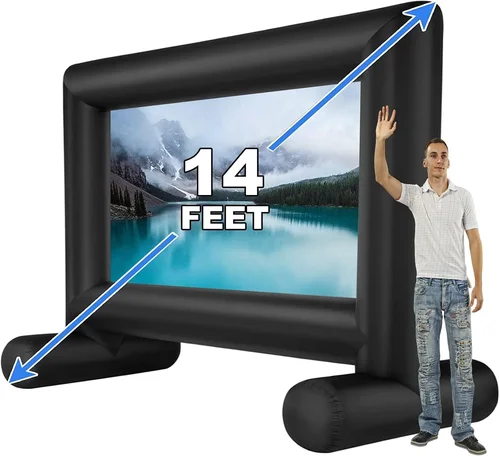
Transforming your backyard into a cozy outdoor cinema is one of the most rewarding home entertainment upgrades you can make. Whether you’re hosting family movie nights under the stars, screening the big game for friends, or simply enjoying a quiet evening with your favorite film, having the right TV makes all the difference. But choosing a backyard TV isn’t as simple as picking up any old screen from the store—outdoor environments present unique challenges like glare, weather exposure, temperature swings, and ambient light that indoor TVs simply aren’t built to handle.
That’s why this comprehensive buying guide exists. We’ve tested, researched, and consulted with industry experts to bring you everything you need to know before investing in a backyard TV. From understanding critical performance specs to avoiding common pitfalls, we’ll walk you through every step of the decision-making process. By the end of this guide, you’ll not only know what features matter most but also how to get the best value for your budget—whether you’re spending a few hundred dollars or over a thousand.
The market for outdoor TVs has evolved significantly in recent years. What once meant bulky, expensive commercial-grade displays now includes sleek, consumer-friendly options that blend performance with practicality. Brands like SunBriteTV, Samsung, LG, and even newer entrants like Sylvane and Peerless have introduced models specifically engineered for outdoor use. At the same time, many homeowners are creatively adapting indoor TVs with weatherproof enclosures or strategic placement—but these DIY solutions come with risks and limitations. This guide will help you navigate both dedicated outdoor TVs and smart alternatives so you can make an informed choice tailored to your space, climate, and viewing habits.

What to Look for When Buying a Backyard TV
1. Weather Resistance & IP Rating
When it comes to backyard TVs, weather resistance isn’t optional—it’s essential. Unlike indoor TVs, outdoor models must withstand rain, snow, dust, humidity, and even extreme temperatures without failing prematurely. The key metric here is the IP (Ingress Protection) rating, which tells you exactly how well the TV resists solids and liquids.
Look for a minimum IP55 rating, which means the TV is protected against low-pressure water jets from any direction and limited dust ingress. For full four-season durability—especially in areas with heavy rain, snow, or coastal salt air—opt for IP65 or higher. IP65 ensures complete protection against dust and powerful water jets, making it ideal for uncovered patios or decks. Some premium models even boast IP66 or IP67 ratings, offering near-total waterproofing.
Beyond the rating itself, examine the build details. Sealed ports, corrosion-resistant screws, and gaskets around vents and speakers are signs of thoughtful engineering. Avoid TVs with exposed circuitry or flimsy plastic backs—these may pass basic tests but won’t last more than a season in harsh conditions.
2. Brightness & Anti-Glare Performance
One of the biggest challenges of outdoor viewing is ambient light. Sunlight reflecting off screens turns vibrant images into washed-out ghosts, ruining the cinematic experience. That’s why brightness—measured in nits—is arguably more important outdoors than resolution or color accuracy.
For shaded areas like covered patios or pergolas, aim for at least 700 nits of brightness. But if your setup is in direct sunlight or partial shade, you’ll need 1,000 nits or more. Premium outdoor TVs often deliver 1,500–2,000 nits, rivaling commercial digital signage. This extra luminance ensures colors pop and details remain visible even at midday.
Equally important is anti-glare technology. Look for TVs with matte or anti-reflective coatings on the screen surface. These diffuse incoming light rather than reflecting it directly into viewers’ eyes. Some models also feature optically bonded glass, which reduces internal reflections by fusing the LCD layer directly to the outer glass—this improves contrast and clarity in bright conditions.
Don’t confuse high brightness with poor energy efficiency. Modern LED-backlit outdoor TVs use local dimming and adaptive brightness sensors to conserve power when full luminance isn’t needed (like during evening screenings). This smart balancing act keeps electricity costs reasonable while maintaining visibility.
3. Screen Size & Viewing Distance
Choosing the right screen size isn’t just about going big—it’s about matching dimensions to your seating arrangement and space constraints. A TV that’s too small forces viewers to squint; one that’s too large overwhelms the scene and strains the eyes.
As a general rule, multiply your optimal viewing distance (in feet) by 8 to get the recommended screen diagonal (in inches). For example, if your seating is 10 feet from the screen, a 80-inch TV (10 × 8) would be ideal. However, outdoor settings often allow for more flexibility. If you have ample space and want an immersive experience, don’t hesitate to go larger—many families enjoy 90- to 100-inch screens for backyard movie nights.
Consider your mounting options too. Will the TV be wall-mounted, on a stand, or inside a weatherproof cabinet? Measure the available area carefully, including clearance for ventilation and cable routing. Also, factor in portability if you plan to move the TV between locations (e.g., from patio to garage).
Keep in mind that larger screens consume more power and may require stronger mounting hardware. For screens over 75 inches, consult a professional installer—especially if mounting on an exterior wall or freestanding pole.
4. Resolution & Picture Quality
While brightness handles the “visibility” challenge outdoors, resolution determines how sharp and detailed your content looks. Today’s standard is 4K UHD (3840 × 2160 pixels), and it’s strongly recommended for any TV over 55 inches. On large outdoor screens, lower resolutions like 1080p appear pixelated when viewed up close.
But resolution alone doesn’t guarantee great picture quality. Look for TVs with high dynamic range (HDR) support—specifically HDR10, HLG, or Dolby Vision. HDR enhances contrast, color depth, and shadow detail, making nighttime scenes richer and daylight scenes more lifelike. This is especially valuable outdoors, where lighting conditions vary dramatically throughout the day.
Color accuracy matters too. Outdoor TVs with wide color gamuts (covering 90%+ of DCI-P3) reproduce cinematic colors faithfully. Avoid models that oversaturate reds and greens—this might look “vibrant” at first but becomes fatiguing over time.
Finally, consider refresh rate. A 60Hz panel is fine for most movies and sports, but if you watch fast-action content like racing or gaming, look for 120Hz support with motion interpolation. This reduces blur and judder, keeping fast-moving subjects crisp.
5. Audio Capabilities & Sound Output
Most outdoor TVs come with built-in speakers, but don’t expect theater-level sound from them. Due to space and weatherproofing constraints, internal audio systems are often underpowered and lack bass. That said, some models include enhanced audio features like Dolby Audio, DTS:X, or virtual surround sound to improve clarity and immersion.
For casual viewing, built-in speakers may suffice—especially if you’re seated close to the screen. But for group gatherings or music-heavy content, we strongly recommend pairing your TV with external outdoor speakers. Weather-resistant soundbars or wireless speaker systems (like those from Sonos, Bose, or Polk) can dramatically elevate the experience.
Check the TV’s audio outputs before buying. Optical (TOSLINK), HDMI ARC, and Bluetooth 5.0+ are ideal for connecting external audio gear. Avoid models that only offer analog RCA or 3.5mm jacks—these limit compatibility and sound quality.
6. Smart Features & Connectivity
Modern backyard TVs aren’t just dumb screens—they’re full-fledged smart platforms. Built-in Wi-Fi, streaming apps (Netflix, YouTube, Disney+, etc.), and voice assistants (Google Assistant, Alexa) let you cut the cord and enjoy content without extra devices.
However, not all smart TVs are created equal. Check the operating system: Android TV, webOS (LG), Tizen (Samsung), and Roku TV each have strengths and weaknesses. Android TV offers the most app flexibility, while Roku is praised for its simplicity and reliability. Avoid proprietary systems with limited app stores—they quickly become outdated.
Connectivity is equally important. Ensure the TV has enough HDMI ports (at least 3–4) for streaming sticks, gaming consoles, soundbars, and cable boxes. USB ports are useful for playing media files or updating firmware. Ethernet ports provide stable internet for 4K streaming, especially if your Wi-Fi signal is weak outdoors.
Also verify that the TV supports the latest HDMI standards (HDMI 2.0 or 2.1) for 4K@60Hz and HDR passthrough. Older HDMI 1.4 ports may bottleneck performance.
7. Power Consumption & Energy Efficiency
Outdoor TVs often run for hours at a time, especially during summer movie marathons or holiday gatherings. High brightness and constant operation can lead to surprisingly high electricity bills if you’re not careful.
Look for ENERGY STAR-certified models, which meet strict efficiency guidelines set by the EPA. These TVs use advanced backlighting, sleep modes, and adaptive brightness to reduce power draw without sacrificing performance. For example, a 75-inch outdoor TV might consume 150–250 watts under full brightness, but drops to 50–80 watts in eco mode.
Consider solar compatibility if you’re off-grid or eco-conscious. Some outdoor TVs work well with portable solar generators or battery systems, though you’ll need to calculate total wattage requirements carefully.
8. Mounting Options & Installation Flexibility
How you mount your TV affects both safety and viewing comfort. Most outdoor TVs support standard VESA mounting patterns (200×200, 400×400, etc.), allowing compatibility with third-party brackets. However, outdoor-specific mounts often include tilt, swivel, and extension features to optimize angle and reduce glare.
Wall mounts are common, but freestanding poles or ceiling mounts work better for open decks or uneven surfaces. Ensure the mount is rated for outdoor use—galvanized steel or powder-coated aluminum resists rust and corrosion.
Professional installation is recommended for heavy units (>80 lbs) or complex setups. Improper mounting can damage your home’s exterior or cause the TV to fall. Always follow local building codes and use appropriate anchors for your wall material (wood, brick, concrete).
Different Types of Backyard TVs

Common Buying Mistakes to Avoid
❌ Mistake: Buying an Indoor TV for Outdoor Use Without Protection
Why it’s bad: Indoor TVs lack weather sealing, corrosion-resistant components, and proper ventilation for outdoor temps. Exposure to moisture, even in light rain, can cause immediate electrical failure or long-term corrosion. Warranty claims are almost always denied for outdoor use.
What to do instead: Either invest in a certified outdoor TV or use a high-quality weatherproof enclosure designed for your specific TV model. Never assume “it’ll be fine under the awning”—condensation and humidity alone can ruin an indoor set.
❌ Mistake: Ignoring Brightness Requirements
Why it’s bad: A 300-nit indoor TV will look dim and washed out in daylight, no matter how good its resolution. You’ll end up squinting or only watching after sunset, defeating the purpose of an outdoor setup.
What to do instead: Match brightness to your environment: 700+ nits for shade, 1,000+ for partial sun, and 1,500+ for direct sunlight. Check real-world reviews—not just spec sheets—for brightness performance.
❌ Mistake: Overlooking Audio Needs
Why it’s bad: Wind, distance, and ambient noise (birds, traffic) drown out weak built-in speakers. Poor audio ruins immersion and forces viewers to strain to hear dialogue.
What to do instead: Plan for external audio from day one. Budget for weatherproof speakers or a soundbar. Test audio setup during daylight hours when ambient noise is highest.
❌ Mistake: Choosing the Wrong Mounting Solution
Why it’s bad: Using indoor mounts outdoors invites rust, instability, and potential collapse. Improperly secured TVs can fall, causing injury or property damage.
What to do instead: Use marine-grade or powder-coated outdoor mounts rated for your TV’s weight and size. Consult a professional if mounting on brick, stucco, or uneven surfaces.
❌ Mistake: Neglecting Power and Connectivity Planning
Why it’s bad: Running extension cords across lawns creates tripping hazards and voltage drops. Weak Wi-Fi signals cause buffering during streaming.
What to do instead: Install a dedicated outdoor GFCI outlet near the mounting location. Use weatherproof cable conduits and Wi-Fi extenders or mesh networks to boost signal strength.
❌ Mistake: Skipping the Warranty Check
Why it’s bad: Many “outdoor” TVs have limited warranties that exclude weather-related damage or require professional installation for coverage.
What to do instead: Read the fine print. Choose brands that offer at least a 2-year outdoor-specific warranty. Register your product immediately after purchase.
❌ Mistake: Forgetting About Seasonal Storage
Why it’s bad: Even all-weather TVs benefit from winter storage in extreme climates. Prolonged exposure to sub-zero temps or UV radiation degrades components over time.
What to do instead: If you live in a region with harsh winters, consider a portable model or invest in a storage cover. Alternatively, choose a TV with a wide operating temperature range (-22°F to 122°F or better).
Budget Guidelines: How Much Should You Spend?
Entry-Level ($600 – $1,200): This tier includes weatherproof enclosures paired with mid-range indoor TVs (55–65 inches, 4K, basic smart features). Ideal for covered patios with minimal sun exposure. Expect decent picture quality but limited brightness (500–700 nits) and basic audio. Brands like Sylvane and Kanto offer solid bundles here.
Mid-Range ($1,200 – $2,200): The sweet spot for most homeowners. These are dedicated outdoor TVs with IP55+ ratings, 1,000+ nits brightness, HDR support, and robust smart platforms. Sizes range from 65 to 85 inches. Models from SunBriteTV (Veranda series) and Samsung (The Terrace) dominate this category, offering excellent balance of performance, durability, and price.
Premium ($2,200 – $4,000): For enthusiasts who want top-tier performance in any condition. These TVs feature 1,500–2,000 nits brightness, optically bonded anti-glare screens, wide color gamuts, and advanced cooling systems. Often include premium audio and extended warranties. Perfect for uncovered decks, pool areas, or regions with intense sunlight.
Luxury ($4,000+): Reserved for commercial applications or ultra-high-end residential setups. Think 98-inch sunlight-readable displays with 24/7 operation capability, redundant power supplies, and custom calibration. Brands like Peerless and Planar lead here, targeting luxury homes, hotels, and public venues.
Expert Tips for Getting the Best Deal
– Buy during off-seasons: Prices drop significantly in late fall and winter (October–February) when demand for outdoor electronics slows. Retailers often clear inventory before spring.
– Check manufacturer refurbished programs: SunBriteTV and Samsung offer certified refurbished outdoor TVs at 20–30% off with full warranties. These are thoroughly tested and indistinguishable from new units.
– Bundle with installation: Some retailers (like Best Buy or local AV specialists) offer discounted or free installation with TV purchase. This saves hundreds and ensures proper setup.
– Compare total cost of ownership: A cheaper TV with high power consumption or short lifespan may cost more long-term. Factor in energy use, warranty length, and expected service life.
– Read real user reviews: Spec sheets lie. Look for reviews from users in similar climates and setups. Pay attention to comments about brightness, reliability after 6+ months, and customer service.
– Test before committing: If possible, visit a showroom or friend’s setup to see how the TV performs in daylight. Bring a phone flashlight to simulate glare.
– Negotiate extended warranties: Many outdoor TVs come with 1–2 year warranties. Ask if the retailer offers discounted extensions—peace of mind is worth the small extra cost.
– Consider financing: Some brands offer 0% APR financing for 12–24 months. This lets you spread payments without interest, freeing up cash for accessories.
Frequently Asked Questions
Q: Can I use a regular TV outside if it’s under a roof?
A: Technically yes, but it’s risky. Even under cover, humidity, temperature swings, and dust can damage internal components over time. Most indoor TV warranties explicitly exclude outdoor use. For reliable, long-term performance, a dedicated outdoor TV or certified enclosure is strongly recommended.
Q: Do outdoor TVs need special power outlets?
A: Not necessarily, but a dedicated GFCI (Ground Fault Circuit Interrupter) outlet is essential for safety. GFCI outlets shut off power instantly if they detect a ground fault, preventing shocks in wet conditions. Have an electrician install one within 6 feet of your mounting location.
Q: How do I clean an outdoor TV screen?
A: Use a microfiber cloth slightly dampened with distilled water. Never spray liquid directly on the screen. For stubborn grime, use a solution of 70% isopropyl alcohol and 30% water. Avoid ammonia-based cleaners (like Windex)—they degrade anti-glare coatings.
Q: Will an outdoor TV work in winter?
A: Yes, if it’s rated for low temperatures. Most quality outdoor TVs operate down to -22°F (-30°C). However, LCD response time slows in extreme cold, causing slight motion blur. Store the TV indoors if temperatures regularly drop below its rated range.
Q: Can I stream Netflix on an outdoor TV?
A: Absolutely—if it has smart capabilities or you connect a streaming device (Roku, Fire Stick, Apple TV). Ensure your Wi-Fi reaches the outdoor area; use a weatherproof extender if needed.
Q: Are outdoor TVs louder than indoor ones?
A: Not inherently. Built-in speakers are often weaker due to weatherproofing constraints. For group viewing, always pair with external outdoor speakers.
Q: How long do outdoor TVs last?
A: With proper care, 7–10 years is typical. Commercial-grade models may last 10–15 years. Avoid leaving the TV on 24/7 unless it’s designed for continuous operation.
Q: Do I need a permit to install an outdoor TV?
A: Usually not for residential setups, but check local codes—especially if mounting on a load-bearing wall or near property lines. Commercial installations often require permits.
Q: Can I game on an outdoor TV?
A: Yes, if it has low input lag (<20ms) and HDMI 2.1 support. Many outdoor TVs now include gaming modes. Just ensure your console or PC can handle the outdoor environment (heat, dust).
Q: What’s the difference between “all-weather” and “weather-resistant”?
A: “All-weather” typically means fully sealed, IP65+, and rated for year-round exposure. “Weather-resistant” may only protect against light rain and dust—not suitable for uncovered areas.
Our Final Recommendations
– Best for Budget-Conscious Buyers: Sylvane 65″ Outdoor TV Enclosure + TCL 6-Series – A smart combo offering 4K HDR, 700 nits brightness, and IP55 protection for under $1,200. Perfect for covered patios.
– Best Overall Value: SunBriteTV Veranda 75″ – Combines 1,000 nits brightness, Dolby Vision, IP55 rating, and robust build quality at a competitive price. Ideal for most backyard setups.
– Best Premium Option: Samsung The Terrace 85″ Full Sun – Boasts 2,000 nits, anti-glare coating, IP56 rating, and premium audio. Built for direct sunlight and luxury entertainment.
– Best for Beginners: Kanto OLE65UHD Outdoor TV – Easy setup, includes mount and cables, 65″ 4K screen with 800 nits. Great entry point with minimal hassle.
– Best for Advanced Users: Peerless-AV Xtreme 98″ Commercial Display – For those who want maximum brightness (2,500 nits), 24/7 reliability, and custom calibration. Overkill for most homes—but unmatched performance.
Conclusion: Making the Right Choice
Choosing the right backyard TV is about more than just screen size or brand name—it’s about matching technology to your environment, usage patterns, and long-term goals. Whether you’re hosting intimate family nights or large neighborhood gatherings, the right TV will enhance every moment under the open sky.
Remember: prioritize weather resistance and brightness above all else. Invest in proper mounting and audio. And don’t skimp on planning—measure twice, buy once. With the insights from this guide, you’re equipped to make a confident, informed decision that delivers years of outdoor entertainment.
Your backyard deserves more than a projector and a white sheet. It deserves a true cinematic experience—one that’s bright, reliable, and built to last. So go ahead: pop the popcorn, dim the string lights, and press play. The perfect outdoor movie night starts with the perfect TV.

