
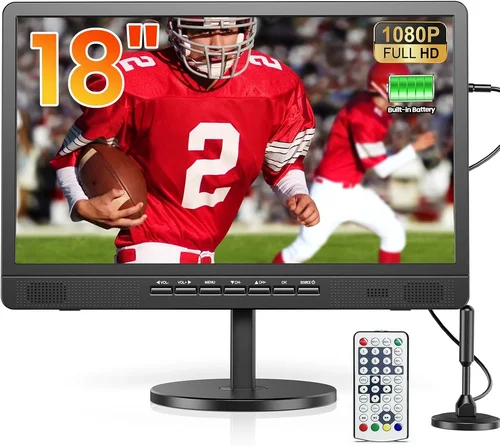
Choosing the right budget poolside TV for outdoor sports watching isn’t just about finding the cheapest screen you can mount near your pool. It’s about balancing performance, durability, visibility, and value—especially when you’re dealing with harsh sunlight, humidity, and the unpredictable elements of outdoor living. Whether you’re hosting a backyard Super Bowl party, catching the World Cup final with friends, or simply unwinding after a swim with your favorite game, your TV needs to deliver a crisp, bright picture that cuts through glare and holds up under real-world conditions.
This guide is designed to help you navigate the crowded and often confusing market of outdoor TVs without overspending. We’ll break down what truly matters when selecting a budget-friendly poolside display, from screen brightness and weather resistance to smart features and audio quality. You’ll learn how to avoid common pitfalls, understand price tiers, and make an informed decision that fits both your lifestyle and your wallet. By the end, you’ll know exactly what to look for—and what to skip—so you can enjoy every touchdown, goal, or home run in stunning clarity, right from your deck or patio.
The outdoor TV market has evolved rapidly in recent years. Once dominated by bulky, expensive all-weather models only available through specialty retailers, today’s options include affordable indoor TVs that can be adapted for outdoor use with proper enclosures or placement. At the same time, purpose-built outdoor TVs have become more accessible, offering better value than ever before. This means more choices—but also more confusion. With brands ranging from mainstream giants like Samsung and LG to niche players like SunBriteTV and Seura, it’s easy to get overwhelmed. Our goal is to cut through the noise and give you a clear, actionable roadmap tailored specifically to watching live sports outdoors on a budget.

What to Look for When Buying Buying Guide
1. Brightness & Sunlight Readability
One of the most critical factors for any outdoor TV—especially one used for fast-paced sports—is screen brightness. Indoor TVs typically range from 250 to 500 nits (a unit measuring luminance), but even 500 nits can appear washed out in direct sunlight. For poolside viewing, you’ll want a minimum of 700 nits, with 1000+ nits being ideal. This ensures colors stay vibrant and motion remains sharp, even at midday.
Look for TVs labeled as “high-brightness,” “sunlight-readable,” or “outdoor-optimized.” Some manufacturers specify “anti-reflective coatings” or “matte finishes,” which help reduce glare from water reflections or overhead sun. OLED screens, while stunning indoors, often struggle outdoors due to lower peak brightness compared to high-end QLED or Mini-LED displays. If you’re considering an indoor TV for outdoor use, check its peak brightness rating carefully—and consider pairing it with a shade structure or awning.
2. Weather Resistance & Durability
Even if your TV is under a covered patio or pergola, it will still face humidity, splashes, dust, and temperature swings. A standard indoor TV isn’t built for this—it lacks sealed components, corrosion-resistant materials, and proper ventilation for outdoor heat. Over time, moisture can seep into ports, damage internal circuits, or fog the screen.
True outdoor TVs are engineered with IP-rated enclosures (typically IP55 or higher), meaning they’re protected against dust and water jets. They also use passive cooling systems (no fans) to prevent dirt buildup and include rust-proof frames and connectors. If you opt for an indoor TV, you’ll need a weatherproof outdoor TV enclosure—but these add cost, bulk, and can limit airflow or remote control functionality.
Ask yourself: How exposed is your setup? If your TV hangs directly over the pool with no overhead cover, invest in a certified outdoor model. If it’s under a solid roof with minimal splash risk, a high-quality indoor TV in a protective case may suffice—but never assume indoor = outdoor-ready.
3. Screen Size & Viewing Distance
Bigger isn’t always better—but for outdoor sports, size definitely enhances the experience. A 43-inch screen might feel cramped when viewed from 10–15 feet away, especially with a group. Most experts recommend matching screen size to viewing distance using this rule of thumb: divide your distance (in inches) by 1.2 to 1.5 for optimal immersion.
For example, if your primary seating is 12 feet (144 inches) from the TV, aim for a 96- to 120-inch diagonal—so a 55- to 65-inch TV is a practical sweet spot. Larger screens (75″+) work well for open patios or large gatherings but come at a higher price. Keep in mind that brightness matters more than size outdoors; a dim 75-inch screen will look worse than a bright 55-inch one in daylight.
Also consider mounting flexibility. Can you angle the TV toward seating areas? Is there room for a swivel mount? Poolside layouts often require creative placement, so measure your space and plan sightlines before buying.
4. Smart Features & Streaming Capabilities
Live sports today are streamed across multiple platforms—ESPN+, Peacock, Paramount+, YouTube TV, FuboTV, and more. A smart TV with robust app support saves you from juggling external devices like Roku sticks or Apple TV boxes. Look for platforms with reliable performance, frequent updates, and broad app compatibility.
Android TV and webOS (LG) offer extensive app libraries, while Roku TV and Fire TV provide user-friendly interfaces ideal for casual viewers. Avoid proprietary or outdated smart systems that lack key sports apps or suffer from slow load times. Also check for voice control (Google Assistant, Alexa) and screen mirroring (AirPlay, Chromecast built-in)—these features enhance convenience during parties or when your phone has the game feed.
5. Audio Quality & External Speaker Options
Most budget TVs—indoor or outdoor—have underwhelming built-in speakers. Outdoors, sound dissipates quickly, and ambient noise (splashing, wind, chatter) further muddies dialogue and commentary. While you can’t expect cinematic audio from a slim TV, decent clarity is essential for understanding play-by-play calls.
Check speaker wattage (10W per channel is minimal; 20W+ is better) and look for features like Dolby Audio or AI sound enhancement. More importantly, ensure the TV has audio output options: optical digital, HDMI ARC, or 3.5mm aux. This lets you connect external weather-resistant speakers, soundbars, or even a whole backyard audio system.
For pool parties, wireless outdoor speakers (like Bose Free or JBL Charge) paired via Bluetooth offer flexibility. Just confirm your TV supports Bluetooth audio output—some budget models only allow input, not output.
6. Connectivity & Input Flexibility
Sports fans often connect multiple devices: cable/satellite boxes, streaming sticks, gaming consoles, or even legacy DVD players for classic game replays. Ensure your TV has enough HDMI ports (at least 3–4), preferably HDMI 2.0 or higher for 4K/60Hz support. Look for USB ports for media playback or firmware updates, and an Ethernet port for stable wired internet (Wi-Fi can be unreliable outdoors).
If you use older equipment, check for composite or component video inputs—though these are rare on newer models. Also verify that HDMI-CEC (Consumer Electronics Control) is supported, so you can control connected devices with one remote.
For outdoor setups, consider cable management. Long HDMI runs may require signal boosters or fiber-optic HDMI cables to maintain 4K quality over distance. Plan your routing to avoid tripping hazards or water exposure.
7. Brand Reputation & Real-World Reliability
Not all budget TV brands are created equal. While TCL, Hisense, and Vizio offer excellent value indoors, their outdoor durability varies. Research user reviews focusing on longevity, customer service, and real-world performance in humid or sunny environments. Brands like SunBriteTV specialize in outdoor displays and have proven track records, but they’re pricier.
Avoid unknown brands with vague specs or no service network. A $300 TV that fails after one summer isn’t a bargain—it’s a loss. Stick to manufacturers with accessible warranties, local repair options, and transparent support policies.
8. Warranty & Support
Outdoor use accelerates wear and tear. A standard 1-year warranty may not cover moisture damage or sun-related degradation—even if the TV is marketed as “outdoor-ready.” Read the fine print: some brands void warranties if used outside without their approved enclosure.
Look for extended warranty options or retailers that offer accidental damage protection. Also check return policies—some outdoor TVs can’t be returned once installed due to custom mounting. If buying online, ensure the seller allows returns within 30 days in case the TV doesn’t meet expectations.
Different Types of Buying Guide

Common Buying Mistakes to Avoid
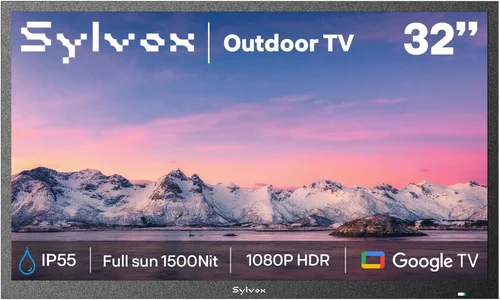
❌ Mistake: Assuming All “Outdoor” TVs Are Created Equal
Why it’s bad: The term “outdoor TV” is loosely used. Some brands market indoor TVs as “suitable for covered patios,” while others build fully sealed, weatherproof units. Confusing the two can lead to premature failure or voided warranties.
What to do instead: Verify the IP rating, warranty terms, and intended use case. If it doesn’t specify resistance to moisture, dust, or temperature extremes, treat it as indoor-only.
❌ Mistake: Ignoring Brightness in Favor of Resolution
Why it’s bad: A 4K TV with 300 nits will look terrible in sunlight, no matter how sharp the pixels are. Sports involve fast motion and bright jerseys—low brightness washes out detail and reduces contrast.
What to do instead: Prioritize brightness (700+ nits) over resolution. A bright 1080p screen often outperforms a dim 4K one outdoors.
❌ Mistake: Skimping on Audio
Why it’s bad: Poor sound makes it hard to hear commentary, especially with pool noise. You’ll constantly adjust volume or miss key moments.
What to do instead: Budget for external weather-resistant speakers or a soundbar. Even a $100 pair of outdoor speakers dramatically improves clarity.
❌ Mistake: Overlooking Mounting and Cable Management
Why it’s bad: Improper mounting can cause glare, limit viewing angles, or create safety hazards. Exposed cables invite water damage and tripping.
What to do instead: Invest in a sturdy, adjustable outdoor mount and use conduit or cable covers to protect wires. Plan your layout before drilling.
❌ Mistake: Buying Based Solely on Price
Why it’s bad: The cheapest option often lacks durability, brightness, or smart features. You may end up replacing it within a year.
What to do instead: Set a realistic budget that includes accessories (mount, speakers, enclosure). A mid-range TV with proven reliability offers better long-term value.
❌ Mistake: Neglecting Return Policies and Warranties
Why it’s bad: Outdoor TVs are harder to return once installed. If the screen fails or brightness is inadequate, you could be stuck with a useless product.
What to do instead: Buy from retailers with generous return windows (30+ days) and check warranty coverage for outdoor use specifically.
❌ Mistake: Forgetting About Future-Proofing
Why it’s bad: Streaming standards and HDMI specs evolve. A TV with only HDMI 1.4 may not support newer devices or 4K HDR content.
What to do instead: Choose a model with HDMI 2.0+, HDR10/Dolby Vision, and regular firmware updates to ensure compatibility for years.
Budget Guidelines: How Much Should You Spend?
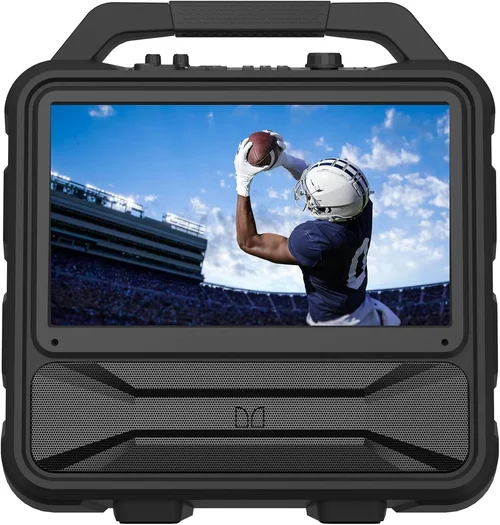
Entry-Level ($300–$600): This tier includes basic indoor TVs (43–50 inches) or portable outdoor displays. Expect lower brightness (400–600 nits), limited smart features, and no weatherproofing. Best for shaded, covered areas with minimal splash risk. Ideal for casual viewers who watch occasionally and prioritize cost over performance.
Mid-Range ($600–$1,200): The sweet spot for most poolside buyers. You’ll find high-brightness indoor TVs (700+ nits), semi-outdoor models, or indoor sets paired with quality enclosures. Look for 55–65-inch screens, robust smart platforms, and decent audio outputs. This range offers the best balance of price, performance, and durability for typical backyard setups.
Premium ($1,200–$2,500): For enthusiasts who want reliability and top-tier visibility. Includes certified all-weather outdoor TVs from brands like SunBriteTV or Seura, with 1,000+ nits brightness, IP55+ ratings, and commercial-grade components. Perfect for fully exposed locations or those who host frequent gatherings.
Luxury ($2,500+): Reserved for large commercial installations or ultra-high-end residential projects. Features include 2,000+ nits brightness, anti-vandal designs, 24/7 operation capability, and custom integration options. Overkill for most homeowners but essential for resorts or public venues.
Expert Tips for Getting the Best Deal
1. Time Your Purchase Around Major Sales Events: Black Friday, Cyber Monday, and post-summer clearance sales (August–September) offer the deepest discounts on TVs. Retailers often clear out older models to make room for new inventory.
2. Compare Online and In-Store Pricing: Online retailers (Amazon, Best Buy, Costco) frequently run exclusive deals, but local stores may price-match or offer free delivery and setup. Use price-tracking tools like Honey or CamelCamelCamel to monitor fluctuations.
3. Consider Refurbished or Open-Box Models: Certified refurbished outdoor TVs from reputable sellers come with warranties and can save 20–40%. Open-box deals at big-box stores are another way to score premium features at mid-range prices.
4. Bundle Accessories for Savings: Some retailers offer discounts when you buy a TV, mount, and speakers together. Check for package deals during checkout.
5. Read User Reviews Focused on Outdoor Use: Generic “great picture” reviews don’t tell the whole story. Search for phrases like “poolside,” “sunlight visibility,” or “humidity” to find real-world insights.
6. Test Before Committing (If Possible): Visit a store with outdoor displays or ask if you can demo a model in similar lighting conditions. Many electronics stores have patio setups for this purpose.
7. Negotiate Extended Warranties: If the standard warranty doesn’t cover outdoor use, ask if the retailer offers an upgraded plan. Sometimes they’ll include it for free with purchase.
8. Check Manufacturer Rebates and Trade-In Programs: Brands like Samsung and LG occasionally offer cashback or trade-in credits for old TVs, effectively lowering your net cost.

Frequently Asked Questions
Q: Can I use a regular indoor TV by the pool?
A: Yes—but only if it’s under a solid roof with minimal splash risk and you accept shorter lifespan. For best results, pair it with a weatherproof outdoor enclosure and ensure it has high brightness (700+ nits). Never place an indoor TV in direct exposure to rain, steam, or heavy humidity.
Q: What’s the minimum brightness needed for outdoor sports viewing?
A: Aim for at least 700 nits. For direct sunlight or reflective pool surfaces, 1,000+ nits is strongly recommended. Anything below 500 nits will appear dim and washed out during daytime games.
Q: Do outdoor TVs need special mounts?
A: Yes. Use mounts rated for outdoor use—they’re made of corrosion-resistant materials (like powder-coated steel) and designed to handle wind and moisture. Avoid cheap indoor mounts, which can rust or fail.
Q: How do I protect my TV from pool chemicals?
A: Chlorine and saltwater vapors can corrode electronics over time. Choose a TV with sealed components or use an enclosure with chemical-resistant seals. Regularly wipe down the exterior with a damp cloth to remove residue.
Q: Can I stream live sports on an outdoor TV?
A: Absolutely. Most modern smart TVs support major sports apps like ESPN, Fox Sports, NBC Sports, and streaming services (YouTube TV, Hulu + Live TV). Ensure your Wi-Fi signal reaches the TV location; consider a mesh network or outdoor Wi-Fi extender if needed.
Q: Are OLED TVs good for outdoor use?
A: Generally no. While OLEDs offer perfect blacks and wide viewing angles, their peak brightness is lower than QLED or Mini-LED, and they’re more susceptible to image retention in bright conditions. Stick with high-brightness LED/LCD panels for poolside setups.
Q: How long do outdoor TVs last?
A: A quality all-weather outdoor TV can last 7–10 years with proper care. Indoor TVs used outdoors typically last 2–4 years due to environmental stress. Regular maintenance (cleaning, checking seals) extends lifespan.
Q: What if my TV gets rained on accidentally?
A: If it’s a certified outdoor model, light rain shouldn’t cause damage. However, power it off immediately, dry it thoroughly, and inspect for water ingress. For indoor TVs, even brief exposure can be fatal—unplug and do not turn on until fully dried (24–48 hours).
Q: Do I need a separate antenna for local sports channels?
A: If you rely on over-the-air broadcasts (ABC, CBS, FOX, NBC), a high-quality outdoor antenna mounted away from the pool can improve reception. Many smart TVs include built-in tuners, so no extra box is needed.
Q: Can I control my outdoor TV with my phone?
A: Yes, most smart TVs offer companion apps for remote control, voice commands, and casting. Ensure your phone and TV are on the same Wi-Fi network for seamless operation.
Our Final Recommendations
Best for Budget-Conscious Buyers: TCL 55-inch Q6 QLED (around $450) + Peerless-AV Outdoor Enclosure ($200). This combo delivers 800+ nits brightness, vibrant colors, and Roku smart features—all under $700. Ideal for covered patios.
Best Overall Value: Hisense 65U6H QLED (~$650). With 1,000 nits peak brightness, Dolby Vision, and Google TV, it outperforms most indoor TVs in sunlight. Pair with a basic outdoor mount for a sub-$800 solution.
Best Premium Option: SunBriteTV Veranda Series 55-inch (~$1,800). Fully weatherproof, 1,000+ nits, and built for year-round outdoor use. Worth the investment if your TV is fully exposed.
Best for Beginners: Vizio V-Series 50-inch (~$350) + Sanus Outdoor Mount ($120). Simple setup, reliable performance, and easy-to-use SmartCast platform. Great for first-time outdoor TV owners.
Best for Advanced Users: LG 65-inch QNED85 (~$900) with custom outdoor enclosure. Combines Mini-LED brightness (1,200 nits), webOS smart features, and excellent motion handling—perfect for fast-paced sports.
Conclusion: Making the Right Choice
Choosing a budget poolside TV for outdoor sports watching doesn’t have to be overwhelming—or expensive. By focusing on brightness, weather resistance, smart functionality, and real-world durability, you can find a display that delivers thrilling game-day experiences without breaking the bank. Remember: the cheapest option isn’t always the best value, and the flashiest specs don’t guarantee outdoor performance.
Prioritize your specific needs: How exposed is your setup? How often will you watch? Who will be viewing? Answer these questions honestly, and use the guidelines in this guide to narrow your options. Whether you go with a high-brightness indoor TV in a protective case or invest in a purpose-built outdoor model, the right choice will transform your backyard into the ultimate sports viewing destination.
Don’t rush the decision. Take time to compare models, read user experiences, and plan your installation. And when the final whistle blows or the last pitch is thrown, you’ll be glad you chose wisely—because nothing beats watching your team win, crystal clear, under the open sky.

