
This guide walks you through how to install a poolside TV for coastal homes, focusing on durability, weather resistance, and smart placement. You’ll learn how to choose the right equipment, mount it safely, and protect it from salt air and humidity.
Key Takeaways
- Choose a marine-grade or outdoor-rated TV: Standard indoor TVs won’t survive coastal conditions. Look for models with IP55 or higher ratings and corrosion-resistant materials.
- Use weatherproof mounts and enclosures: A sturdy, rust-proof mount and protective casing are essential to shield your TV from salt spray, rain, and UV rays.
- Plan cable routing carefully: Conceal and protect all wiring using waterproof conduits to prevent damage and tripping hazards.
- Install in a sheltered but visible location: Position the TV under a pergola, awning, or roof overhang to reduce direct exposure while maintaining a great viewing angle.
- Test and maintain regularly: Coastal environments accelerate wear. Clean the screen and check seals monthly to extend your TV’s lifespan.
- Consider smart features and streaming: Pair your TV with a streaming device for easy access to content without needing a cable box outdoors.
- Hire a professional if unsure: Electrical work and structural mounting can be risky. When in doubt, consult a licensed technician.
How to Install Poolside TV for Coastal Homes
Imagine lounging by the pool on a sunny afternoon, sipping a cold drink while watching your favorite show on a crisp, clear screen just steps from the water. For coastal homeowners, a poolside TV isn’t just a luxury—it’s a way to blend indoor comfort with outdoor living. But installing a TV near the ocean comes with unique challenges: salt air, high humidity, intense sun, and sudden storms can quickly damage standard electronics.
This comprehensive guide will walk you through how to install a poolside TV for coastal homes the right way. Whether you’re upgrading your backyard oasis or building a new outdoor entertainment zone, you’ll learn how to choose the best equipment, mount it safely, protect it from the elements, and enjoy reliable performance year-round.
We’ll cover everything from selecting a weatherproof TV to routing cables and maintaining your setup. By the end, you’ll have a durable, high-quality outdoor viewing experience that stands up to coastal conditions.
Why Coastal Homes Need Special Considerations
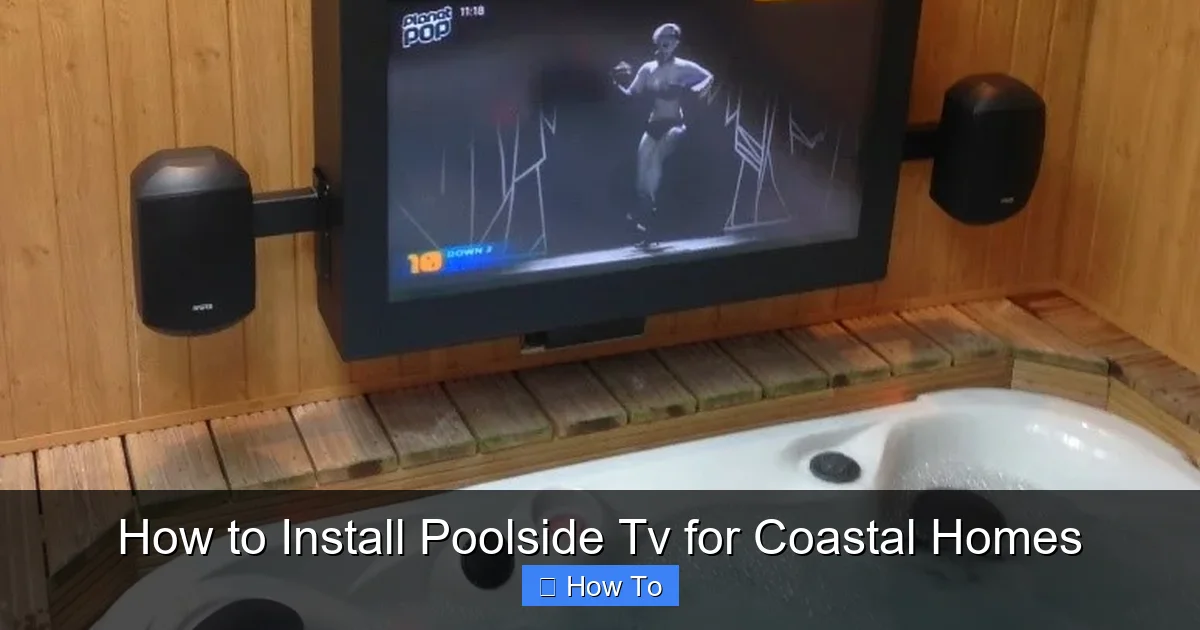
Visual guide about How to Install Poolside Tv for Coastal Homes
Image source: armagard.com
Coastal environments are beautiful but harsh on electronics. Salt air is highly corrosive and can eat away at metal components, degrade wiring, and fog up screens. Humidity promotes mold and condensation, while UV rays from strong sun can fade screens and weaken plastics. Add in occasional rain, wind, and sand, and you’ve got a recipe for equipment failure—unless you plan carefully.
Standard indoor TVs are not built for these conditions. Even if you cover them with a tarp, they’ll likely fail within months. That’s why installing a poolside TV for coastal homes requires specialized gear and smart installation techniques.
The good news? With the right approach, your outdoor TV can last for years—even in salty, humid climates. The key is using marine-grade or outdoor-rated equipment and following best practices for protection and placement.
Step 1: Choose the Right Outdoor TV
The foundation of a successful poolside TV setup is selecting the correct television. Not all outdoor TVs are created equal, especially for coastal areas.
Look for Outdoor or Marine-Grade Ratings
Start by choosing a TV specifically designed for outdoor use. These models are built to withstand temperature swings, moisture, and dust. Look for an IP (Ingress Protection) rating of at least IP55, which means the TV is protected against water jets and limited dust ingress. For coastal homes, IP65 or higher is even better.
Marine-grade TVs go a step further. They’re engineered for boats and coastal environments, with corrosion-resistant materials, sealed components, and enhanced cooling systems. Brands like SunBrite, Seura, and Samsung’s Terrace series offer excellent options.
Consider Screen Type and Brightness
Outdoor TVs come in two main types: partial sun and full sun. For poolside areas that get direct sunlight, choose a full-sun model with high brightness (measured in nits). Aim for at least 1,000 nits—standard indoor TVs typically have 300–500 nits and will appear washed out in daylight.
Full-sun TVs use anti-glare coatings and high-lumen backlights to maintain visibility. Some even have built-in sunshades or adjustable brightness based on ambient light.
Size and Viewing Distance
Pick a screen size that matches your viewing distance. For most poolside setups, a 55- to 65-inch TV works well. If you’re sitting 8–12 feet away, a 55-inch screen is ideal. For larger decks or lounging areas, go up to 75 inches.
Avoid going too big—oversized screens can be hard to see from close range and may overwhelm the space.
Smart Features and Connectivity
Most outdoor TVs come with built-in smart platforms (like Android TV or Roku) or support external streaming devices. This lets you access Netflix, YouTube, and other apps without needing a separate box.
Make sure the TV has enough HDMI ports for devices like gaming consoles, soundbars, or cable boxes. Also, check for Wi-Fi and Bluetooth support for wireless streaming and audio.
Step 2: Select a Weatherproof Mount and Enclosure
Even the best outdoor TV needs protection. A sturdy mount and protective enclosure are essential for long-term performance.
Choose a Rust-Proof Mount
Standard wall mounts will rust quickly in coastal air. Instead, use a mount made from marine-grade aluminum or stainless steel. These materials resist corrosion and can handle salt spray.
Look for mounts labeled “outdoor-rated” or “weatherproof.” They should include sealed bearings and powder-coated finishes for added protection.
Consider a Full Outdoor Enclosure
If your TV isn’t fully sealed, or you want extra protection, use an outdoor TV enclosure. These are weatherproof cases that fit around your TV, shielding it from rain, dust, and UV rays.
Enclosures often include built-in cooling fans, heaters (for cold mornings), and anti-reflective glass fronts. Some even have remote-controlled lids that open when you turn on the TV.
For coastal homes, choose an enclosure with a high IP rating and corrosion-resistant hardware. Brands like Peerless-AV and Outdoor Digital offer reliable options.
Tilt, Swivel, or Fixed?
Decide how you want to position the TV. A fixed mount is simplest and most secure. Tilt mounts let you angle the screen downward for better viewing from lounge chairs. Full-motion mounts allow swiveling, so you can watch from different areas.
For poolside use, a tilt or fixed mount is usually best—full motion adds complexity and potential weak points.
Step 3: Pick the Perfect Location
Where you install your TV matters just as much as what you install. The right spot balances visibility, protection, and safety.
Shelter from the Elements
Avoid placing the TV in direct exposure to sun, rain, or ocean spray. Instead, install it under a covered area like a pergola, gazebo, or roof overhang. This reduces UV damage and keeps the screen dry.
If you don’t have coverage, consider adding a retractable awning or shade sail. These provide sun protection and can be adjusted based on the time of day.
Optimal Viewing Angle
Mount the TV at eye level when seated. For most people, this is about 42–48 inches from the ground to the center of the screen. Avoid placing it too high—looking up for long periods can cause neck strain.
Angle the screen slightly downward so it’s easy to see from lounge chairs or pool floats. A 10- to 15-degree tilt is usually comfortable.
Avoid Salt Spray and Wind Exposure
Salt air is the biggest enemy of coastal electronics. If possible, install the TV on the leeward side of your house or behind a windbreak like a fence or hedge.
Avoid mounting it directly facing the ocean or in areas where waves crash nearby. Even a few feet of distance can make a big difference in salt exposure.
Check for Obstructions
Make sure trees, umbrellas, or structures won’t block the view. Also, avoid placing the TV where it might reflect glare off the water or pool surface. A matte screen or anti-glare filter can help.
Step 4: Plan and Route Cables Safely
Power and signal cables are vulnerable to moisture, corrosion, and physical damage. Proper cable management is critical for safety and performance.
Use Waterproof Conduits
Run all cables through waterproof conduits or outdoor-rated raceways. These protect wires from rain, salt, and UV degradation. PVC or metal conduits work well—just make sure they’re sealed at all joints.
Avoid running cables along the ground where they can be stepped on or damaged by pool equipment.
Conceal Wiring for Aesthetics and Safety
Hide cables inside walls, under decking, or through conduit channels. This keeps your setup looking clean and reduces tripping hazards.
If you’re mounting the TV on an exterior wall, drill a small hole to feed cables inside. Seal the hole with silicone caulk to prevent water intrusion.
Use Outdoor-Rated Cables
Standard HDMI and power cables aren’t built for outdoor use. Choose cables labeled “outdoor-rated” or “direct burial” with UV-resistant jackets and waterproof connectors.
For long runs, consider fiber optic HDMI cables, which resist interference and can transmit high-quality signals over greater distances.
Install a GFCI Outlet
Always plug your TV and accessories into a Ground Fault Circuit Interrupter (GFCI) outlet. These shut off power if they detect a leak, preventing electric shock near water.
If you don’t have a GFCI outlet nearby, hire an electrician to install one. Never use extension cords outdoors—they’re unsafe and not code-compliant.
Step 5: Mount the TV Securely
Now it’s time to install. Proper mounting ensures your TV stays safe and stable, even in strong coastal winds.
Use a Stud Finder
Locate wall studs before drilling. Mounting into drywall alone won’t support the weight of a TV and enclosure. Use a stud finder to mark the center of each stud.
For concrete or brick walls, use masonry anchors rated for outdoor use.
Follow the Mount’s Instructions
Each mount comes with specific installation steps. Follow them carefully, especially torque settings for bolts. Over-tightening can crack brackets; under-tightening can lead to failure.
Use a level to ensure the mount is perfectly horizontal. A crooked TV is annoying and can stress the mount over time.
Secure the Enclosure (If Using)
If you’re using an outdoor enclosure, attach it to the mount first, then slide the TV inside. Make sure all latches and seals are closed tightly.
Test the fit before final installation. The TV should sit snugly without forcing.
Double-Check Stability
Give the TV a gentle shake to test stability. It shouldn’t wobble or move. If it does, tighten the bolts or reposition the mount.
Step 6: Connect and Test the System
Once mounted, it’s time to connect your devices and test everything.
Connect Power and Signal Cables
Plug in the power cable and connect HDMI, audio, or other signal cables. Use waterproof cable glands or connectors to seal entry points.
If using a streaming device, connect it to the TV and power it separately.
Turn On and Calibrate
Power on the TV and check the picture quality. Adjust brightness, contrast, and color settings for outdoor viewing. Many outdoor TVs have preset “outdoor” modes.
Test all inputs—HDMI, USB, streaming apps—to ensure everything works.
Check Audio
Built-in TV speakers often sound weak outdoors. Consider adding weatherproof outdoor speakers or a soundbar for better audio.
Mount speakers under the same covered area, angled toward seating zones. Use wireless models to simplify wiring.
Step 7: Protect and Maintain Your TV
Coastal conditions demand regular upkeep. A little maintenance goes a long way in extending your TV’s life.
Clean the Screen Monthly
Use a soft, microfiber cloth and a mild cleaner designed for screens. Avoid ammonia-based products, which can damage anti-glare coatings.
Gently wipe the screen and enclosure to remove salt residue, dust, and fingerprints.
Inspect Seals and Mounts
Check gaskets, seals, and mounting hardware every few months. Look for cracks, rust, or loosening. Tighten bolts and replace damaged parts promptly.
Cover During Storms (Optional)
While outdoor TVs are built to handle weather, extreme storms can cause damage. If a hurricane or severe storm is forecast, consider covering the TV with a waterproof cover or temporarily removing it.
Monitor for Condensation
If you notice fogging inside the screen or enclosure, it may indicate a seal failure. Turn off the TV and let it dry. If the problem persists, contact the manufacturer.
Troubleshooting Common Issues
Even with careful planning, problems can arise. Here’s how to handle common issues.
TV Won’t Turn On
Check the power source first. Is the GFCI outlet working? Try resetting it. If the outlet has power, inspect the cable for damage.
Picture Is Too Dark or Washed Out
Adjust the brightness and contrast settings. If the screen is still hard to see, check for glare or dirt. Clean the screen and reposition the TV if needed.
Audio Is Weak or Distorted
Test with external speakers. If the issue persists, check cable connections or update the TV’s firmware.
Mount Feels Loose
Turn off the TV and tighten all bolts. If the wall is damaged, reinforce it with additional anchors or consult a professional.
Salt Corrosion on Hardware
Wipe down metal parts with a vinegar-water solution to remove salt buildup. Apply a corrosion inhibitor like WD-40 Specialist Marine to protect against future damage.
Conclusion
Installing a poolside TV for coastal homes is a rewarding project that enhances your outdoor lifestyle. By choosing a weatherproof TV, using a corrosion-resistant mount, and protecting cables and components, you can enjoy high-quality entertainment right by the water.
Remember: coastal environments are tough on electronics, but with the right gear and careful installation, your TV can thrive for years. Regular maintenance and smart placement are key to long-term success.
Whether you’re watching the sunset with friends or catching the big game from your floatie, your poolside TV will be a centerpiece of fun and relaxation. So grab your tools, follow this guide, and start enjoying the ultimate outdoor viewing experience.

