
This guide walks you through how to install an outside TV for an outdoor kitchen, covering everything from choosing the right TV to mounting, wiring, and weatherproofing. Enjoy your favorite shows while grilling, dining, or relaxing outdoors—safely and stylishly.
Key Takeaways
- Choose a weatherproof outdoor TV: Standard indoor TVs aren’t built for outdoor conditions. Invest in a TV specifically rated for outdoor use to ensure durability and safety.
- Pick the right mounting location: Select a spot that’s protected from direct rain, extreme sun, and high heat, while still offering a clear view from your seating or dining area.
- Use outdoor-rated cables and conduits: Regular indoor cables can degrade quickly outdoors. Always use UV-resistant, waterproof cables and protective conduits for power and signal lines.
- Ensure proper electrical safety: Hire a licensed electrician to install a dedicated outdoor GFCI outlet. Never run extension cords across walkways or under rugs.
- Secure the mount with weatherproof hardware: Use stainless steel or coated mounting brackets and anchors designed for outdoor use to prevent rust and ensure stability.
- Test and maintain regularly: After installation, test all connections and check for wear, corrosion, or loose parts every few months.
- Consider smart features and sound: Many outdoor TVs come with built-in streaming apps. Pair with weatherproof speakers for a complete outdoor entertainment experience.
How to Install Outside TV for Outdoor Kitchen
Imagine this: It’s a warm summer evening. You’re grilling burgers, friends are laughing around the patio table, and your favorite game is playing on a crisp, clear screen mounted right above the outdoor kitchen. No more crowding around a tablet or rushing inside to catch the final inning. With an outdoor TV, your backyard becomes the ultimate entertainment hub.
Installing an outside TV for your outdoor kitchen isn’t just about mounting a screen—it’s about creating a safe, weather-resistant, and enjoyable experience. Whether you’re building a new outdoor kitchen or upgrading an existing one, adding a TV can elevate your space from functional to fantastic.
But it’s not as simple as screwing a bracket into the wall and plugging in a standard TV. Outdoor environments bring unique challenges: rain, humidity, temperature swings, dust, and UV exposure. That’s why proper planning, the right equipment, and careful installation are essential.
In this comprehensive guide, you’ll learn exactly how to install an outside TV for your outdoor kitchen—step by step. We’ll cover everything from choosing the right TV and mounting location to running cables safely and protecting your investment from the elements. By the end, you’ll have a reliable, high-quality outdoor entertainment setup that lasts for years.
Let’s get started.
Step 1: Choose the Right Outdoor TV
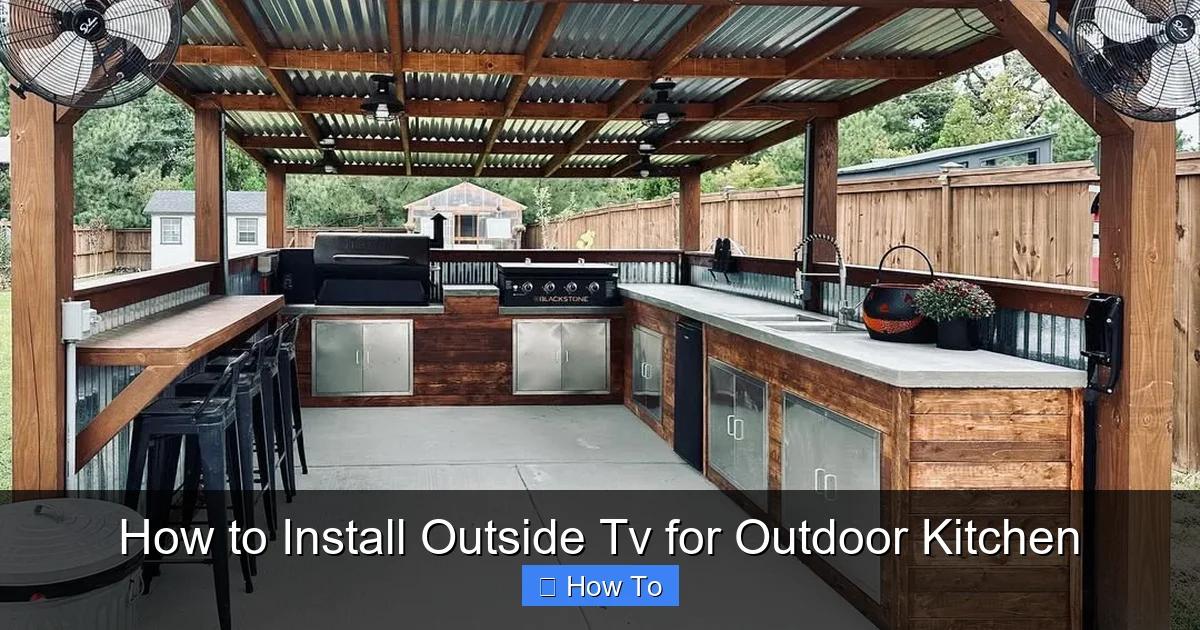
Visual guide about How to Install Outside Tv for Outdoor Kitchen
Image source: cdn.thecoolist.com
Not all TVs are created equal—especially when it comes to outdoor use. A standard indoor TV might seem like a cost-effective option, but it’s not built to handle the rigors of an outdoor environment. Exposure to moisture, temperature changes, and sunlight can damage internal components, reduce lifespan, and even create safety hazards.
Why You Need an Outdoor-Rated TV
Outdoor TVs are specifically engineered for exterior use. They feature:
– Weatherproof casings: Sealed against rain, snow, and humidity.
– Temperature regulation: Built-in cooling and heating systems to prevent overheating in summer or freezing in winter.
– Anti-glare screens: Designed to remain visible even in bright sunlight.
– Rust-resistant materials: Frames and internal components made from corrosion-resistant metals.
Popular brands like SunBriteTV, Seura, and SkyVue offer models ranging from 43 to 85 inches, with options for partial or full sun exposure.
Indoor vs. Outdoor TV: Key Differences
| Feature | Indoor TV | Outdoor TV |
|——–|———-|———–|
| Weather Resistance | None | IP55 or higher rating |
| Screen Brightness | 300–500 nits | 700–2,500 nits (sunlight-readable) |
| Temperature Range | 50°F–95°F | -30°F to 140°F |
| Ventilation | Open vents (dust/moisture risk) | Sealed, fanless design |
| Mounting | Standard VESA | Outdoor-rated brackets included |
If your outdoor kitchen is under a covered patio or pergola, a partial-sun outdoor TV may suffice. For full sun exposure, opt for a full-sun model with higher brightness and advanced cooling.
Smart Features to Consider
Many outdoor TVs now come with built-in Wi-Fi, streaming apps (like Netflix, YouTube, and Hulu), and voice control via Alexa or Google Assistant. This eliminates the need for external devices like streaming sticks, reducing cable clutter and potential failure points.
Look for models with:
– Built-in apps and app store access
– Bluetooth connectivity for wireless headphones or speakers
– HDMI and USB ports (sealed or covered)
– Remote control with long-range infrared or RF
Step 2: Plan the Mounting Location
Where you mount your TV is just as important as the TV itself. A poor location can lead to glare, obstructed views, or exposure to water—even under a roof.
Assess Your Outdoor Kitchen Layout
Start by evaluating your outdoor kitchen setup. Ask yourself:
– Where will people be sitting or standing while watching?
– Is there a natural focal point (like a grill or island)?
– Are there overhangs, pergolas, or awnings that provide shade?
The ideal mounting spot should:
– Be visible from primary seating areas
– Be protected from direct rain and intense midday sun
– Allow for easy cable routing
– Be at a comfortable viewing height (typically 60–66 inches from the floor to the center of the screen)
Check for Structural Support
You’ll need a sturdy surface to mount the TV. Common options include:
– A solid wall (brick, concrete, or wood-framed with sheathing)
– A post or column (if thick and stable)
– A custom-built TV cabinet or niche
Avoid mounting on thin siding, lattice, or lightweight fencing. These won’t support the weight of an outdoor TV and mount (which can exceed 100 pounds combined).
Use a stud finder to locate wall studs if mounting on wood framing. For masonry, ensure the wall is solid and not just veneer.
Consider Viewing Angle and Distance
For optimal viewing:
– Mount the TV so the center is at eye level when seated (about 42–48 inches from the ground).
– Maintain a viewing distance of 1.5 to 2.5 times the screen size. For example, a 55-inch TV should be viewed from 6.5 to 11 feet away.
– Tilt the screen slightly downward if mounted high (most outdoor mounts allow tilt adjustment).
Avoid placing the TV where reflections from water, glass, or stainless steel appliances could cause glare.
Step 3: Select the Right Mount and Hardware
A high-quality mount is critical for safety and performance. Standard indoor mounts aren’t designed for outdoor conditions and may rust or fail over time.
Types of Outdoor TV Mounts
– Fixed Mount: Holds the TV flat against the wall. Best for permanent, unobstructed views.
– Tilt Mount: Allows slight downward adjustment. Ideal if the TV is mounted above eye level.
– Full-Motion (Articulating) Mount: Lets you pull the TV away from the wall and swivel it. Great for flexible viewing angles but requires more space and stronger anchoring.
For most outdoor kitchens, a tilt or fixed mount is sufficient. Full-motion mounts are better suited for larger patios or multi-angle viewing.
Weatherproofing the Mount
Ensure your mount is:
– Made of powder-coated aluminum or stainless steel (not plain steel, which rusts)
– Rated for outdoor use by the manufacturer
– Compatible with your TV’s VESA pattern (the spacing of the mounting holes)
Many outdoor TVs come with a compatible mount included. If not, check the manufacturer’s recommendations.
Anchoring Securely
Use appropriate anchors for your wall type:
– Wood framing: Lag bolts into studs (minimum 3/8” diameter, 3” long)
– Concrete or brick: Concrete sleeve anchors or wedge anchors
– Metal studs: Heavy-duty toggle bolts or snap-toggle anchors
Never use drywall anchors alone—they won’t support the weight.
Step 4: Run Power and Signal Cables Safely
This is where many DIYers go wrong. Improper wiring can lead to electrical hazards, signal loss, or damage to your TV.
Hire a Licensed Electrician
Outdoor electrical work must comply with the National Electrical Code (NEC). A licensed electrician should:
– Install a dedicated 15- or 20-amp GFCI outlet near the TV location
– Run UF-B (underground feeder) cable or use conduit for protection
– Ensure the circuit is on a GFCI breaker for added safety
GFCI (Ground Fault Circuit Interrupter) protection is required for all outdoor outlets. It shuts off power if it detects a ground fault, preventing shocks.
Use Outdoor-Rated Cables
All cables—power, HDMI, coaxial, Ethernet—must be rated for outdoor use. Look for:
– UV-resistant jackets (won’t crack or degrade in sunlight)
– Waterproof connectors or in-line junction boxes
– Direct burial rating if running underground
Avoid using indoor extension cords. They’re not weatherproof and can become brittle or conductive when wet.
Route Cables Through Conduit
For maximum protection, run all cables through PVC or metal conduit. This shields them from:
– Moisture
– Rodents
– UV damage
– Physical wear
Use conduit from the outlet to the TV location, with sealed fittings at both ends. If running cables along a wall, secure them with outdoor-rated cable clips every 12–18 inches.
Manage Cable Length and Connections
– Keep HDMI and power cables as short as possible to reduce signal loss.
– Use HDMI over Ethernet extenders if the source device (like a cable box) is far from the TV.
– Label all cables at both ends for easy troubleshooting.
Step 5: Install the TV Mount
Now it’s time to secure the mount to the wall. Take your time—this step affects everything that follows.
Mark and Drill Pilot Holes
1. Hold the mount against the wall in the desired position.
2. Use a level to ensure it’s straight.
3. Mark the screw hole locations with a pencil.
4. Drill pilot holes slightly smaller than the anchor size.
For masonry, use a hammer drill and masonry bit. For wood, a standard drill bit is fine.
Secure the Mount
1. Insert anchors into the pilot holes (if needed).
2. Align the mount and insert screws.
3. Tighten securely with a wrench or socket driver—don’t overtighten, as this can strip the threads.
Double-check that the mount is level and firmly attached. Give it a gentle shake to test stability.
Attach the TV to the Mount
Most outdoor TVs come with VESA mounting plates. Follow these steps:
1. Attach the mounting plate to the back of the TV using the provided screws.
2. Lift the TV and hook it onto the wall mount.
3. Secure with locking screws or pins (if included).
4. Ensure all connections are tight and the TV doesn’t wobble.
Use two people for TVs over 50 inches to avoid injury or damage.
Step 6: Connect and Test the System
With the TV mounted, it’s time to connect everything and power it up.
Connect Power and Signal Cables
1. Plug the power cable into the GFCI outlet.
2. Connect HDMI, coaxial, or Ethernet cables to the TV and source devices.
3. Use waterproof cable glands or silicone sealant around entry points to prevent moisture ingress.
Power On and Configure
1. Turn on the TV and follow the on-screen setup.
2. Connect to Wi-Fi or Ethernet.
3. Update the firmware if prompted.
4. Test all inputs (HDMI, USB, antenna).
Adjust Picture and Sound Settings
Outdoor lighting affects picture quality. Adjust:
– Brightness and contrast for daylight viewing
– Color temperature (cool for bright days, warm for evenings)
– Motion smoothing (reduce for sports)
If the built-in speakers aren’t loud enough, connect weatherproof outdoor speakers via Bluetooth or wired connection.
Step 7: Weatherproof and Protect the Setup
Even with an outdoor-rated TV, extra protection extends its life.
Use a TV Cover or Enclosure
When not in use, cover the TV with a breathable, UV-resistant cover. Avoid plastic tarps—they trap moisture.
For added protection, consider a weatherproof TV enclosure with a clear front panel. These allow remote control use and protect against dust and insects.
Install a Surge Protector
Power surges from lightning or grid fluctuations can damage electronics. Use an outdoor-rated surge protector with a high joule rating (1,000+).
Regular Maintenance
Every 3–6 months:
– Inspect cables for cracks or fraying
– Check mount screws for tightness
– Clean the screen with a microfiber cloth and mild cleaner
– Look for signs of rust or corrosion
Troubleshooting Common Issues
TV Won’t Turn On
– Check GFCI outlet—press the “Reset” button.
– Test the power cable with another device.
– Ensure the circuit breaker hasn’t tripped.
Poor Picture Quality
– Adjust brightness and contrast settings.
– Check HDMI cable connections—loose cables cause signal drop.
– Ensure the source device (cable box, streaming stick) is functioning.
Remote Not Working
– Replace batteries.
– Ensure no obstructions block the IR sensor.
– Use an RF remote or smartphone app if available.
Overheating or Shutting Down
– Verify the TV is in a shaded, ventilated area.
– Clean any dust from vents (if accessible).
– Ensure the model is rated for your climate.
Conclusion
Installing an outside TV for your outdoor kitchen transforms your backyard into a true entertainment destination. It’s not just about watching TV—it’s about enhancing your outdoor lifestyle, whether you’re hosting a game night, enjoying a quiet evening under the stars, or catching up on your favorite show while cooking.
By following this guide, you’ve learned how to choose the right TV, pick a safe and visible mounting location, use weatherproof hardware, run cables safely, and maintain your system for long-term enjoyment. Remember: safety and durability come first. Skimping on quality components or electrical work can lead to costly repairs—or worse.
With the right preparation and attention to detail, your outdoor TV will deliver years of reliable performance. So fire up the grill, invite some friends over, and enjoy the show—outdoors, where it belongs.

