Struggling with messy cables from your garden TV setup? This guide shows you simple, apartment-friendly ways to hide and manage cables so your outdoor space looks clean and organized—no permanent changes needed.
Key Takeaways
- Use cable raceways or covers: These plastic or metal channels stick to walls or floors and hide wires neatly without drilling.
- Opt for wireless alternatives: Choose wireless speakers or streaming devices to reduce the number of visible cables.
- Route cables along natural features: Use fences, railings, or planters to guide and conceal wires out of sight.
- Choose renter-friendly solutions: Avoid permanent installations; use adhesive hooks, clips, or zip ties that won’t damage surfaces.
- Plan your layout first: Map out where your TV, power source, and devices will go before running any cables.
- Weatherproof outdoor cables: Always use outdoor-rated extension cords and cable protectors to prevent damage.
- Keep it tidy with cable ties and sleeves: Bundle loose wires together to reduce clutter and make hiding them easier.
How to Hide Cables for Garden TV in Apartments
Setting up a garden TV in your apartment can transform your outdoor space into a cozy entertainment zone. Whether you’re watching movies under the stars or catching up on your favorite shows while enjoying fresh air, a garden TV adds comfort and fun. But one common challenge? Those unsightly cables snaking across your patio, balcony, or yard. They’re not just an eyesore—they can also be a tripping hazard or get damaged by weather and foot traffic.
The good news? You can enjoy a clean, cable-free look—even in a rental apartment—without drilling holes or making permanent changes. This guide will walk you through practical, renter-friendly solutions to hide garden TV cables safely and effectively. From clever routing techniques to smart storage ideas, you’ll learn how to keep your outdoor setup looking sleek and organized.
By the end of this guide, you’ll know exactly how to:
- Plan your garden TV layout for minimal cable visibility
- Use adhesive and non-permanent cable management tools
- Route cables along natural outdoor features
- Protect wires from weather and wear
- Maintain a tidy setup that’s easy to adjust or remove
Let’s get started!
Step 1: Plan Your Garden TV Setup
Before you run a single cable, take time to plan your layout. A little prep work saves time, reduces clutter, and helps you avoid last-minute fixes. Think of this as the blueprint for your outdoor entertainment zone.
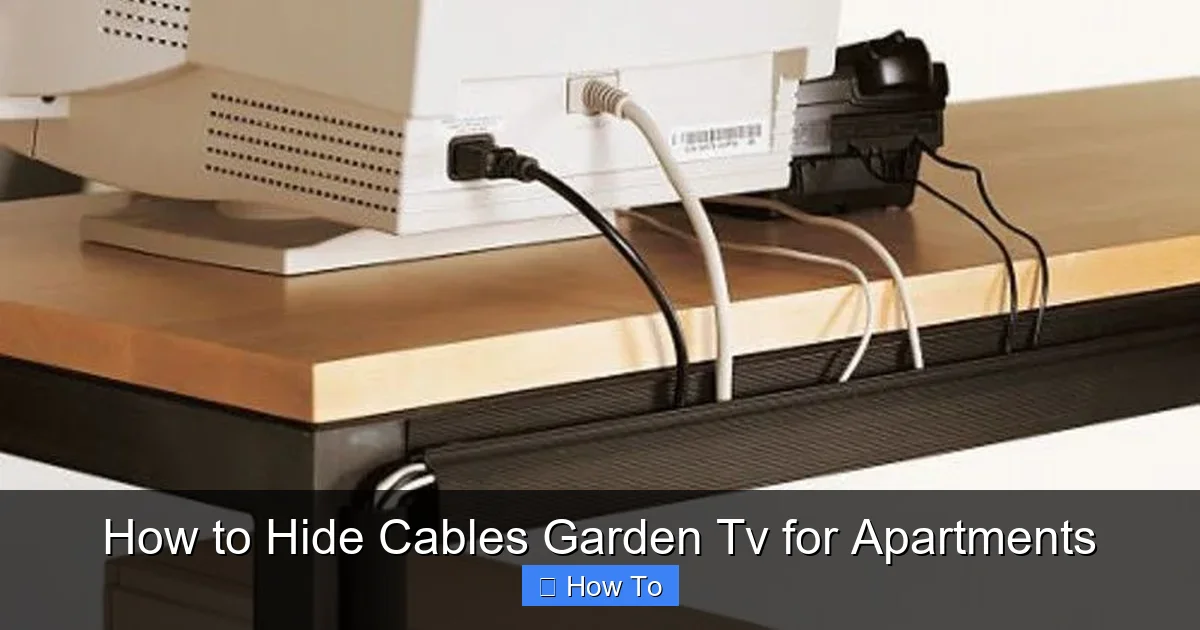
Visual guide about How to Hide Cables Garden Tv for Apartments
Image source: i.pinimg.com
Choose the Right TV Location
Pick a spot that’s sheltered from direct rain and harsh sunlight. A covered balcony, pergola, or under an awning is ideal. Make sure the TV is at a comfortable viewing height and angle. Also, consider how far it is from your power source and Wi-Fi router—this affects cable length and routing.
Map Out Power and Signal Sources
Identify where your power outlet is. Is it inside your apartment, on the balcony, or near a window? You’ll need an outdoor-rated extension cord to reach your TV safely. Also, check your Wi-Fi signal strength in the garden area. Weak signals can cause buffering, so you might need a Wi-Fi extender or a wired Ethernet connection.
List All Devices and Cables Needed
Typical garden TV setups include:
- TV power cable
- HDMI cable (for streaming devices like Roku, Fire Stick, or Apple TV)
- Power cable for streaming device
- Optional: Speaker or soundbar cables
- Optional: Ethernet cable for wired internet
Count how many cables you’ll need to manage. The fewer, the better—so consider wireless options where possible.
Sketch a Simple Layout
Draw a quick sketch of your space. Mark the TV, power source, and device locations. Then, trace the shortest and least visible paths for your cables. This helps you visualize where to place clips, raceways, or covers.
Pro Tip: Use painter’s tape to temporarily mark cable routes on the floor or wall. Walk around and see if the path looks clean and safe. Adjust as needed before installing anything.
Step 2: Use Renter-Friendly Cable Management Tools
Since you’re in an apartment, you likely can’t drill holes or run wires through walls. That’s okay! There are plenty of damage-free cable management solutions designed for renters.
Cable Raceways and Covers
Cable raceways are plastic or metal channels that snap over wires to hide them. They come in various sizes and colors to match your walls or floor. Most use strong adhesive backing, so they stick firmly without nails or screws.
- Best for: Running cables along walls, baseboards, or under outdoor furniture
- Installation: Clean the surface, peel off the adhesive, and press the raceway in place. Snap the cable inside and close the cover.
- Bonus: Some raceways are paintable, so you can blend them with your wall color.
Adhesive Cable Clips and Hooks
These small plastic or metal clips stick to walls, railings, or furniture and hold individual cables in place. They’re perfect for guiding wires along edges or keeping them off the ground.
- Best for: Short cable runs, like from a power outlet to a TV stand
- Tip: Use clips every 12–18 inches to prevent sagging.
Zip Ties and Velcro Straps
Bundle loose cables together with reusable zip ties or Velcro straps. This reduces clutter and makes it easier to hide the entire bundle.
- Best for: Grouping power cords or HDMI cables behind the TV
- Tip: Use Velcro straps instead of plastic zip ties—they’re easier to remove and reuse.
Magnetic Cable Clips
If your balcony or railing is metal, magnetic clips are a great option. They snap onto surfaces and hold cables securely without adhesives.
- Best for: Railings, metal posts, or outdoor furniture frames
- Tip: Look for weather-resistant magnets designed for outdoor use.
Step 3: Route Cables Along Natural Features
One of the easiest ways to hide cables is to use what’s already in your space. Fences, railings, planters, and furniture can double as cable guides.
Use Fences and Railings
If you have a balcony or patio with a railing, run cables along the underside or backside. Use adhesive clips or zip ties to secure them. This keeps wires out of sight and off the walking path.
- Tip: For wooden railings, use outdoor-rated adhesive hooks. For metal, try magnetic clips.
Hide Cables Behind Planters and Pots
Large outdoor planters or potted plants can conceal cables running along the ground. Place a tall plant near the cable route to block the view.
- Tip: Use a cable cover or flat raceway under the planter for extra protection.
Tuck Wires Under Outdoor Rugs or Mats
If your cables run across a deck or patio, use a flat cable cover or lay them under a weather-resistant outdoor rug. Choose a rug with a non-slip backing to prevent tripping.
- Tip: Avoid running power cords under rugs for long periods—this can cause overheating. Use a flat, ventilated cable protector instead.
Route Through Furniture
If your TV is on a stand or cabinet, run cables through the back or sides. Many outdoor TV stands have built-in cable management holes. If not, use a drill-free grommet or adhesive cable port.
- Tip: Use a cable sleeve to bundle wires before threading them through furniture.
Step 4: Choose Wireless Alternatives
The fewer cables you have, the easier they are to hide. Whenever possible, go wireless.
Use a Wireless Streaming Device
Devices like the Google Chromecast, Apple TV, or Fire TV Stick connect to your TV via HDMI and stream content over Wi-Fi. You only need one power cable—no long HDMI runs from inside your apartment.
- Tip: Plug the streaming device into a nearby outdoor outlet or use a short extension cord.
Go Wireless with Audio
Instead of running speaker wires, use a Bluetooth soundbar or wireless outdoor speakers. Pair them with your TV or streaming device for great sound without the clutter.
- Tip: Look for weatherproof speakers with long battery life or outdoor power options.
Use a Wireless HDMI Kit (Optional)
If you must connect a device inside your apartment to the outdoor TV, consider a wireless HDMI transmitter. These kits send video and audio signals over Wi-Fi, eliminating the need for a long HDMI cable.
- Note: These can be pricey and may have slight lag, so they’re best for movies, not gaming.
Step 5: Protect Cables from Weather and Wear
Outdoor cables face sun, rain, dirt, and foot traffic. Protect them to avoid damage and ensure safety.
Use Outdoor-Rated Cables
Never use indoor extension cords or cables outside. Look for labels like “SJTW” or “outdoor rated” on extension cords and cables. These are designed to resist moisture, UV rays, and temperature changes.
- Tip: Choose a bright color (like orange or yellow) for visibility, or a neutral color (like gray or black) to blend in.
Install Cable Protectors
Cable protectors are rubber or plastic covers that go over cords on the ground. They prevent tripping and protect wires from crushing or water damage.
- Best for: Cables crossing walkways or high-traffic areas
- Tip: Use flat protectors for a low-profile look, or heavy-duty ramps for larger cables.
Seal Connections with Weatherproof Covers
Use outdoor electrical boxes or silicone sealant to protect plug connections from rain. You can also buy weatherproof outlet covers that snap over extension cords.
- Tip: Elevate plugs off the ground using a small platform or waterproof box.
Use UV-Resistant Cable Sleeves
Long-term sun exposure can crack and degrade cables. Slide a UV-resistant cable sleeve over wires running along walls or railings. These flexible sleeves protect against sun, dust, and abrasion.
- Tip: Choose a sleeve that matches your wall or railing color for a seamless look.
Step 6: Keep It Tidy and Maintain Regularly
A clean setup today can turn messy tomorrow if you don’t maintain it. Follow these tips to keep your garden TV looking great.
Label Your Cables
Use colored tape or labels to mark each cable (e.g., “Power,” “HDMI,” “Speaker”). This makes troubleshooting and adjustments much easier.
Check Connections Monthly
Inspect cables for fraying, loose connections, or water damage. Tighten clips and replace worn parts before problems arise.
Reorganize as Needed
If you move furniture or add new devices, reassess your cable layout. A little tweaking keeps everything neat and functional.
Store Cables When Not in Use
If you only use your garden TV seasonally, unplug and store cables indoors during winter or rainy months. Use a labeled storage bin to keep them tangle-free.
Troubleshooting Common Issues
Cables Keep Falling Off
If adhesive clips or raceways won’t stick, the surface might be dirty, wet, or too smooth. Clean the area with rubbing alcohol and let it dry completely before reapplying. For very smooth surfaces, use heavy-duty outdoor adhesive or double-sided outdoor tape.
Wi-Fi Signal Is Weak
Move your router closer to the window or use a Wi-Fi extender placed near the garden area. Alternatively, run a long Ethernet cable from inside your apartment (use a raceway to hide it) or switch to a wired connection.
Cables Are Still Visible
If wires are still noticeable, try painting raceways to match your wall or using more natural hiding spots like tall plants or outdoor furniture. Sometimes, a little creativity goes a long way.
Extension Cord Overheats
Never coil or bundle extension cords while in use—this traps heat. Use a cord rated for the wattage of your TV and devices. If it feels hot, unplug it and check for overload or damage.
Final Thoughts
Hiding cables for your garden TV doesn’t have to be complicated or permanent. With the right tools and a bit of planning, you can create a clean, safe, and stylish outdoor entertainment space—even in an apartment. Focus on renter-friendly solutions, use natural features to your advantage, and always prioritize safety and weather protection.
Remember, the goal isn’t perfection—it’s a setup that looks good, works well, and doesn’t stress you out. Whether you’re watching a movie night with friends or enjoying a quiet evening under the stars, your garden TV should enhance your experience, not distract from it.
So grab your tools, map out your plan, and start enjoying your outdoor oasis—cable-free and clutter-free.